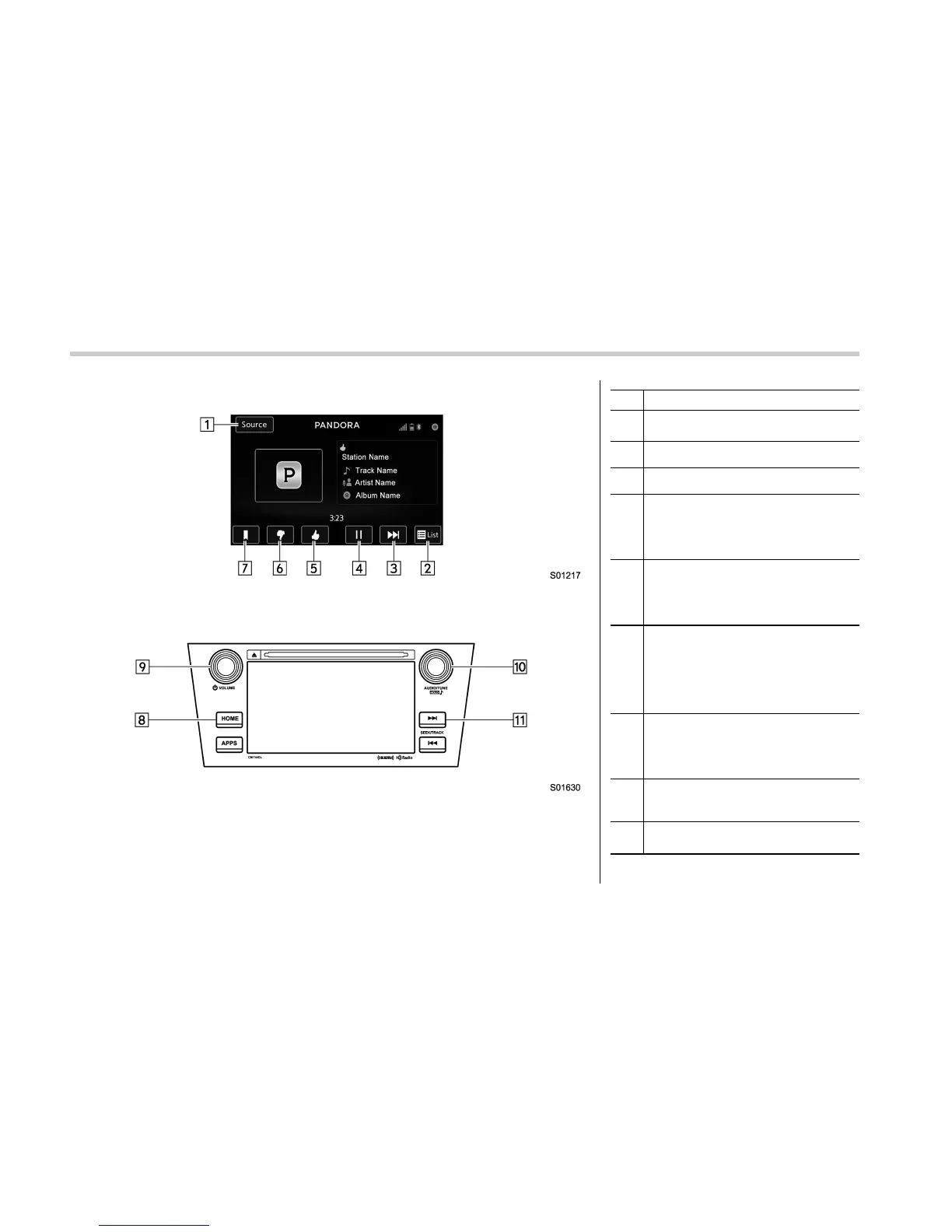
Audio/Media operation
Control screen
Control panel
No. Function
&
1
Select to display the audio source
selection screen.
&
2
Select to open Station List.
&
3
Select to skip the current track.
&
4
Select to play back or pause a track.
The Pause icon is displayed in the
“Play/Pause” key during playback and
the Playback icon is displayed in the
“Play/Pause” key during pause.
&
5
Select to set Thumbs Up.
This gives a high rating to the current
song.
All other similar songs will be played
back more frequently.
&
6
Select to set Thumbs Down.
This gives a low rating to the current
song.
All other similar songs will be played
back less frequently.
When you select Thumbs Down, the
current track is skipped.
&
7
During playback of a station, you can
use the “Bookmark Key” to bookmark a
song or artist.
The Bookmark Type Selection screen is
displayed.
&
8
Select to display the sound setting
screen. Refer to “Basic operation” F5-
11.
&
9
Turn to adjust volume.
Press to turn the audio system on/off.
5-76















 To Next Page