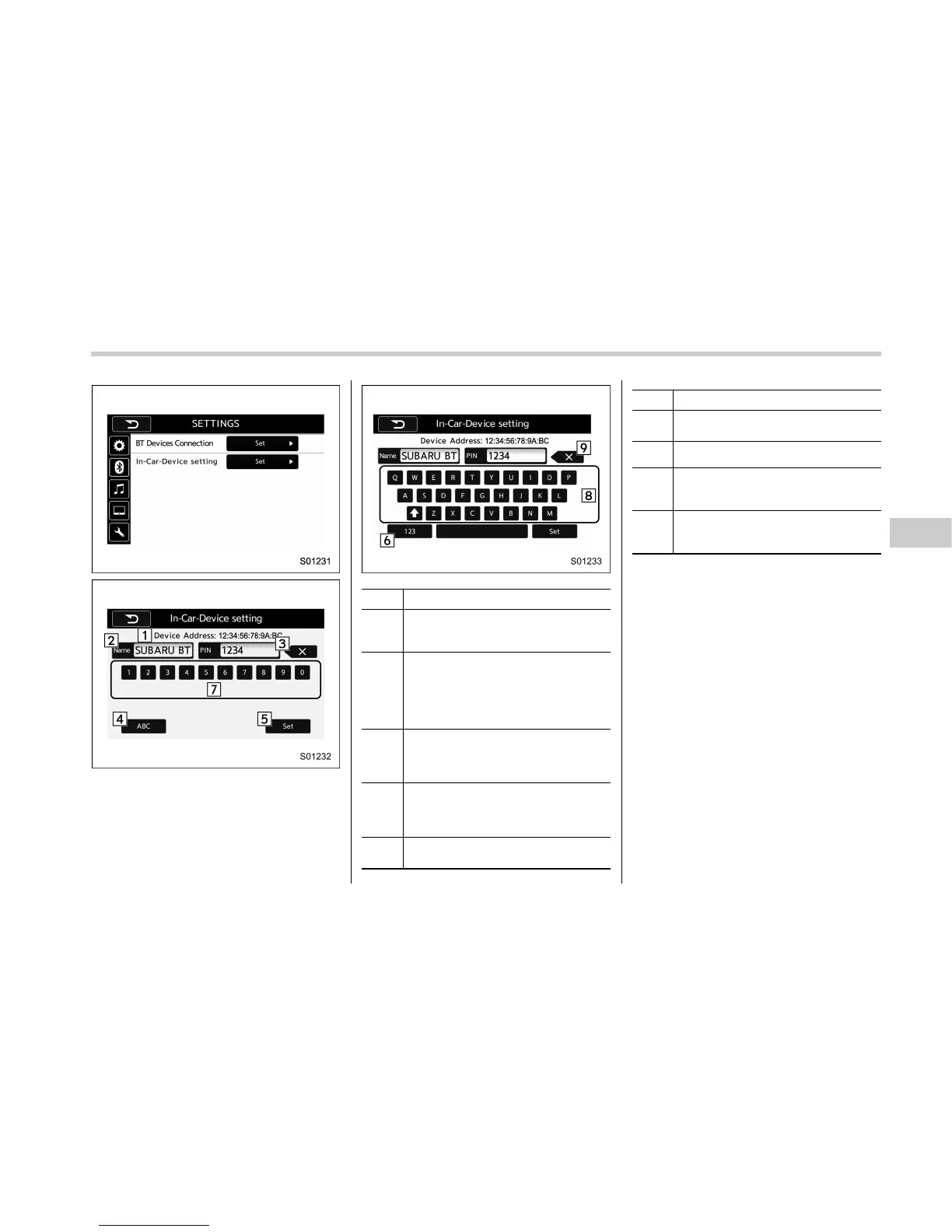
No. Function
&
1
BT device address: Displays the
Bluetooth device address of the in-
vehicle equipment.
&
2
BT device name: Displays the Blue-
tooth device name of the in-vehicle
equipment. The default name is
“SUBARU BT”, which can be changed
by selecting it and entering alphanu-
meric characters.
&
3
PIN code: Displays the PIN code of
the in-vehicle equipment. The default
code is “1234”, which can be changed
by selecting it and entering numbers.
&
4
“ABC” key: Switches the screen to
input alphabet characters. This key
cannot be selected when entering the
PIN code.
&
5
“Set” key: Saves the current BT
device name and PIN code.
No. Function
&
6
“123” key: Switches the screen to
input numbers.
&
7
Numeric input keys.
&
8
Alphabet input keys. The up arrow
key toggles the input between upper
case and lower case characters.
&
9
“Delete” key: Deletes one character
from the currently selected item (BT
device name or the PIN code).
! Editing the Bluetooth Name
1. Select a BT device name.
2. Enter a name and then select “Set”.
! Editing the PIN-Code
1. Select “PIN-Code”.
2. Enter a PIN-code and then s elect
“Set”.
! Common operations
. Press the “Alphabet” key or “Number”
key to make the changes.
. Press the “Set” key to set the entered
value. The screen changes to the “Set-
tings Bluetooth” screen.
. Press the “Back” key to discard the
entered value. The screen returns to the
“Settings Bluetooth” screen.
Audio/Bluetooth
®
settings
– CONTINUED –
5-85















 To Next Page