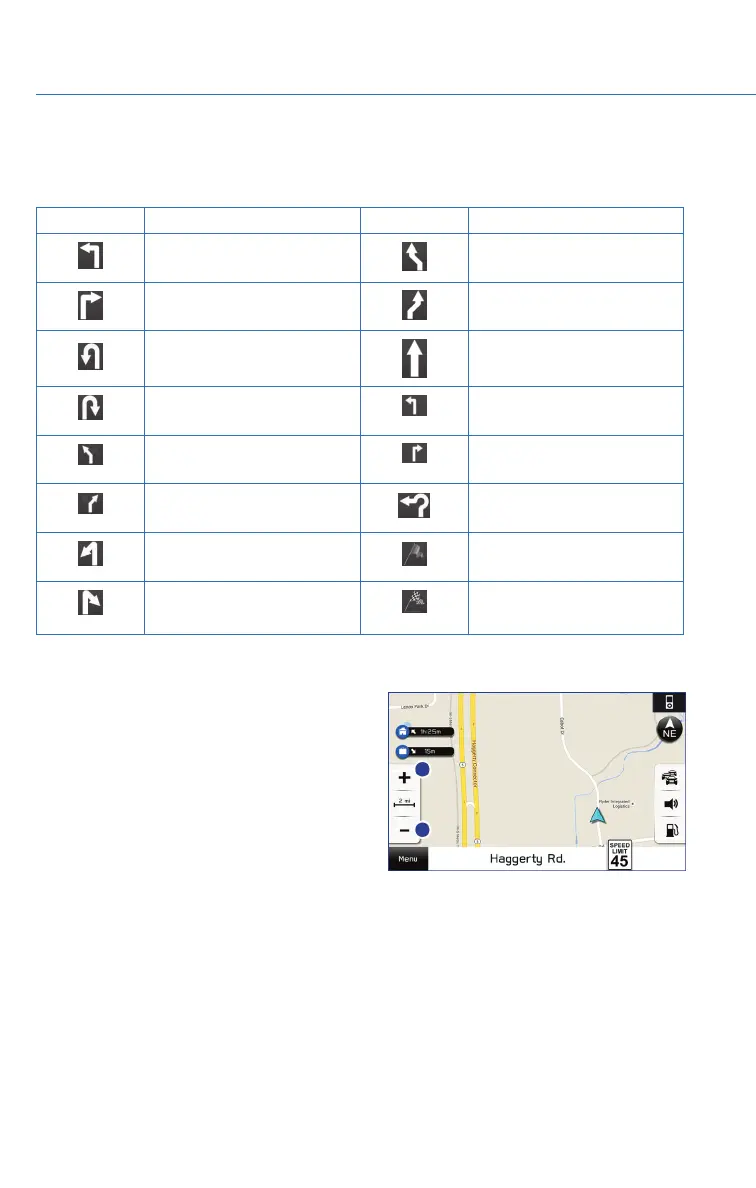
Guidance Screen Icons
The Guidance Screen Icons are the common icons used for the navigation guidance:
ICON EXPLANATION ICON EXPLANATION
Turn left. Stay in the left lane.
Turn right. Stay in the right lane.
U-Turn Left.
Straight ahead at the
intersection.
U-Turn right. Turn left at the T junction.
Keep left at the fork in the
road.
Turn right at the T junction.
Keep right at the fork in the
road.
Go left at the roundabout.
Turn left & sharp curve.
You are half way to your
destination.
Turn right & sharp curve.
You have arrived at your
destination.
Map Zoom
Once on the map screen, you can zoom in or
out by touching the “+” or “-” buttons on the
screen. You can also use two fingers on the
screen and move them apart to zoom in or
together to zoom out.
MAPS (if equipped)
72















 To Next Page