Black plate (322,1)
一般Model "A2510GE-B" EDITED: 2015/ 6/ 25
5-90
Audio/Phone operation (Hands–free system for cellular phones)
! When the contact is empty
For PBAP incompatible but OPP com-
patible Bluetooth phones
. On the Contacts screen, select “Down-
load Contacts”. A screen where you can
select how to download contacts opens.
. You can select to download all items or
download one item.
*: To download all items, you may need to
change the settings in your cellular phone
beforehand.
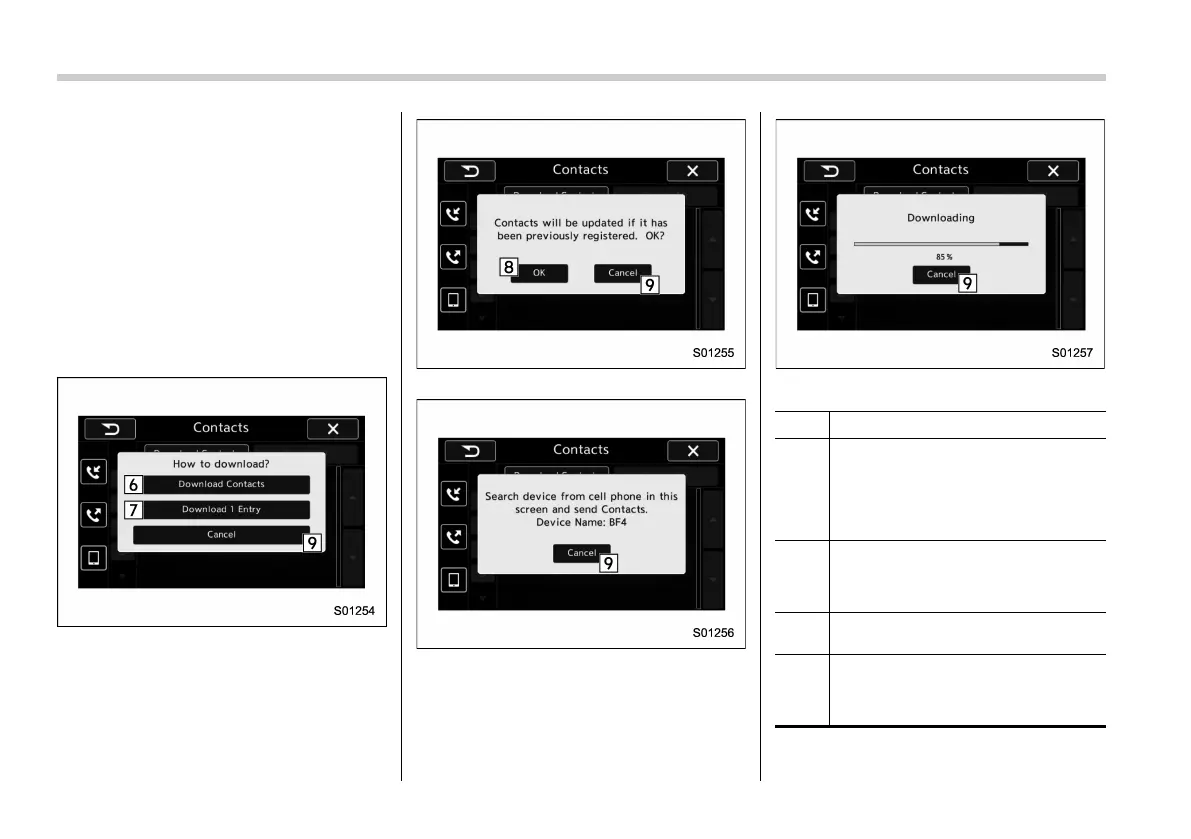
Contacts screen (Download selection)
Contacts screen (Download confirmation)
Contacts screen (Download confirmation)
Contacts screen (Download in progress)
No. Function
&
6
“Download Contacts” key: Opens the
Download Confirmation screen. Con-
firm whether or not to download. If the
downloaded contact(s) already
exist(s), confirm whether or not to
overwrite the existing data.
&
7
“Download 1 Entry” key: Downloads
one set of contact data. To download
the data, you need to operate from the
connected device.
&
8
“OK” key: Starts downloading all
contacts.
&
9
“Cancel” key: Cancels the download.
The screen returns to the Contacts
screen. (The pop-up screen disap-
pears.)















 To Next Page