1-6
1. Introduction|Structure
1.Introduction
HEATER key2/ LED
Starts/cancels the heating
cycle of the rear heat shrink
oven.
POWER key
Turns on and off the splicer. LED
illuminates while the splicer is
on.
HEATER key1/ LED
Starts/cancels the heating
cycle of the front heat shrink
oven.
RESET key
Cancels the splicing process.
Initialization
The LED illuminates during the
heat cycle.
It blinks during the pre-
heating processes.
SET key
Starts the splicing process.
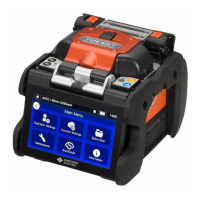
Keys are equipped on the top of the splicer. There are also SET, RESET and
HEAT icons on the touchscreen monitor.
■Heat shrink oven
1
3
4
2
2
3
■Keypad
2
1
HEATER Key 1
HEATER Key 2
4
Heat shrink oven lid
Heat shrink oven clamps
1
Heating plate
Heating plate
Heats fiber protection sleeve.
Heat shrink oven lid
Heat shrink oven
clamps
Hold fibers straight.
Oven clamp switching lever
Link the lid with the clamps o
separate the lid from the clamps.
▸P.7-5: Heater clamp operation
Oven clamp switching
lever



 To Next Page