Cleaning and maintenance continued
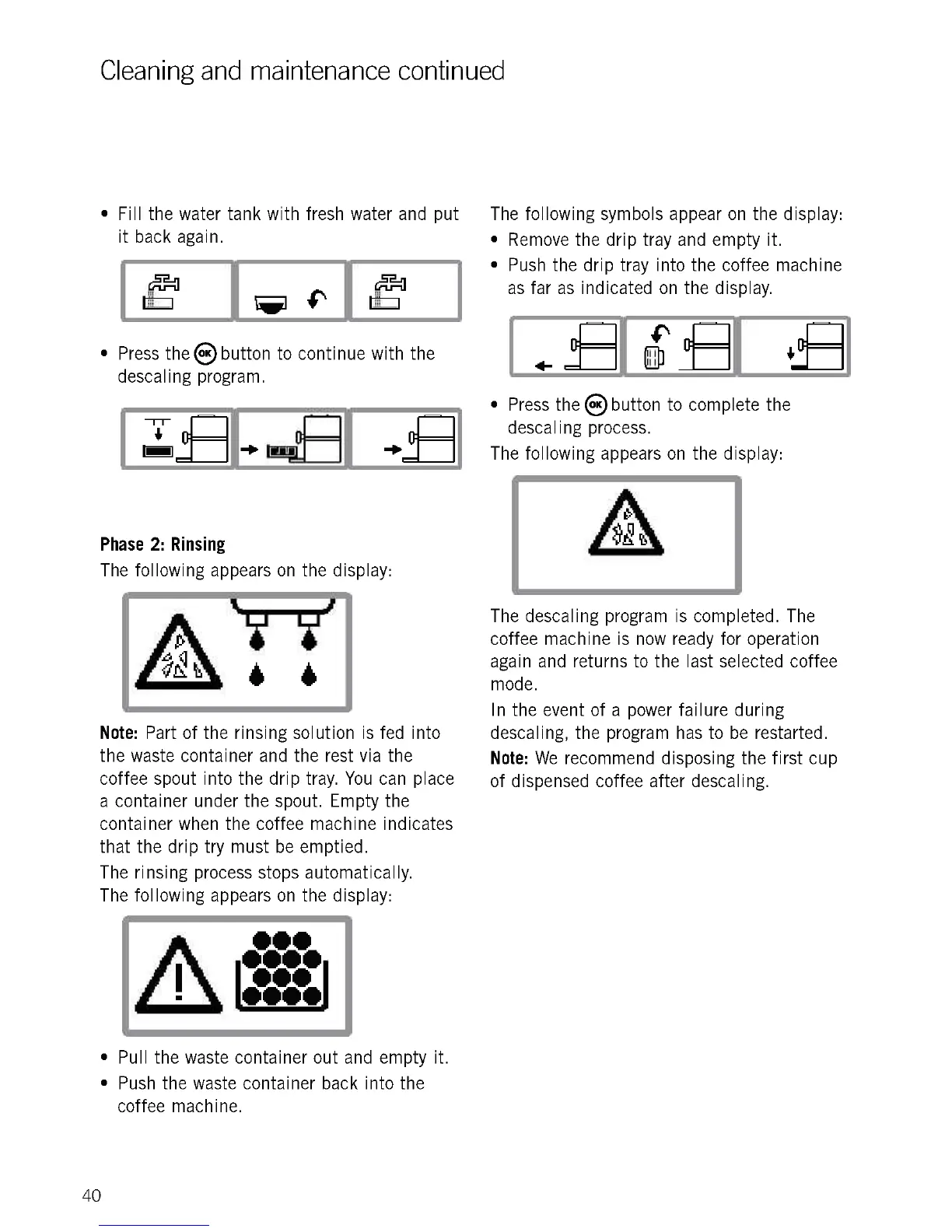
Fill the water tank with fresh water and put
it back again.
Press theObutton to continue with the
descaling program.
11
-P -10
=I
Phase 2: Rinsing
The following appears on the display:
Note: Part of the rinsing solution is fed into
the waste container and the rest via the
coffee spout into the drip tray. You can place
a container under the spout. Empty the
container when the coffee machine indicates
that the drip try must be emptied.
The rinsing process stops automatically.
The following appears on the display:
Pull the waste container out and empty it.
Push the waste container back into the
coffee machine.
40
The following symbols appear on the display:
Remove the drip tray and empty it.
Push the drip tray into the coffee machine
as far as indicated on the display.
V- 11 Cr-
41- -
liill
i
Press thesbutton to complete the
descaling process.
The following appears on the display:
The descaling program is completed. The
coffee machine is now ready for operation
again and returns to the last selected coffee
mode.
In the event of a power failure during
descaling, the program has to be restarted.
Note: We recommend disposing the first cup
of dispensed coffee after descaling.











 To Next Page