THREE PHASE HI 8~12kW | Installer Manual38
What this page displays:
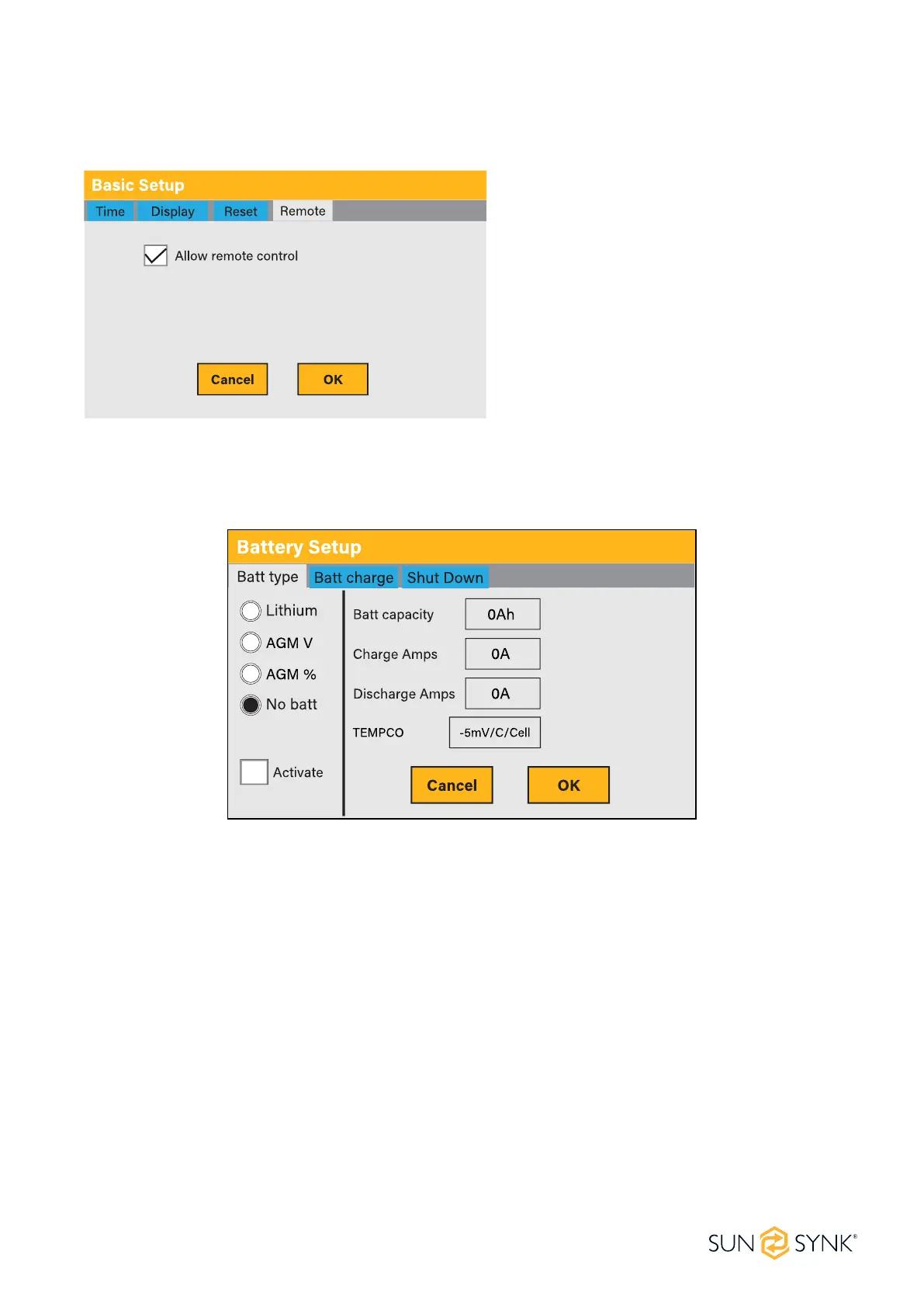
Remote control option.
What this page displays:
Allows remote control of the inverter.
What you can do from this page:
Battery Setup Page
To congure battery settings, click on the BATTERY icon and then on ‘Batt type’.
Inverter Remote Control
To control the inverter remotely, tick the box that allows it.
Lithium: This is BMS protocol. Please reference the document (Approved Battery).
AGM V: Use battery voltage for all settings (V).
AGM %: Use battery SOC for all settings (%).
No batt: Tick this box if no battery is connected to the system. If it's ticked and the CT coil is connected,
the inverter operates as a grid-tied inverter.
Battery capacity in (Ah): For non-BMS-batteries the range allowed is 0-2000Ah, while for lithium-ion,
the inverter will use the capacity value of the BMS.
Charge/Discharge Amps: The Max battery charge/discharge current (0-190A for 8kW model, 0-210A for
10kW model, 0-240A for 12kW model).
Active battery: This feature will help recover a battery that is 100% discharged by slowly changing from
the solar array. Until the battery reaches a point where it can change normally.
TEMPCO settings: The temperature coecient is the error introduced by a change in temperature.





 To Next Page