Chapter 6: Advanced Chassis Setup
6-19
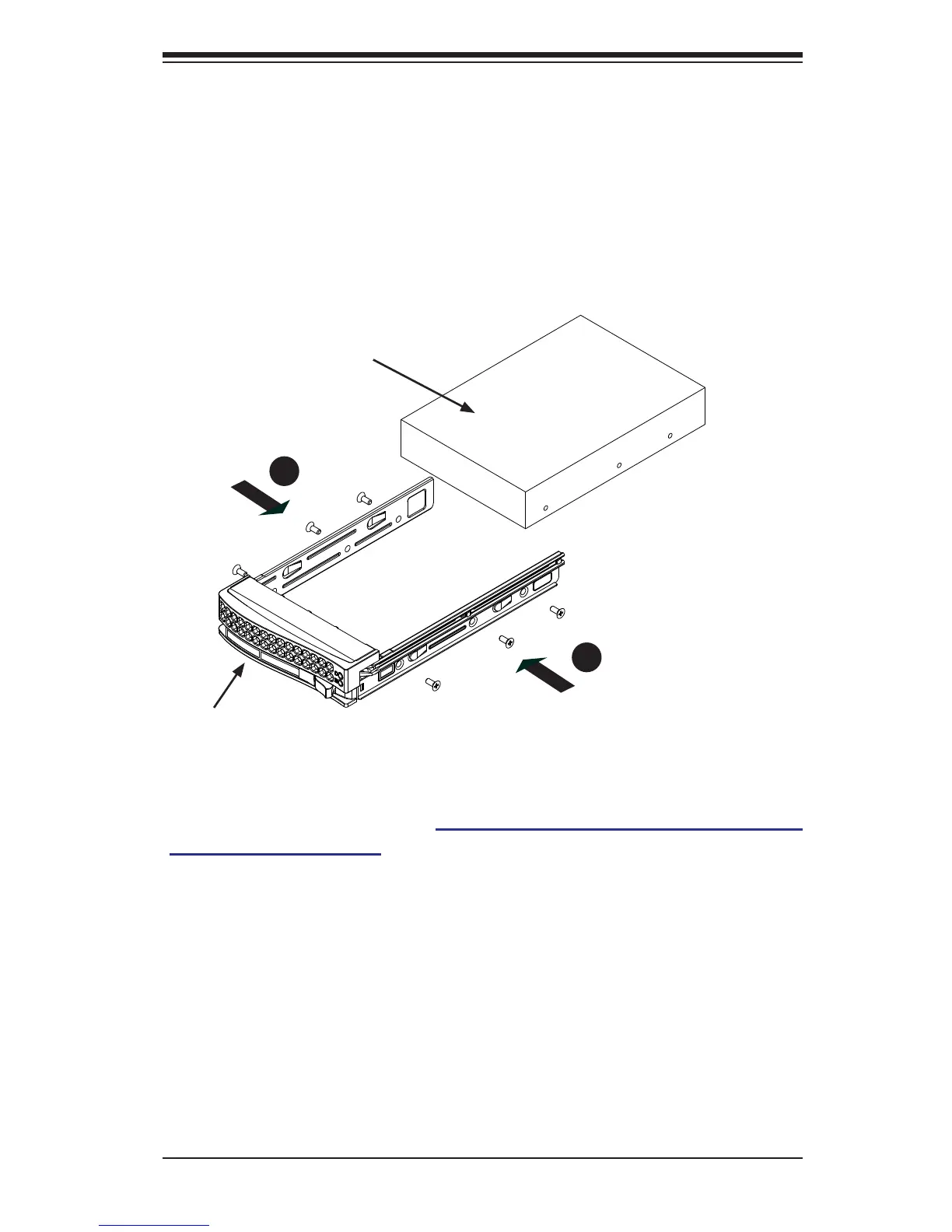
Installing the Hard Drive (Figure 6-18)
1. Install a new drive into the carrier with the printed circuit board side facing
down so that the mounting holes align with those in the carrier.
2. Secure the hard drive by tightening all six (6) screws.
3. Use the open handle to replace the drive tray into the chassis. Make sure the
close the drive tray handle.
Figure 6-18. Installing the Hard Drive
Drive Tray
SAS/SATA Hard Drive
1
2
2
2
Caution! Enterprise level hard disk drives are recommended for use in
Supermicro chassis and servers. For information on recommended HDDs,
visit the Supermicro Web site at http://www.supermicro.com/products/nfo/files/
storage/SAS-CompList.pdf


 To Next Page