CD-G Operation
The PSD340 offers a way to play CD-G discs in the CD
player drive, and output disc graphics via the digital
output using an external graphics decoder box (available
through Superscope Technologies).
Before working with CD-G, you need to turn the CD-G
function ON. To do this, press the MENU/STORE button,
then turn the SELECT jog wheel to until the display reads
“CD-G.” Press the SELECT jog wheel to select. Turn the
SELECT jog wheel so the display reads, “ON,” and press
the jog wheel to activate CD-G.
During CD-G operation, Tempo control will be disabled,
Key alterations will be audible through the LINE OUT and
speaker.
Pressing RECORD at any time will enter Record Pause
mode. Pressing RECORD again will record your karaoke
performance. You may also use RECORD WITH CD mode
to sync your player and recorder drive. (See pg. 19).
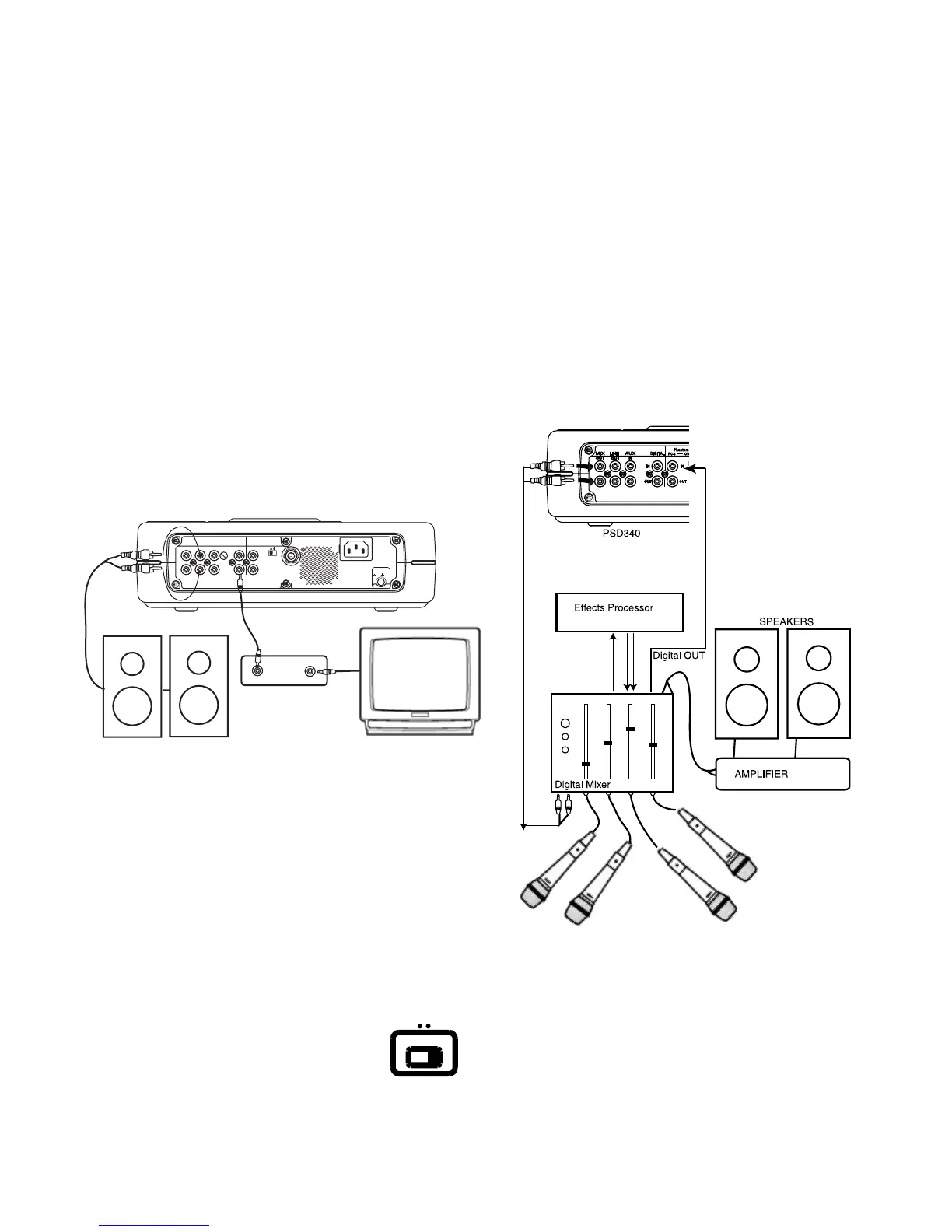
The above diagram (Figure C) illustrates how to
connect equipment in order to view graphics on a
monitor. Connect a coaxial cable from the PSD340’s
DIGITAL OUT to a CD-G decoder box’s coaxial DIGITAL
IN. Then connect the VIDEO OUT of the CD-G decoder
box to a video monitor’s VIDEO IN.
Phantom Power
IN
RC-5
OUT
ON
OFF
IN
OFF
ON/
POWER
OUT
DIGITAL
OUT
AUX
LINE
MIX
IN
PEDAL
FOOT
OUT
IN
L
R
Input
Level
VIDEO OUT
DIGITAL IN
"I Did It
My Way"
CD-G Decoder Box
Powered Speakers
Monitor
PSD340
Figure C
Precaution on Unfinalized Disc Playback
in CD Player Drive
While the CD player drive is capable of playing
unfinalized CD-R and CD-RW discs, tolerance specifica-
tions are very precise. The unit reads a provisional Table
of Contents in a narrow band at the disc center. The
presence of dirt or scratches could prohibit the laser from
reading this area of the disc, making it impossible to read
the unfinalized disc.
- 29 -
Independent Operation
Certain recording applications may demand
the use of the PSD340’s independent CD
Player and CD Recorder drives.
For example, you may want to send CD
audio to an external processor before recording. You
may also need to send CD audio to a sound system to
INPUT
DIGITAL
ANALOG
accompany other vocalists or musicians before recording
the total mix. This is all possible with the help of a digital
mixer. With a CD in the CD drive, follow these steps:
1 Set the front-panel ANALOG/DIGITAL switch to
“DIGITAL.”
2 Connect the MIX OUT of the PSD340 to a stereo line
INPUT on your digital mixer.
3 Connect the mixer’s coaxial DIGITAL OUTPUT to the
PSD340’s DIGITAL INPUT.
4 Use the PSD340’s controls to start or stop CD
playback or CD recording whenever necessary. NOTE:
If you only want to process your CD audio--and your
processor has a digital output--connect the MIX OUT
directly to a stereo line input of the processor and
connect the coaxial DIGITAL OUTPUT of the proces-
sor to the DIGITAL INPUT of the PSD340.



 To Next Page