Authentication
16
Delete Auth Mode
1 Press and authenticate with the Admin level credential.
2 Press AUTHENTICATION > Auth Mode.
3 Press and select an item to delete.
4 When you press OK, the selected item will be deleted.
Add Auth Mode
1 Press and authenticate with the Admin level credential.
2 Press AUTHENTICATION > Auth Mode.
3 Press .
4 Set the desired auth mode by pressing , then select a schedule.
5 When you press OK, the auth mode will be added.
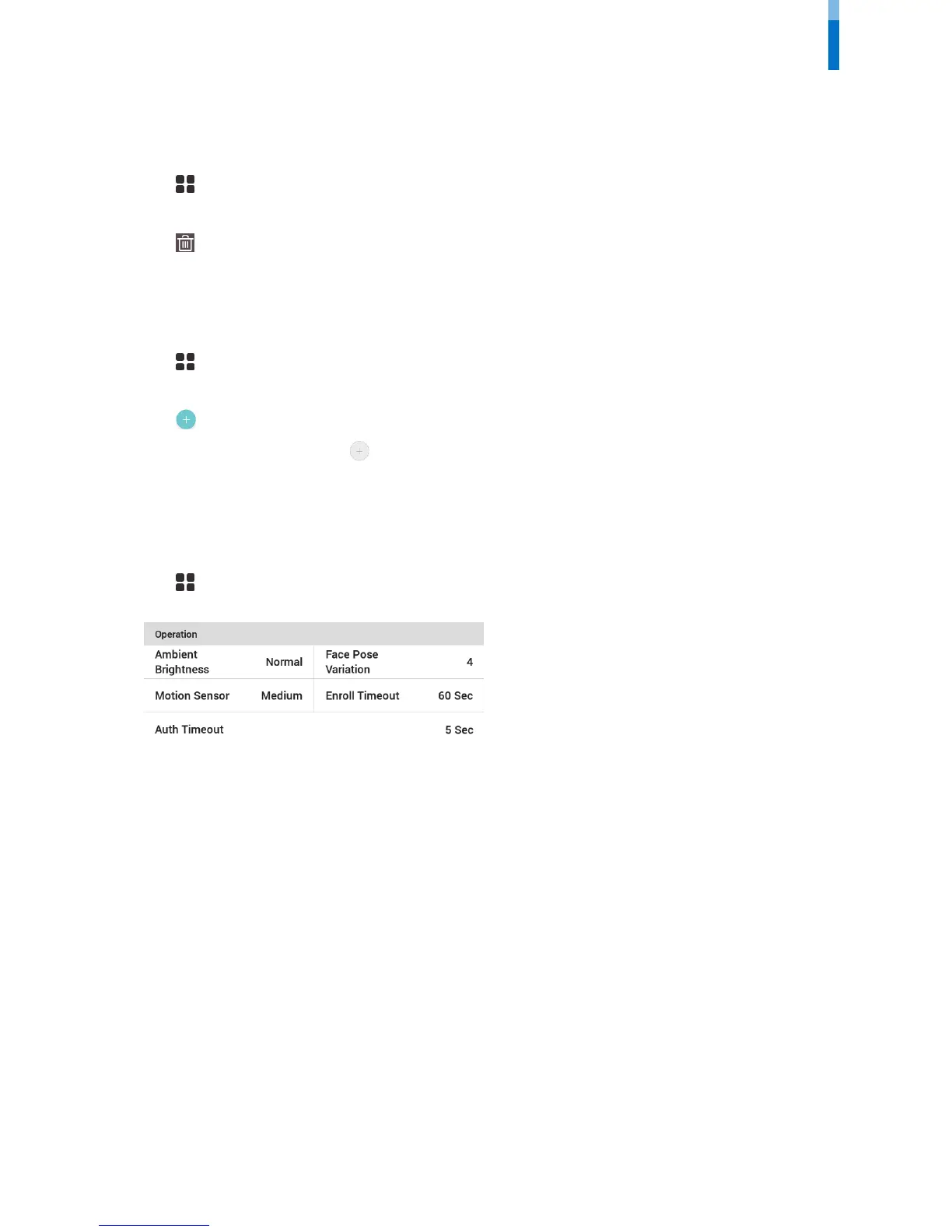
Operation
1 Press and authenticate with the Admin level credential.
2 Press AUTHENTICATION and then modify the items below Operation.
• Ambient Brightness: Detect the ambient brightness and adjust the intensity of IR LED. Change settings according to the installation
environment.
• Motion Sensor: Set the sensitivity for detecting motion near the device.
• Auth Timeout: If the authentication is not completed during the set time, the authentication will fail.
• Face Pose Variation: Set the sensitivity for the position, angle, and distance of a face when registering the face. Set high if you wish to obtain a
detailed face template
• Enroll Timeout: If a face is not registered during the set time, the face registration will be canceled.



 To Next Page