Network
18
Network
Network Settings
You can change the network settings of the device.
Ethernet
1 Press and authenticate with the Admin level credential.
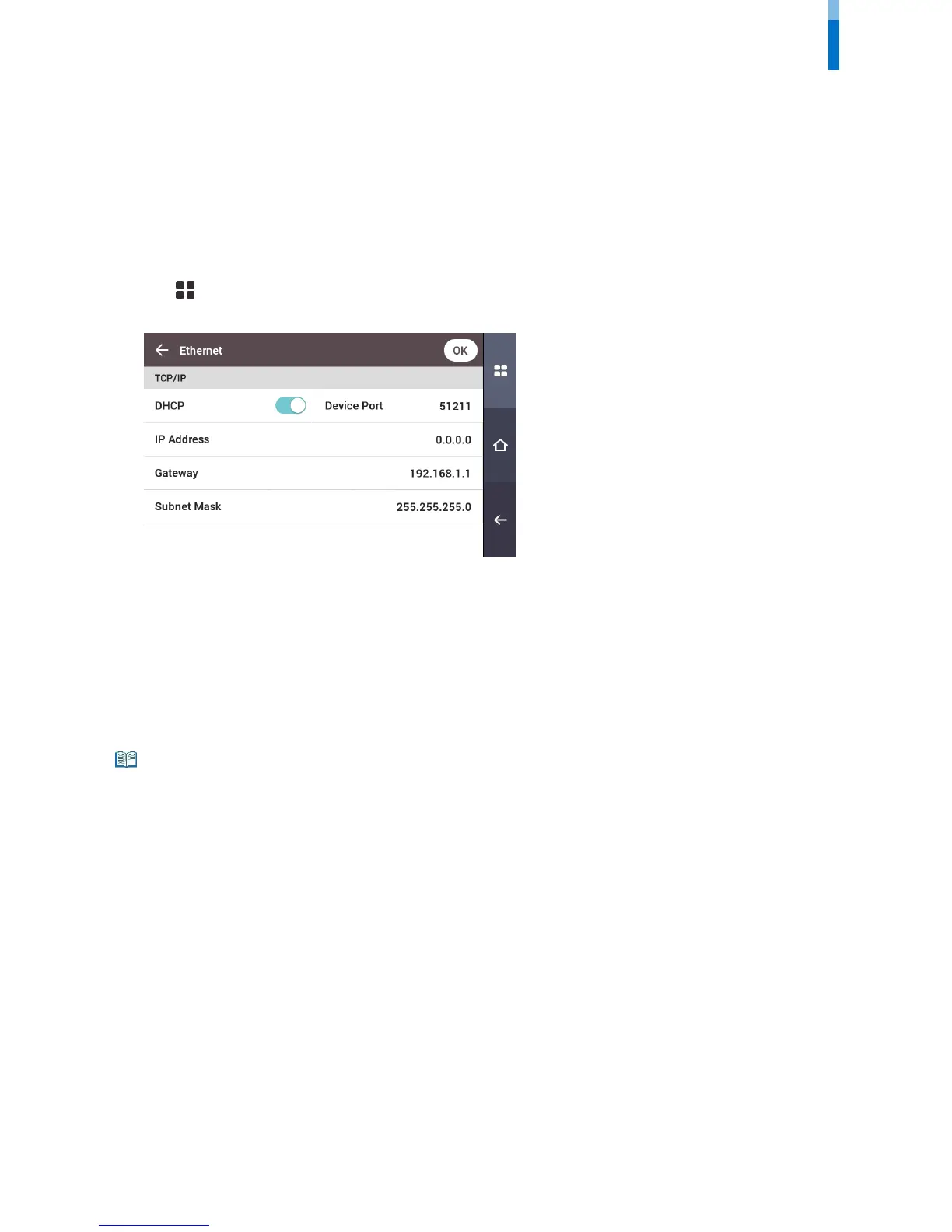
2 Press NETWORK > Ethernet.
• DHCP: Set whether or not to use DHCP. If DHCP setting is disabled, the user can modify Device Port, IP Address, Gateway, Subnet Mask, and
DNS.
• Device Port: Set the device port.
• IP Address: View the IP address of the device. To modify, disable DHCP setting.
• Gateway: View the gateway of the device. To modify, disable DHCP setting.
• Subnet Mask: View the subnet mask of the device. To modify, disable DHCP setting.
• DNS server: Set the DNS server address.
3 To modify network information manually, disable DHCP setting. You can modify Device Port, IP Address, Gateway, Subnet Mask
and DNS.
• Ethernet cannot be used at the same time as Wireless.



 To Next Page