Device
22
Device
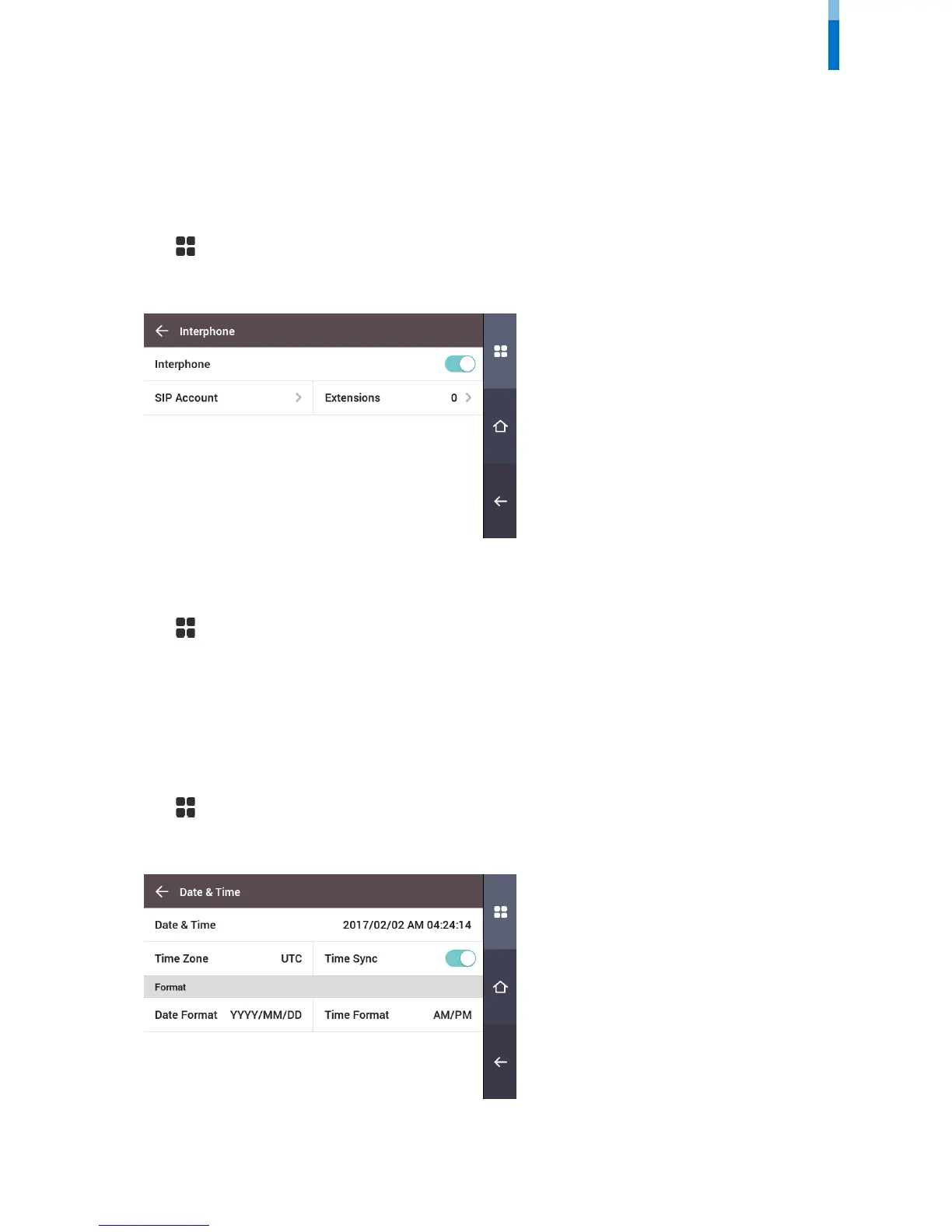
Interphone
Set the account and extensions of SIP interphone.
1 Press and authenticate with the Admin level credential.
2 Press DEVICE > Interphone.
3 When Enable is set for Interphone, you can set the SIP account and the extensions. Ensure to set each item correctly.
Relay
You can set the open time and the input port of the exit button in the device.
1 Press and authenticate with the Admin level credential.
2 Press DEVICE > Relay.
• Open Time: Set the duration for the door to remain open when standard user authentication has been carried out.
• Exit button: Select the input port where the exit button is connected.
• Switch: Select the relay type (N/O or N/C).
Date & Time
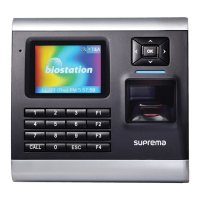
You can set date and time. Set the date and time accurately in order to collect accurate log data.
1 Press and authenticate with the Admin level credential.
2 Press DEVICE > Date & Time.
3 Change the desired item.
• Date & Time: Check the current date and time. To modify it directly, disable Time Sync.
• Standard time zone: Set the time reference of the current location.



 To Next Page