User
14
Modifying user information
User Management or Administrator can modify the registered user information. A user’s face or card can be added, and the PIN and level
can be modified.
1 Press and authenticate with the Admin level credential.
2 Press User > .
3 Select your search terms. You can search for a user by User ID, Name, Face and Card.
4 Select a user you wish to modify and modify the information by referring to Registering user information.
• To select a user, press and then press OK.
• Access Group can be registered in BioStar 2. For detailed contents regarding registering an access group, refer to the BioStar 2 Administrator
Manual.
Delete All Users
You can delete all registered users at once.
1 Press and authenticate with the Admin level credential.
2 Press User > and select Delete All or select a user you wish to delete.
3 When you press OK, all registered users will be deleted.
View User Usage
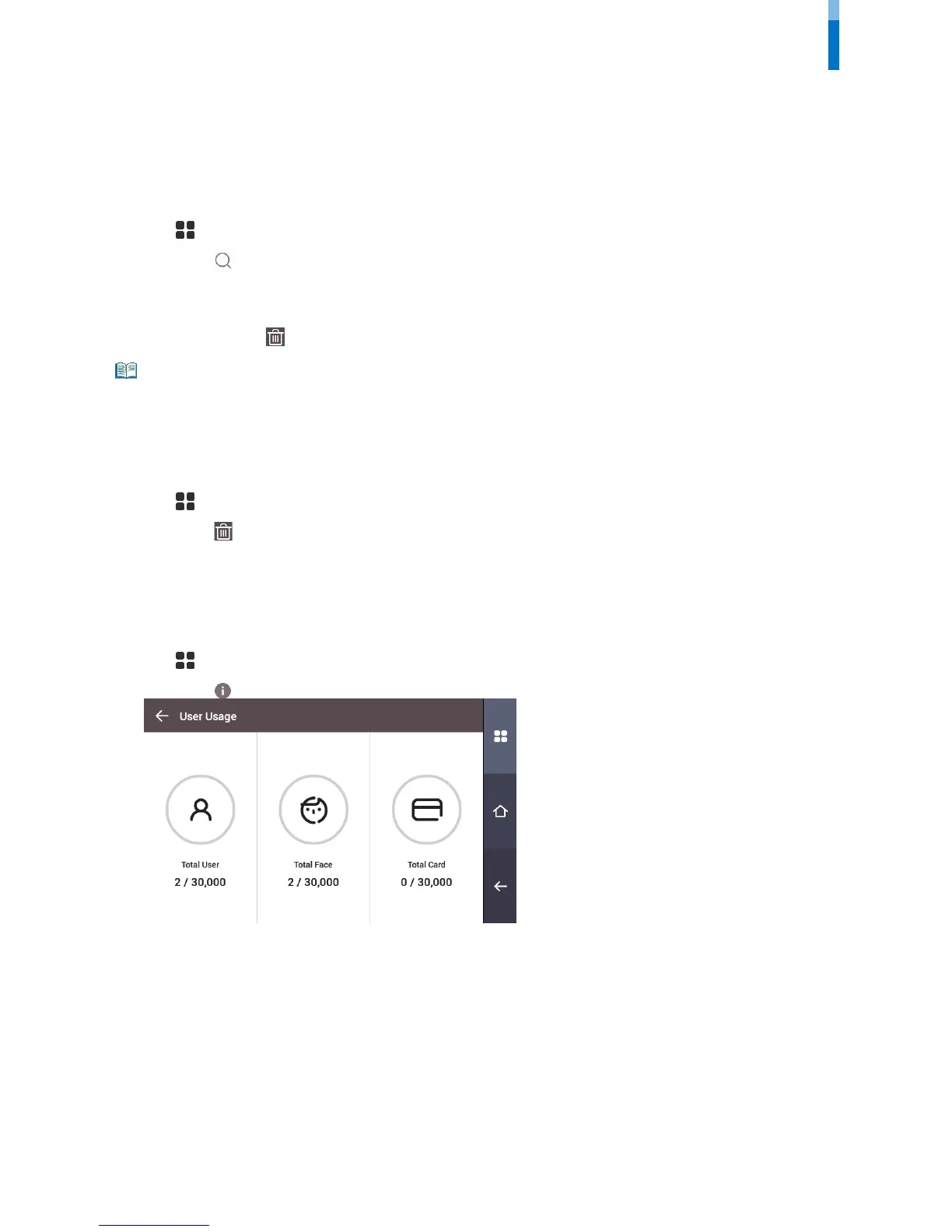
You can see the number of registered users, faces, and cards at a glance.
1 Press and authenticate with the Admin level credential.
2 Press User > .



 To Next Page