Authentication
17
Face Recognition
Change settings regarding face authentication.
1 Press and authenticate with the Admin level credential.
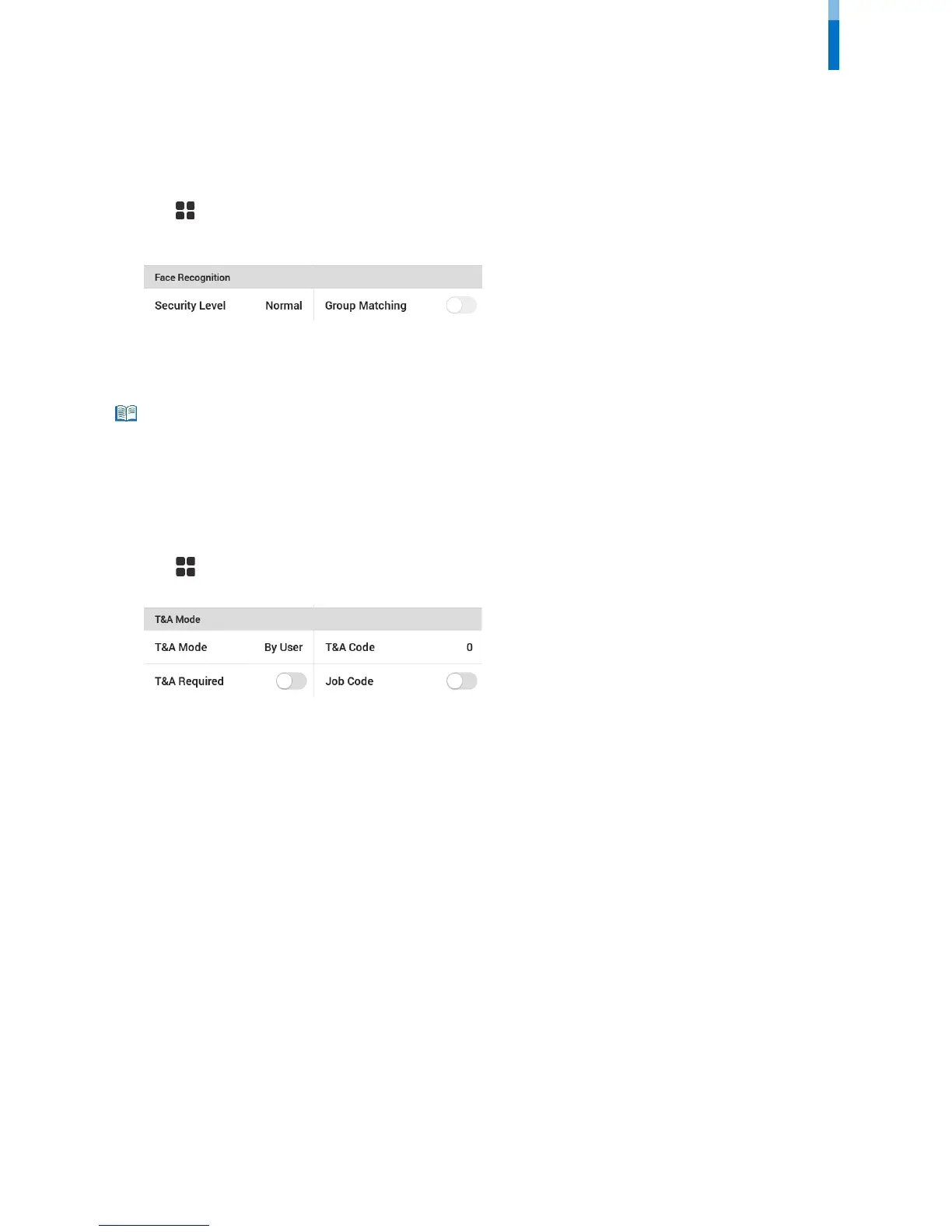
2 Press AUTHENTICATION and then modify the items below Face Recognition.
• Security Level: Set the security level for 1:N authentication.
• Group Matching: Check whether or not to use Group Matching. If Group Matching is used, you can increase the authentication speed by
designing various users
’ faces in a group.
• Group Matching can be set in BioStar 2. For detailed contents, refer to the BioStar 2 Administrator Manual.
T&A Mode
You can set how to register T&A Mode.
1 Press and authenticate with the Admin level credential.
2 Press AUTHENTICATION then modify the items below T&A Mode.
3 Select and set the desired item.
• T&A Mode: Set the method to use T&A mode.
• T&A Code: Register a new T&A code.
• T&A Required: Set to require a user to select a T&A event when authenticating.
• Job Code: Select whether or not to use Job Code.



 To Next Page