396-3815Y1 SureFire PumpRight for Raven RCM 43 Revised 01/16/2018
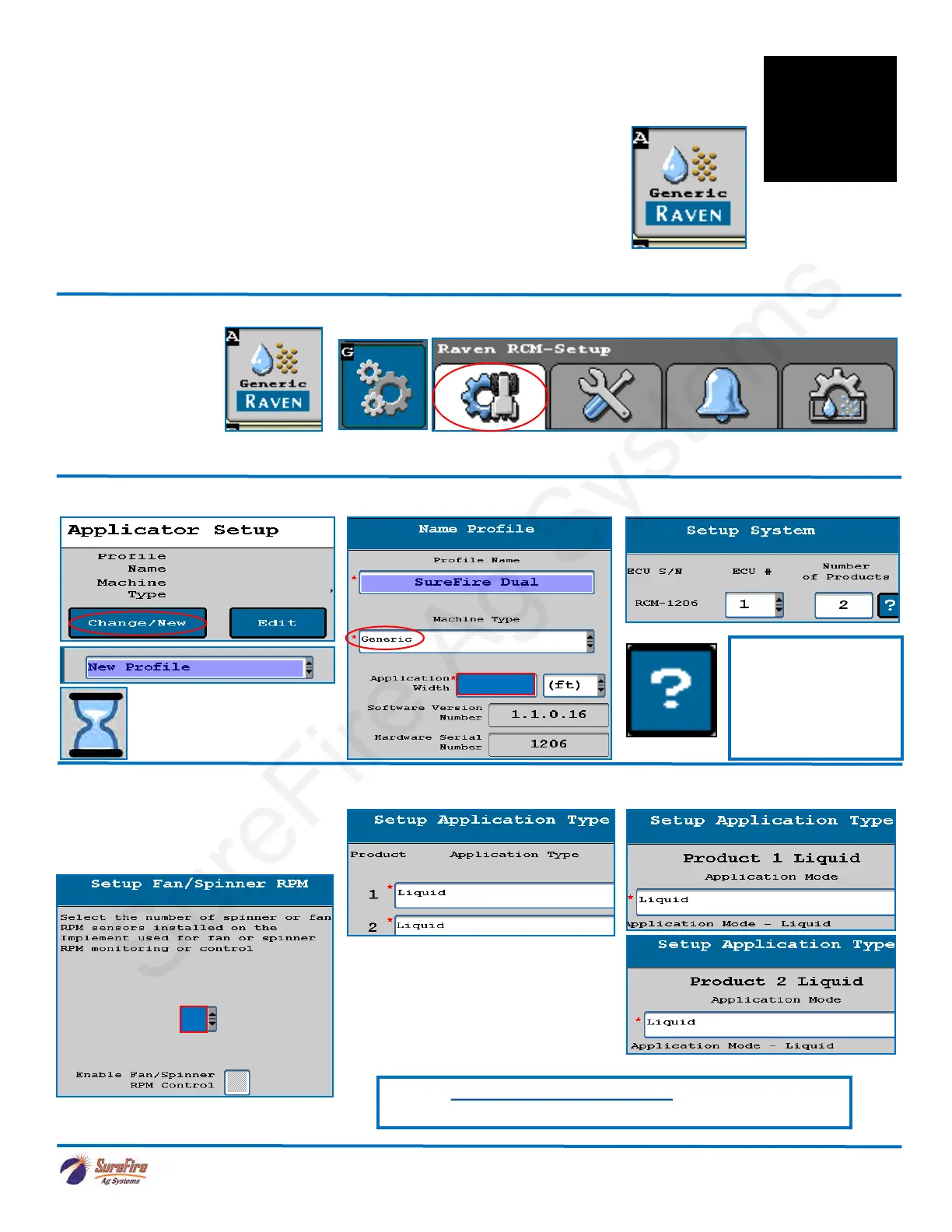
1. Navigate to the Setup Wizard.
2. Start a New Profile. 3. Enter a Profile Name. Machine Type > Generic 4. Number of Products = 2
For the initial setup, start a new profile. The Raven RCM allows you to store 8 profiles. Be prepared to wait during this
phase of the setup process.
6. Select Application Type & Mode
5. Fan/Spinner RPM-Use for pump
RPM sensor on hydraulic pump.
Product 2 uses RPM Sensor # 2 on
the SureFire harness.
You will see this icon
at times. Be patient.
Many setup screens
have this “?”.
This will take you to a
Help Screen with
valuable information.
See the Raven RCM Operation Manual for safety information
and additional setup/operating information.
Setup
Applicator
Setup
System
Settings
Alarm
Settings
Rates
Setup
Enter Width
Select 0, 1, or 2
If you are using a Pump RPM sensor on
Product 2, you must set up 2 sensors, even
if you are not using a sensor on Product 1.
If you are applying a Dry product,
one or both products could be set
up as Granular Fertilizer, with an
appropriate Application Mode for
that setup.
Following are screen shots typical of a Raven RCM 2-product setup. Your
setup and screens may vary since the RCM is capable of running many
different application scenarios.
To access the RCM, push this button. If this button is not present the rate
controller is not communicating with the display.
This button will take you to the Main Run Screen below.
Rate Control Module (RCM) Setup
F
Setup &
Operation



 To Next Page