396-3815Y1 SureFire PumpRight for Raven RCM 45 Revised 01/16/2018
Setup instructions for Raven RCM and SureFire: 2 Liquid Products
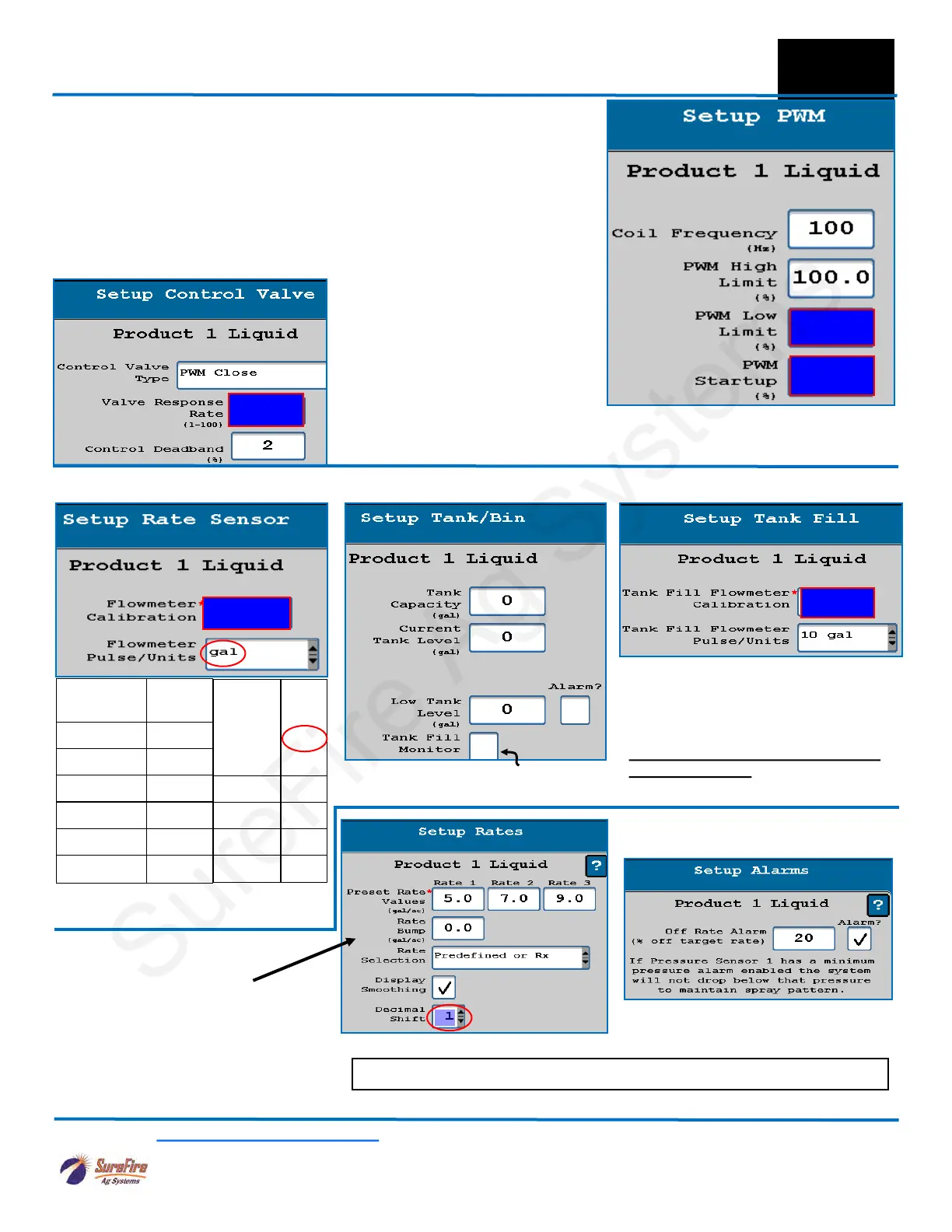
Valve Response Rate: (Adjust as needed)
PumpRight (hydraulic) 80
Tower (electric) 100
Catalyst and Spartan 80
Control Deadband: Start at 2
Flowmeter
Size (GPM)
Pulses/
Gal
0.08-1.6 22710
0.13-2.6 3000
0.3-5.0 3000
0.6-13 2000
1.3-26 2000
2.6-53 2000
10. Control Valve Setup (start with the numbers indicated for your system)
11. Enter appropriate Flowmeter Cal. 12(a). Tank and Fill Flowmeter setup 12(b). Fill Flowmeter Cal setup
13. Set Rates as desired.
You must enter at least one rate.
Check Display Smoothing
Set the Decimal Shift box at 1.
Set Decimal Shift at 2 for rates such
as 0.25 gal/ac.
14. Set Off-Rate Alarm as desired.
Spartan
model
#
Puls/
fl oz
110 1760
120 880
130 440
140 220
F
Setup &
Operation
See at
Left
Low Limit (Adjust in field as needed)
PumpRight (hydraulic) 25
Tower (electric) 8
Catalyst and Spartan 8
PWM Startup (Adjust in field as needed)
PumpRight (hydraulic) 40
Tower (electric) 30
Catalyst and Spartan 10
See below
See
Above
If pump is slow responding to rate
or speed changes, increase Valve
Response Rate 10 at a time. If
product oscillates around rate go-
ing across the field, reduce Valve
Response Rate.
Electric Pumps will also have to
use Advanced Tuning (described
later).
SureFire Electromagnetic Flowmeters.
Verify pls/gal on Serial Number label.
OPTIONAL: Use as desired Then enter Tank Fill Flowmeter
Calibration
SFA 3” Fill Flowmeter 130
SFA 2” Fill Flowmeter 300
(Units are 10 gal on SureFire Tank
Fill flowmeters .)
Check Tank Fill Monitor box if
using a fill flowmeter.
Read the Raven RCM Operation Manual for safety information and additional setup/operating information.
Fine-tune PWM Low Limit at
Diagnostics > Tests > Calibrate
PWM Limits
Set up Product 2 in a similar fashion to the Product 1 setup.
OPTIONAL



 To Next Page