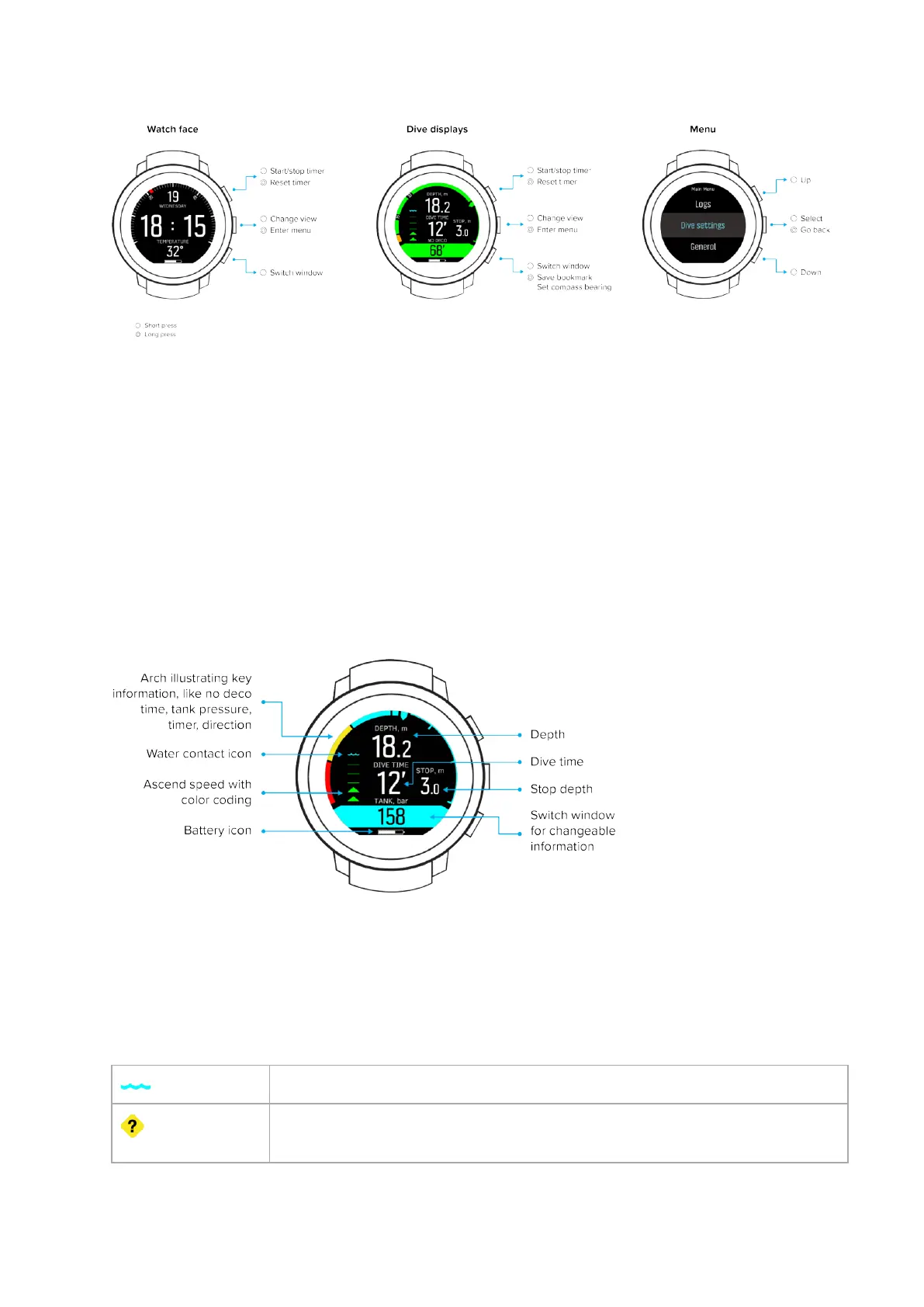
Suunto D5 has three main dive modes: Air / Nitrox, Gauge and Free.
Press and hold the middle button to enter Main menu and select the appropriate mode for
your dive under Dive settings » Mode. Select O if you want use Suunto D5 as a regular
watch. In this case all dive functionalities are switched o.
Suunto D5 automatically restarts to change mode.
Dierent dive modes have dierent views. Some views are available by default, some of them
can be made available through customization in DM5. See 3.8. Customizing with Suunto DM5.
For more detailed information on the views availabe in the dierent modes, see 3.14. Dive
modes.
Suunto D5 automatically switches between surface and dive state. If you are more than 1.2 m
(4 ft) below the water level and water contact is on, the dive state is activated.
In a default dive display, you see the following information:
The switch window has diferrent information that can be changed by short pressing the lower
button.
For a complete map of the available menu items within your Suunto D5, see 6.7. Menu.
2.3. Icons
Suunto D5 uses the following icons:
Water contact
Device is functioning abnormally (e.g. water contact is not working as
expected)
Suunto D5
10



 To Next Page