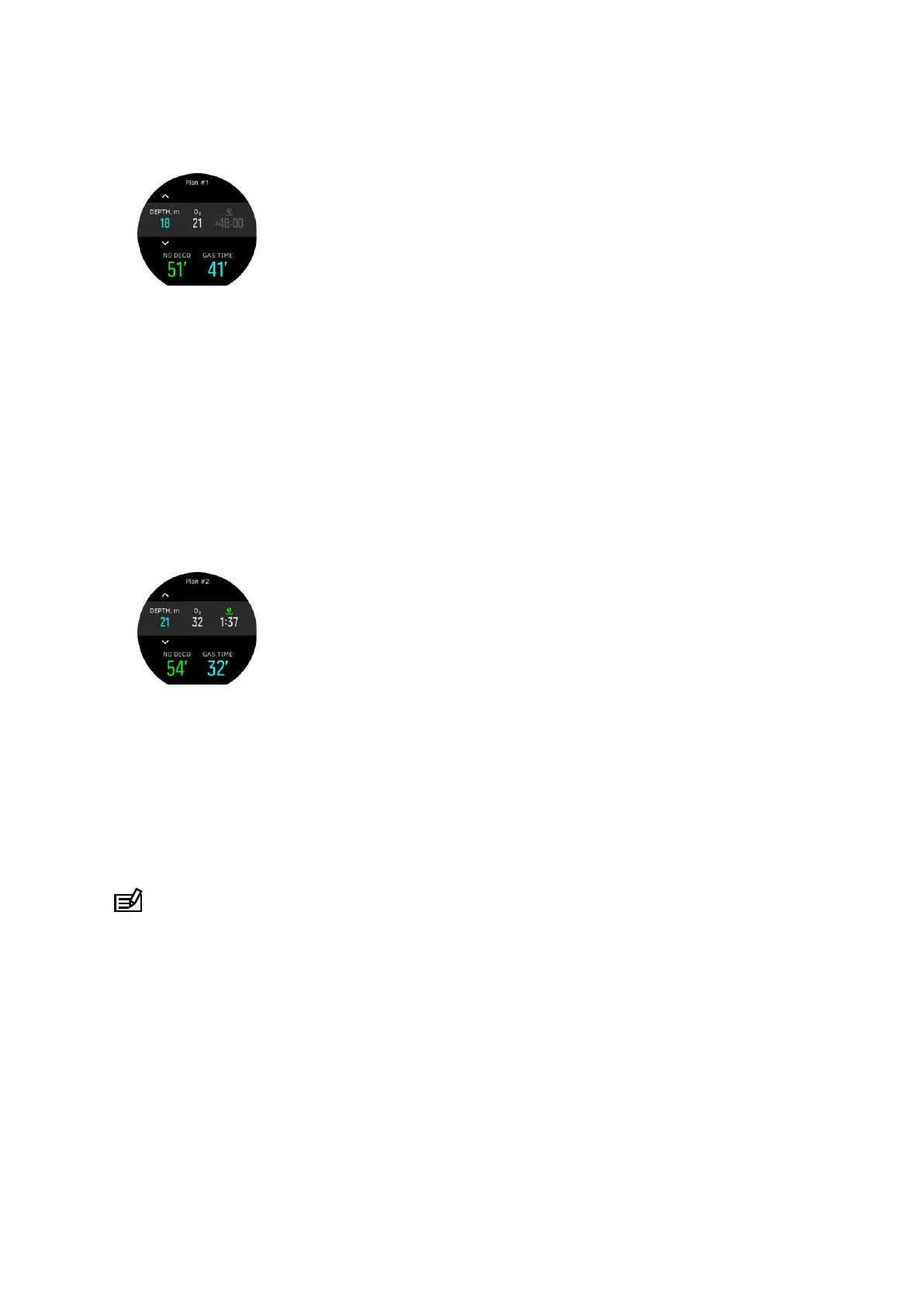
2. As an example, enter 18 meters, use a mixture of 21% oxygen, and you will see the
following:
In this example, the calculated values are:
a. Dive number in the dive series: 1
b. Available no decompression time: 51 minutes
c. Remaining gas time: 41 minutes
Planning additonal dives
1. The dive planner allows you to adjust surface time in 10-minute increments. 48:00 hours is
the maximum value to be set.
In the example below, the surface time before the second dive is 1:37 minutes. Adjust
surface time to see how it impacts no decompression time.
4.8. How to customize dive modes with DM5
To customize Suunto D5:
1. Download and install Suunto DM5 from http://www.suunto.com/DM5.
2. Connect your Suunto D5 to a computer with a USB cable.
3. In the devices window, select Suunto D5.
4. Select the Customization tab. You can create new dive modes and modify existing ones.
NOTE: When creating or modifying dive modes, you need to synchronize the changes
with your Suunto D5 before disconnecting the USB cable to save the changes to your device.
Customization is divided into four categories:
•
Dive mode name
•
Dive algorithm
•
Gas settings
•
Customize views
To customize categories:
Suunto D5
48



 To Next Page