•
Decompression stop: this is a compulsory stop on your decompression dive that is for
your safety, preventing decompression sickness.
In Dive settings » Parameters, you can
•
turn deepstops on or o (it is on by default)
•
adjust the safety stop time to be 3, 4 or 5 minutes (default is 3 minutes)
•
set last stop depth to 3.0 m or 6.0 m (default is 3.0 m)
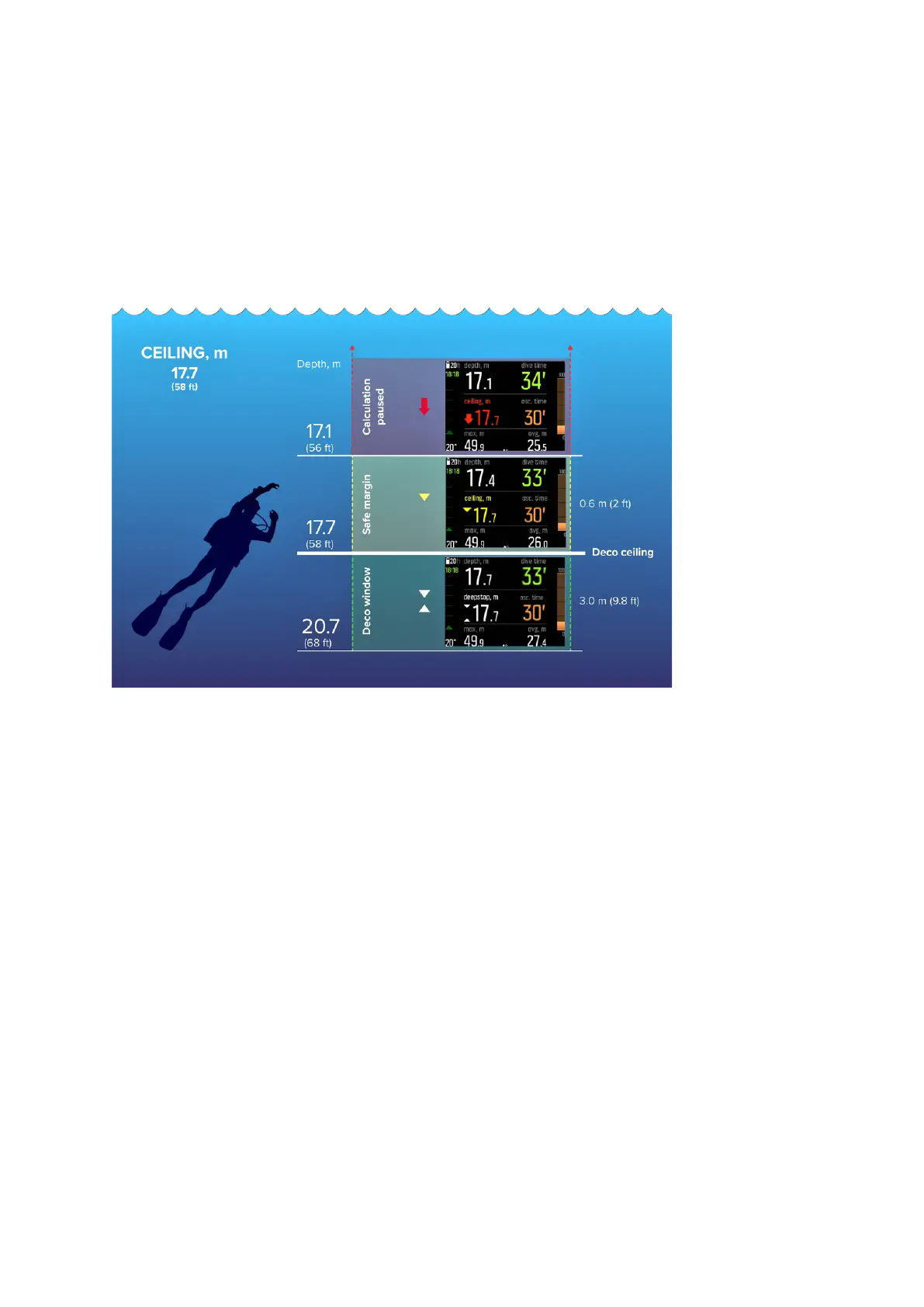
The following illustration shows a decompression dive where the ceiling is at 17.7 m (58 ft):
From bottom to top you see the following in the above image:
1. There is a decompression window (Deco window) that is the distance between the
decompression ceiling (Deco ceiling) plus 3.0 m (9.8 ft) and the decompression ceiling. So
the decom window in this example is between 20.7 m (68 ft) and 17.7 m (58 ft). This is the
area where decompression takes place. The closer to the ceiling you stay, the more
optimal the decompression time is.
When you ascend close to the ceiling depth and enter the deco window area, two arrows
appear in front of the ceiling depth value. The downward and upward pointing white
arrows indicate that you are within the deco window.
2. If you ascend above the ceiling depth, there is still a safe margin area, equaling to ceiling
depth minus 0.6 meters (2 ft). So in this example, it is between 17.7 m (58 ft) and 17.1 m (56
ft). In this safe margin area, decompression calculation still continues, but you are advised
to go down below the ceiling depth. This is indicated by the ceiling depth number turning
yellow with a downward pointing yellow arrow in front of it.
3. If you go above the safe margin area, the decompression calculation is paused until you
go back down below this limit. An audible alarm and a downward pointing red arrow in
front of the ceiling depth value indicate unsafe decompression.
If you ignore the alarm and stay above the safe margin for three minutes, Suunto EON
Steel Black locks the algorithm calculation, and decompression information will not be
available anymore on the dive. See 4.6.1. Algorithm lock.
Suunto EON Steel Black
26



 To Next Page