AMI Oxytrace QED
Maintenance
A-96.250.531 / 300617 55
6.8.4 Carry out comparison measurement
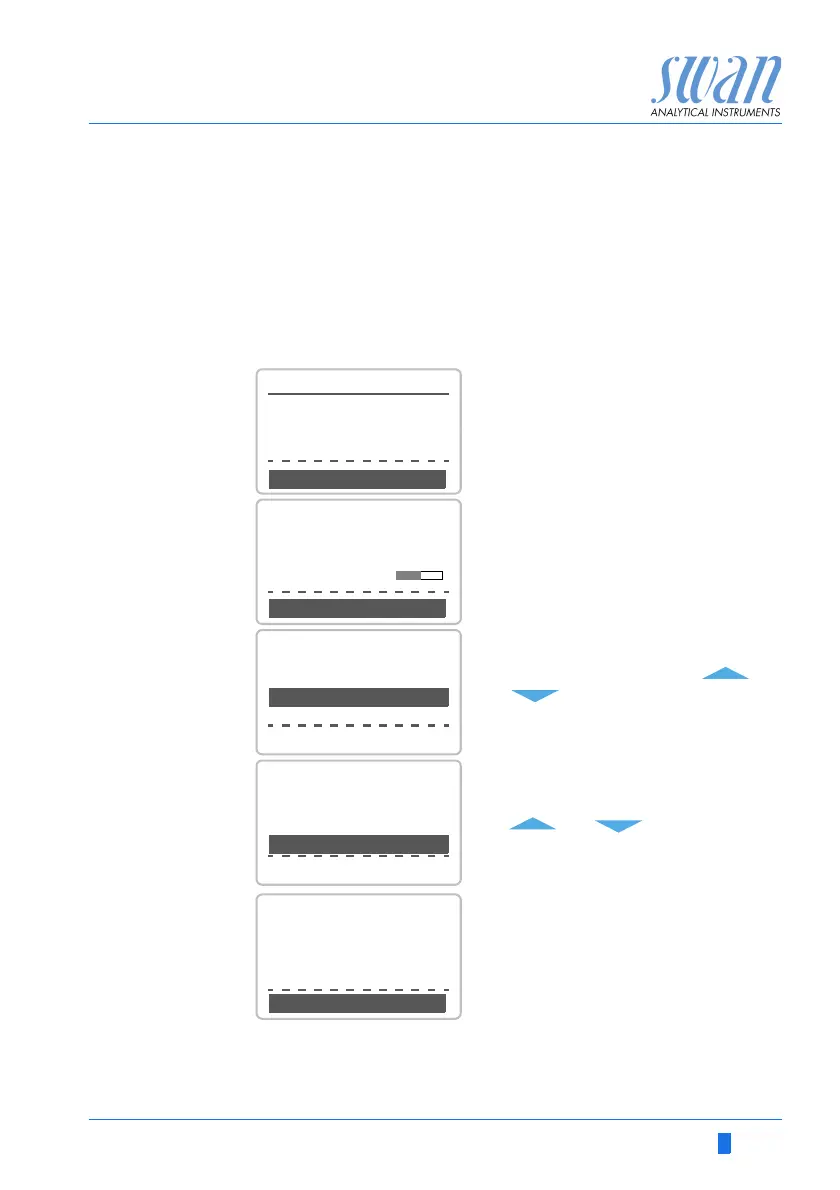
The comparison measurement is menu driven. Start by selecting
Quality Assurance in menu 3.5 of the monitor AMI Oxytrace.
1 Navigate to menu Maintenance /Quality Assurance.
2 Press [Enter].
3 Follow the dialog on the Display.
4 Carry out pre test preparations
Connect instruments.
Regulate sample flow to 10 l/h us-
ing the appropriate valve.
5 Wait 10 minutes whilst measure-
ment is running.
Press [Enter] to continue.
6 Read the ppb value of the refer-
ence instrument and enter under
“Inspector” by using the [ ] or
[ ] keys.
7 Press [Enter] to confirm.
8 Read temperature value of the ref-
erence instrument and enter un-
der “Inspector Temp.” by using the
[ ] or [ ] keys.
9 Press [Enter] to confirm.
10 Press [Enter] to continue.
The results are saved in QA-
History regardless if successful
or not
3.5.5
Quality Assurance
- Carry out preparations
- Install Inspector
- Sample flow to 10 l/h
<Enter> to continue
3.5.5
Quality Assurance
Value O2 0.05 ppb
Value Temp. 25.00 C
Wait 10 Minutes
<Enter> to continue
3.5.3
Quality Assurance
Value O2 0.05 ppb
Value Temp. 25.00 C
<Enter> to continue
Inspector O2 0.06 ppb
Inspector Temp. 25.0 C
3.5.4
Quality Assurance
Value H2 0.05 ppb
Value Temp. 25.00 C
<Enter> to continue
Inspector 0.06 ppb
Inspector Temp. 25.0 C
3.5.5
Quality Assurance
Max. Dev. O2 0.5 %
Max. Dev. Temp. 0.4 °C
QA-Check succesful
Dev. O2 0.1 %
Dev. Temp. 0.4 °C


 To Next Page