Equipment details
102
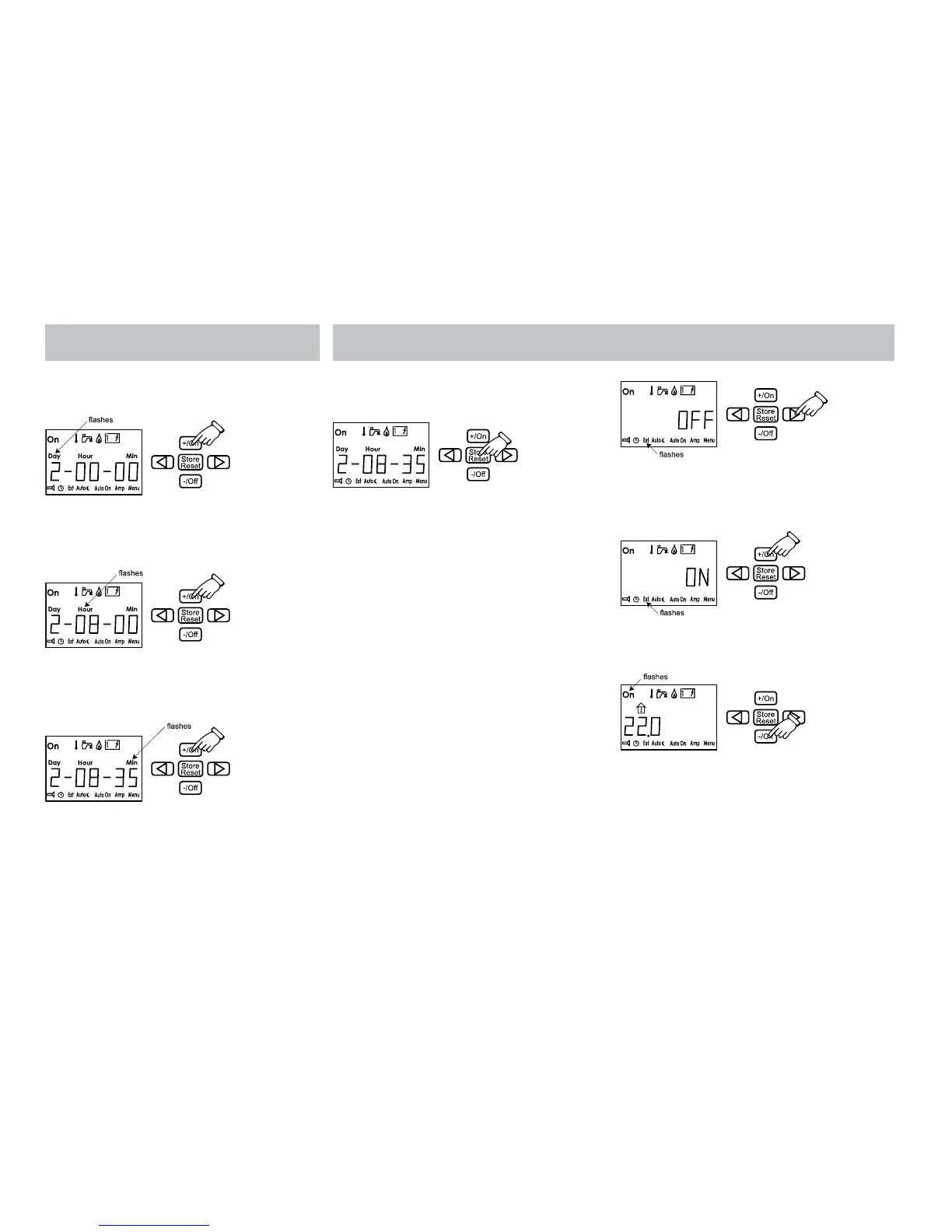
2. Press the +/On button. Day flashes. Use +/
On or -/Off to set the weekday.
3. Step forward with the arrow key until the
time is displayed. Hour flashes. Use +/On or -/
Off to set the full hour.
4. Then step forward with the arrow key until
the minutes are displayed. Min flashes. Use +/
On and -/Off to set the minutes.
5. Press Store and the time you have set is
stored.The example shows Tuesday, 08.35.
If the power to the panel is broken and the
battery backup is not connected, the clock
must be set again.
Weekday: 1-7
1=Monday
7= Sunday
Hours: 0-23
Minutes: 0-59
13. EXTERNAL START EXT
This function is used if you wish to start the
heater in the caravan from outside. To use this
function it is necessary to have an installation
for external start (see vehicle manual). To
activate external start, first light up the lower
menu row of functions (see item 11).
1. Press the button with the arrow until the
“Ext” symbol flashes. The “OFF” text
is shown next to the temperature in the
display.
2. Press the +/On button. The “ON” text
is shown next to the temperature in the
display.
3. Press the button with the arrow until the On
symbol (main breaker) flashes. Press -/Off.
4. Off and Ext are shown in the display when
the panel returns to standby. External start
is activated.






 To Next Page