Equipment details
103
When external start is activated the heater will
start with the latest settings and “ON” (main
breaker) comes on. If 12V is not connected to
the heater, the display will not light up until 12V
is connected. The external start function is still
activated.
To switch off external start, go to the
“Ext” symbol in the on position and press the -/
Off button.
14. AUTOMATIC TEMPERATURE Auto
CHANGE
This function is used when you wish to set
automatic temperature change, for example,
during the night.
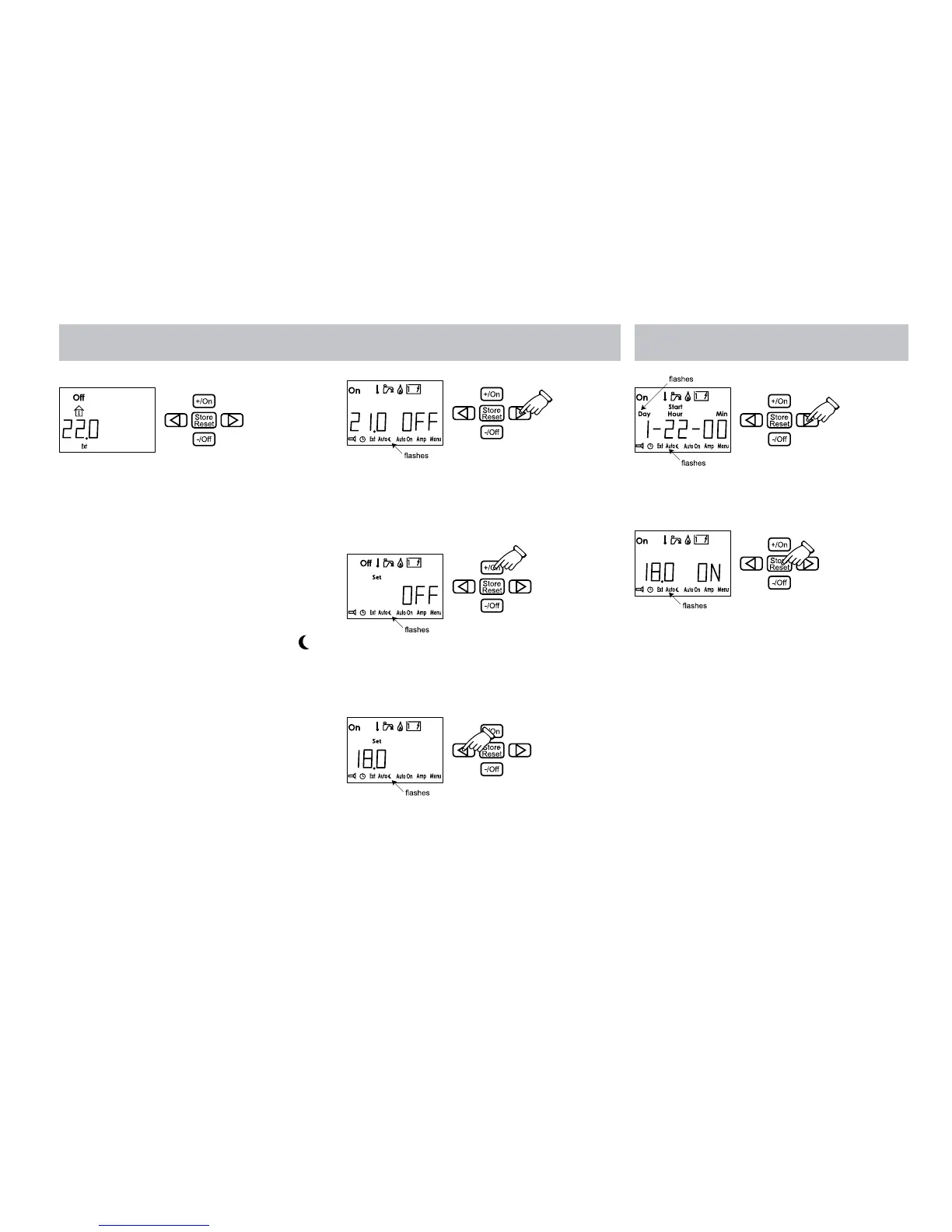
In order to activate automatic temperature
change, first light up the lower row of functions
(see item 11).
1. Press the button with the arrow until the
symbol for automatic temperature change
flashes. The temperature and the “OFF”
text are shown on the display.
2. Press the +/On button. Set flashes and the
OFF text is shown in the display. Press +/
On to activate the function. “ON” is shown
in the display.
3. Press the left arrow key. The required
temperature is displayed. Then adjust the
temperature by pressing the +/On or -/Off
button.
4. Then press Store and the start time is
displayed. Adjust the start time (the same
procedure as in 12) and press the “Store”
button.
5. Now adjust the stop time and press “Store”
again. The text field shows the required
temperature and ON.
6. If you want the temperature change to be
repeated daily, select day 0. Auto is shown
in the display when the panel returns to
standby.
15. STARTING THE HEATER
AUTOMATICALLY AutoOn
This function is used if you want the heater to
start automatically at a later time. The heater
works for 24 hours and then stops.
Automatic start is repeated the following week
as long as the function is activated.
To activate the function you must first light up
the lower row of functions (see item 11).
The function controls the panel’s main breaker.






 To Next Page