2 - 6 VC5090 Vehicle Computer Product Reference Guide
Important Fixing Information
•
A minimum of four fixing positions must be used.
•
All nuts and caps screws must be checked periodically and tightened if required.
•
When installing the vehicle computer, care must be taken to ensure that the mounting bracket footprint is
fully supported. Additional plates may be required to achieve this.
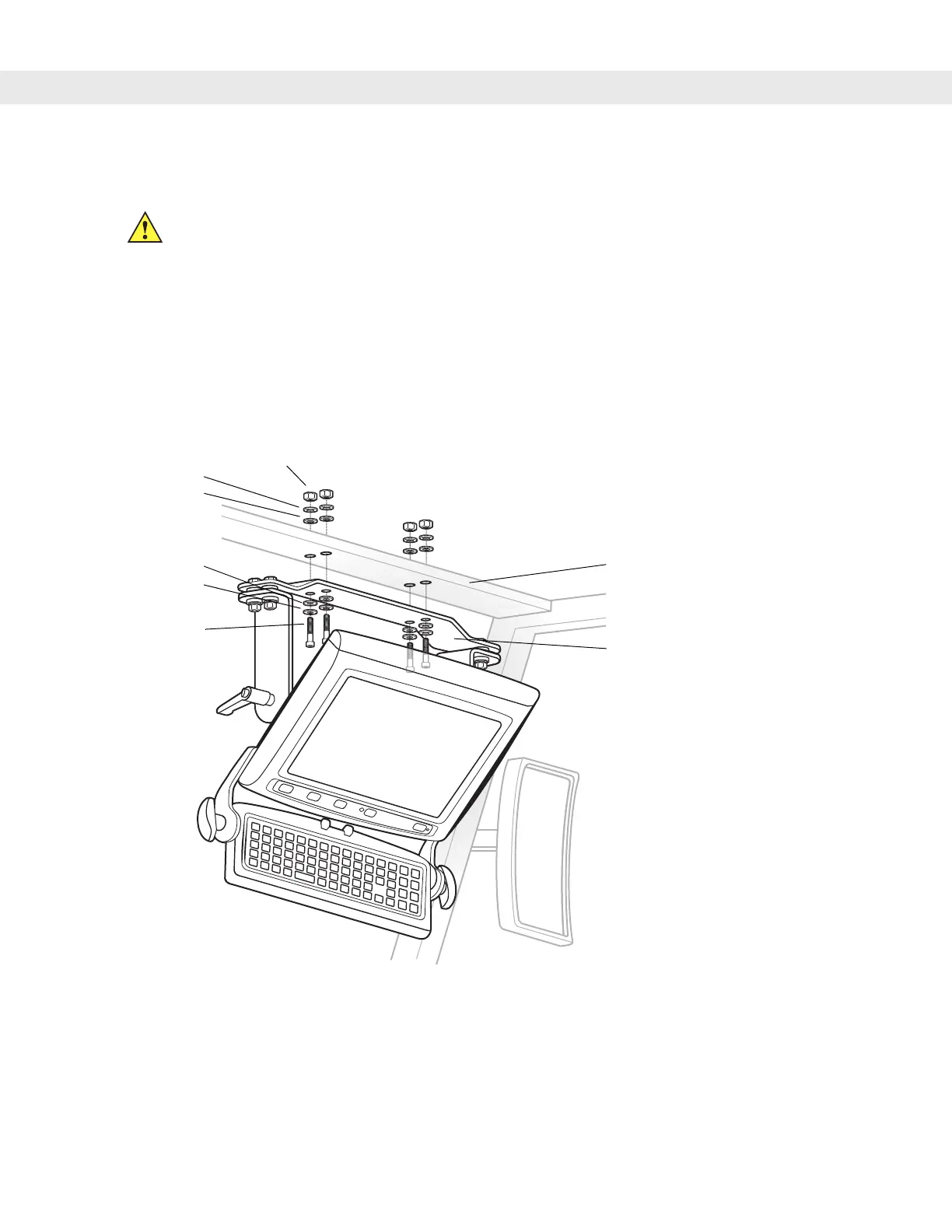
Mounting onto an Over-Head Cross-Beam Example
The diagram below illustrates a typical installation where the vehicle computer is mounted onto a cross-beam.
Figure 2-6
Mounting the VC5090 onto an Over-Head Cross-Beam Example
CAUTION Any modification to supplied mounting bracket could cause failure of the unit and/or mountings.
Nuts
Flat Washers
Cap Screws
Vehicle Cross-Beam
Mounting Bracket
Lock Washers
Lock Washers
Flat Washers


 To Next Page