Operating the VC5090 3 - 7
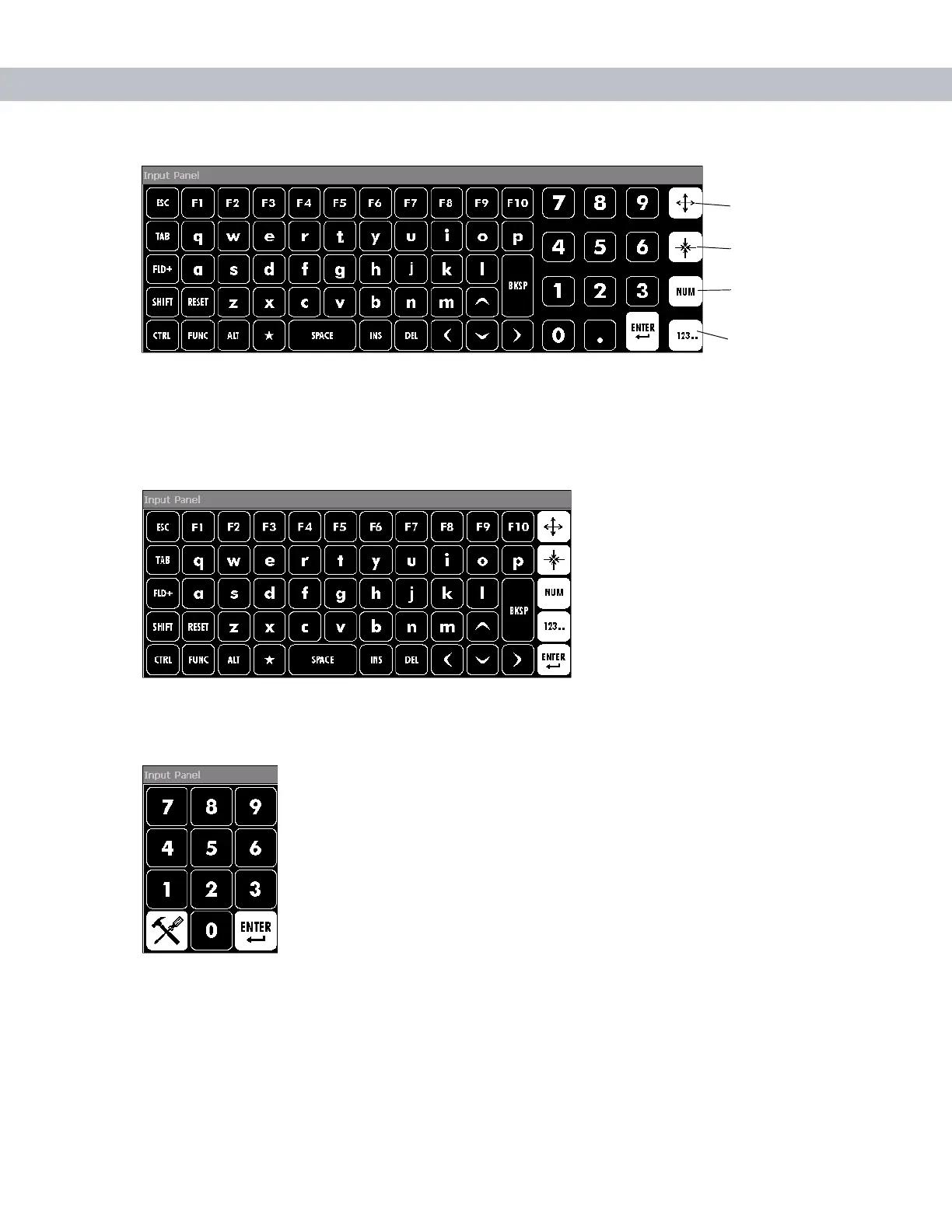
Figure 3-9
VC5090 Soft Input Panel Keyboard - Normal Size
Tap the Enlarge or Reduce Keyboard button to scale the keyboard. The three sizes are small, normal and large
with normal being the default size.
To hide or show the numeric keys tap the
Alpha-Numeric Toggle button.
Figure 3-10
Keyboard with Numeric Key Hidden
To only display the numeric keys tap the
Numeric Key Toggle button.
Figure 3-11
Numeric Only Keys
The
FUNC key, when depressed, displays a second layer of characters. The second layer stays visible until the
FUNC key is pressed again.
Enlarge Keyboard
Button
Reduce Keyboard
Button
Alpha-Numeric Key
Toggle Button
Numeric Key
Toggle Button


 To Next Page