6-3
Rev 2.2, 10/31/94
Set the input level by increasing the setting of the selected input level control until the green
LEDs in the
HEADROOM display illuminate. Ideally, the highest signal level should illuminate
the -2 dB LED, and the
CLIPPING LED should never illuminate (the CLIPPING LED operates at 1
dB below clipping.)
It is possible for the
CLIPPING LED to illuminate even though the green LEDs in the HEADROOM
display are not completely illuminated. If this occurs, decrease the setting of the appropriate
gain trim control (mic or line) sufficiently to keep the
CLIPPING LED from illuminating, then
access the global digital
gAIn
setting from the GLOBAL switch. Increase the digital
gAIn
setting as
required.
The 601 should now pass signal.
Rev-B
MIXER
ANALOG
TAPEDECK
ANALOG
PHANTOM
BYPASS
+48V
POWER
MIC INPUT
BALANCED OUT R BALANCED OUT LAES/EBU
DIGITAL
INPUT
S/PDIF
S/PDIF
AES/EBU
LINE INPUT
DIGITAL
OUTPUT
S/PDIF
AES/EBU
S/PDIF
MIDI
INPUT
MIDI
MANUFACTURED IN THE USA BY
THIS UNIT CONTAINS NO
USER SERVICEABLE PARTS.
POWER
OUTPUT
12.5W MAXIMUM
AES/EBU
RPSSE ESSPRESSPR
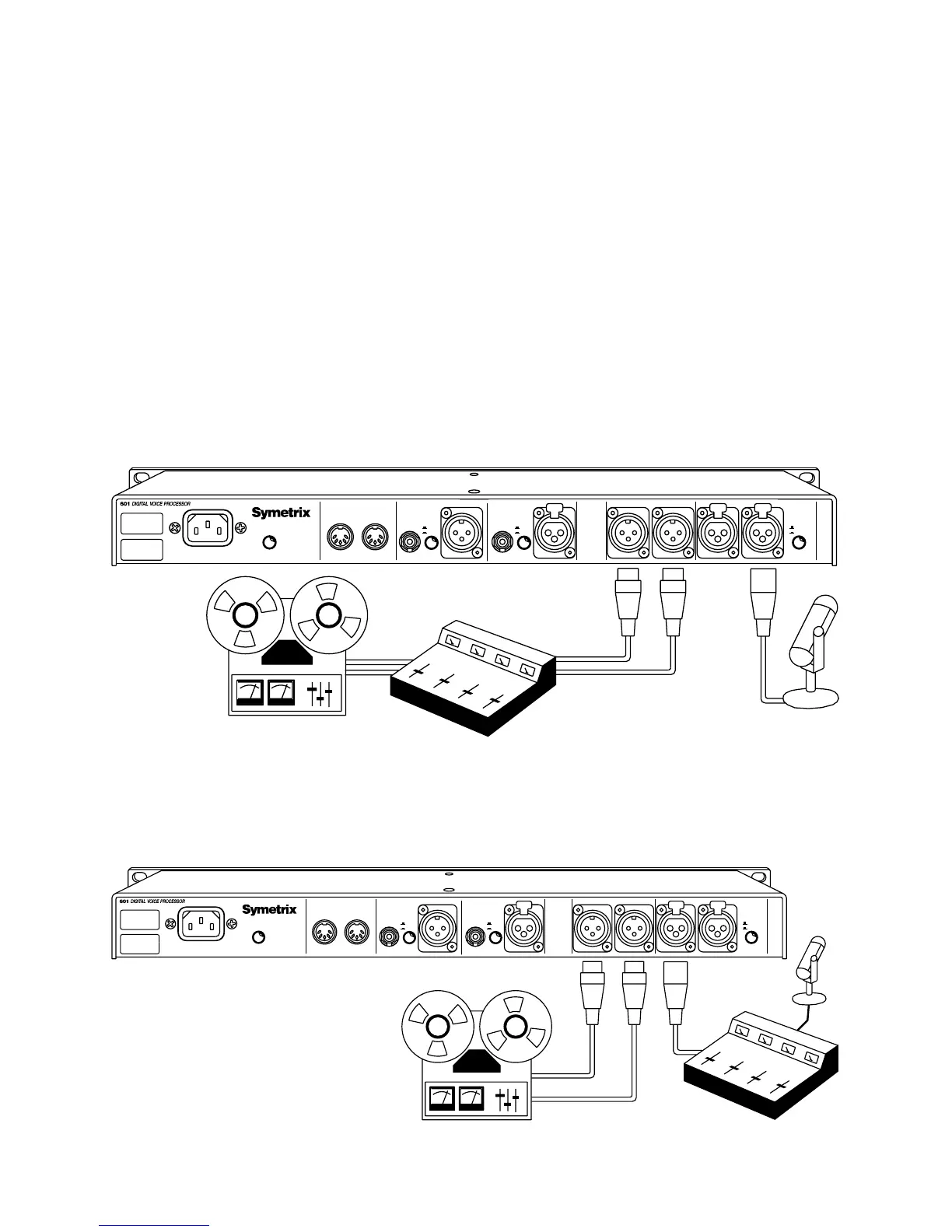
Figure 6-2. Using the 601 with a microphone source and an analog destination.
Rev-B
DESTINATION
SOURCE
ANALOG
TAPEDECK
ANALOG
PHANTOM
BYPASS
+48V
POWER
MIC INPUT
BALANCED OUT R BALANCED OUT LAES/EBU
DIGITAL
INPUT
S/PDIF
S/PDIF
AES/EBU
LINE INPUT
DIGITAL
OUTPUT
S/PDIF
AES/EBU
S/PDIF
MIDI
INPUT
MIDI
MANUFACTURED IN THE USA BY
THIS UNIT CONTAINS NO
USER SERVICEABLE PARTS.
POWER
OUTPUT
12.5W MAXIMUM
AES/EBU
RPSSE ESSPRESSPR
Figure 6-3. Using the 601 with an analog line-level source and an analog destination.



 To Next Page