3 leveL 0.0 erutarepmet
Other values : when PV=(target SV-WAIT),
program entering next segment
When program executes, if WAIT=0.0, and SV reaches set temperature, whether PV reaches target
temperature or not, the controller will enter the next segment
When program executes, if WAIT value is not 0.0, and SV reaches set temperature, as PV has not reached
target temperature, controller will wait for PV temperature to reach SV-WAIT
(1) WAIT = 0.0 without wait function set
Assume the set temperature of current segment is 100.0°C, and as SV reaches the
set temperature of this segment, the controller will enter the next segment
(2) WAIT = 5.0 with wait function set
Assume the set temperature of current segment is 100.0°C, and as SV reaches
the set temperature of this segment, PV temperature needs to reach 100.0-5.0 (SV-WAIT)=95.0
then entering the next segment
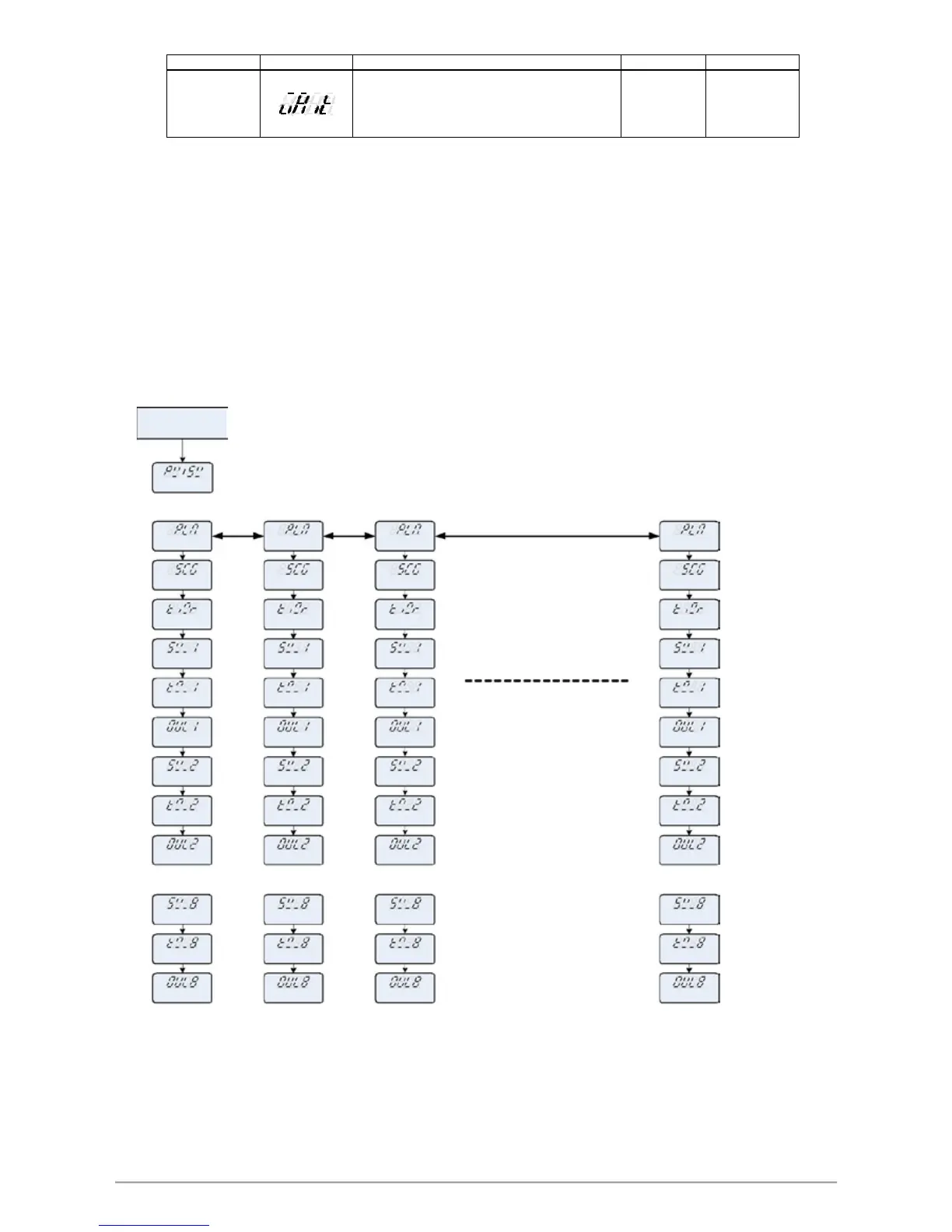
13.4 Create Program
There are 18 sets PTN to choose and each PTN have 8 segments for setting
Program structure diagram
Level 1
PV
.
/ SV
PTN group setting
. Press SET Key
MAX Pattern =18
.
1
3 2
18
1
1 1 1
MAX Segment =8
TIMR
RMIT RMITRMIT
SV-1
1-VS 1-VS1-VS
TM- 1
1 -MT1 -MT
TM- 1
OUT1
1TUO 1TUO1TUO
SV-2
2-VS 2-VS2-VS
TM- 2
2 -MT2 -MT
TM- 2
OUT2
2TUO 2TUO2TUO
.
.. .
.
.. .
.
. . .
SV-8
8-VS 8-VS8-VS
TM- 8
8 -MT8 -MT
TM- 8
OUT8
8TUO 8TUO8TUO
FY/FU operation manual 50


 To Next Page
 Loading...