TASCAM Model 24
11
2 – Names and Functions of Parts
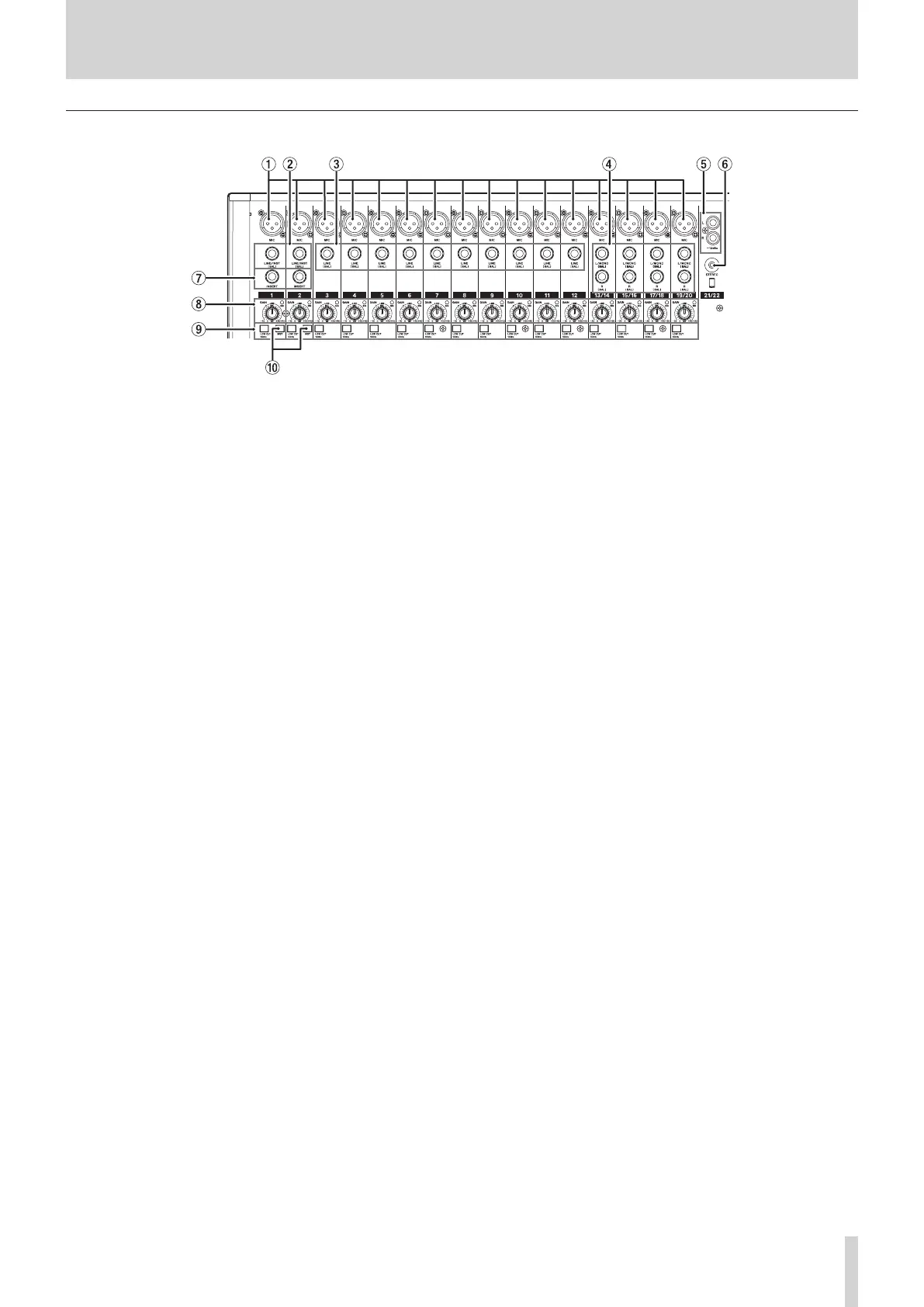
Analog input jack section
1 MIC input jacks (1-12, 13/14-19/20)
These are balanced XLR jacks for mic input.
o
XLR (1: GND, 2: HOT, 3: COLD)
2 LINE/INST (BAL) mono input jacks (1-2)
These standard TRS jacks are mono line inputs.
Use the INST switches on the top of the unit to enable balanced line
(MIC/LINE) input or unbalanced (INST) input.
When directly connecting a guitar, bass or other instrument, set the
INST switch to on.
o
TRS (Tip: HOT, Ring: COLD, Sleeve: GND)
3 LINE (BAL) input jacks (3-12)
These standard TRS jacks are line inputs.
o
TRS (Tip: HOT, Ring: COLD, Sleeve: GND)
4 L/MONO (BAL)/R (BAL) stereo input jacks (13/14-19/20)
These standard TRS jacks are stereo line inputs.
If only the L/MONO (BAL) jack in a pair is connected, the same sig-
nal was be sent to both left and right channels.
o
TRS (Tip: HOT, Ring: COLD, Sleeve: GND)
5 −10dBu (external input) jacks (21/22, RCA pin)
These RCA pin jacks are analog line outputs.
6 STEREO input jack (21/22, stereo mini)
This stereo mini jack is a line input jack.
Use this to connect with the line output jack of a tablet or other
external device.
7 INSERT jacks (1-2, standard)
Use these standard TRS jacks to connect external devices (effects).
o
TRS (Tip: SEND, Ring: RETURN, Sleeve: GND)
8 GAIN knobs and SIG indicators (1-12, 13/14-19/20)
Use the GAIN knobs to adjust the input levels of each channel.
When the MODE switch is set to LIVE or PC for a channel, its SIG
indicator will light green when a signal is input (−32 dB or higher).
9 LOW CUT switches (1-12, 13/14-19/20)
Turn this switch on to enable low cut filters that cut noise and other
sounds at low frequencies.
0 INST switches (1-2)
Set according to the LINE/INST (BAL) input jack input sources.
Turn the INST switch on when connecting an electric guitar, electric
bass or other equipment with high output impedance.
Turn the INST switch off when connecting electronic instruments,
audio devices, mics and other equipment.



 To Next Page