14
TASCAM Model 24
2 – Names and Functions of Parts
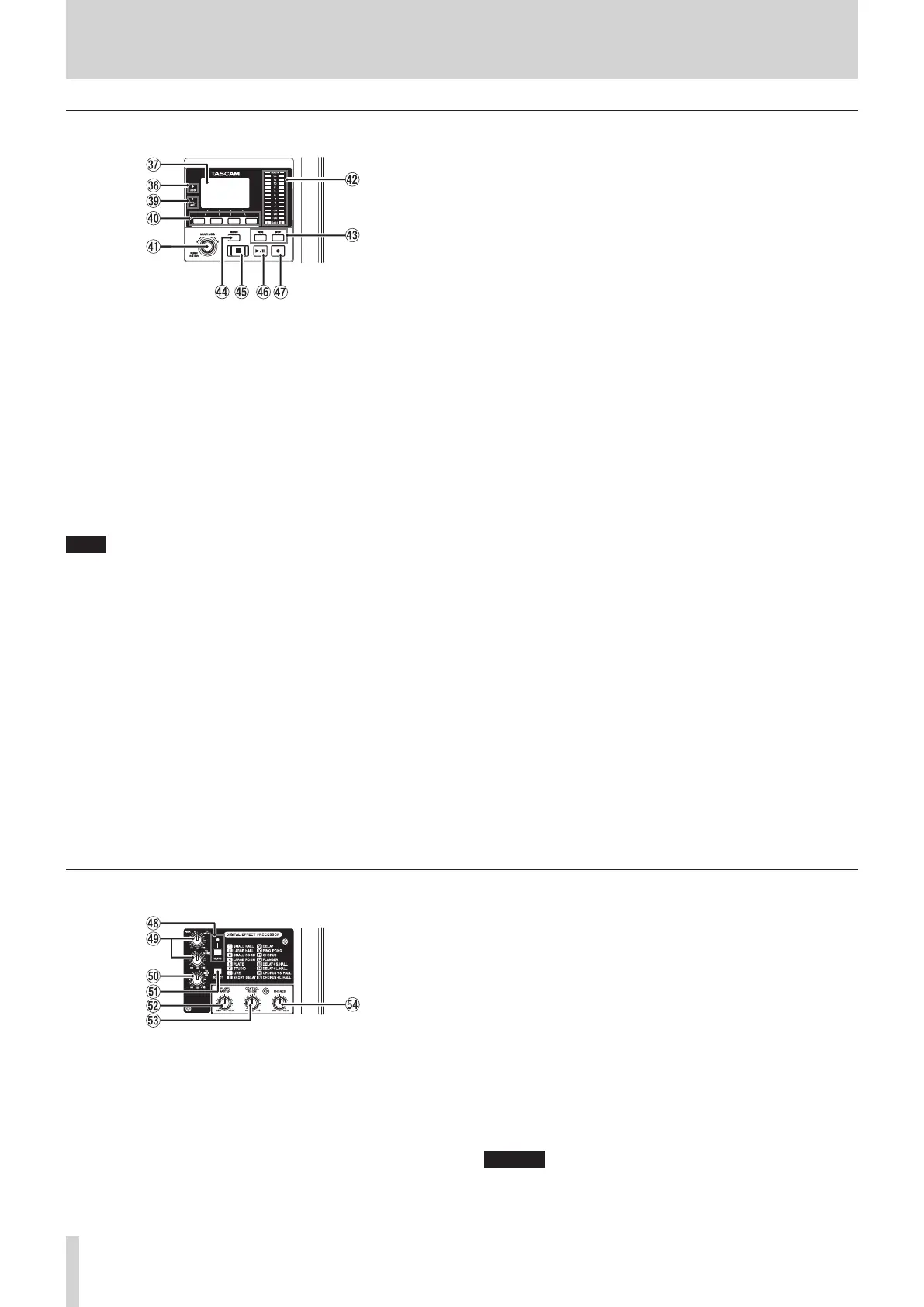
Screen operation section
m Display
Shows a variety of information.
, USB indicator
This lights when the USB connection is working.
. PFL/AFL indicator
This indicator lights when a channel PFL switch is on or when the
MON 1/MON 2 fader AFL switch is on.
/ Function buttons
The functions of these buttons change depending on the screen
shown on the display. The functions shown at the bottom of the dis-
play are the currently assigned functions.
NOTE
For convenience, the four buttons under the display are called the
function buttons in this manual. From left to right, they are called the
F1, F2, F3 and F4 buttons.
! MULTI JOG dial
This dial functions as a dial when turned and as a button when
pressed.
Dial functions
i
Turn when the Home Screen is open to move the file playback
position.(see “Locate function” on page 30)
i
When a MENU Screen is open, turn to select items and change set-
ting values.(see “Basic MENU screen operations” on page 18)
Button function
i
Press when the Home Screen is open to designate a locate point.
(see “Locate function” on page 30)
i
When a Menu Screen is open, press to confirm selections and set-
tings (ENTER button function).
@ Output level indicators
These are output level indicators for the MAIN OUTPUT jacks.
# m/, buttons
i
When stopped and during playback, press and hold these buttons
to search backward/forward.
i
When the Home Screen is open, press the m button to locate
to the beginning of the current song (00:00:00, which is the zero
point).
i
When the Home Screen is open, press the , button to locate to
the end of the current song.
i
While pressing the 8 button, press the m button to locate to
the point where recording last started.
i
While pressing the 8 button, press the , button to locate to
the point where recording last stopped.
i
If the current song has auto punch in or out points set, you can
also locate to those points.
i
When the SD PLAY Screen is in playback state, press
to skip a file.(see “Playing WAV files on SD cards
(SD PLAY mode)” on page 36)
$ MENU button
i
When the Meter Screen is open, press to open the Home Screen.
i
When the Home Screen is open, press to open the MENU Screen.
(see “Menu structure” on page 17) and(see “Basic MENU screen
operations” on page 18)
i
When the MENU Screen or a menu item settings screen is open,
press to return to the Home Screen.
% 8 button/indicator
Press to stop playback or recording.
This button lights when stopped.
Press this button when paused to return to the beginning of the song
or file.
^ 7/9 button/indicator
Press this button to start playback.
This button lights during playback and recording.
This button blinks when paused.
& 0 button/indicator
Press this button to start recording.
This button lights during recording.
Press this button during playback to start recording (punch in).(see
“Automatic punch in/out function” on page 31)
Built-in effects operation section
* MUTE switch/indicator
When the MUTE switch is on (MUTE indicator lit), the signal from
the built-in effect is muted.
( TO MON 1/TO MON 2 knobs
Use these to adjust the levels of signals sent from the built-in effects
to the MONITOR OUT 1/2 buses.
) TO MAIN LR knob
Use these to adjust the levels of signals sent from the built-in effects
to the MAIN MIX L/R buses.
Q SELECT button
Open the EFFECT Screen and make built-in effect settings.(see “Using
the built-in effects” on page 28)
The built-in effect return signal is return to the MAIN MIX L/R bus and
MONITOR OUT 1/2 buses.
W PFL/AFL MASTER knob
Use these to adjust the send level from the PFL/AFL L/R bus.
E CONTROL ROOM knob
Use to adjust the output levels of the CONTROL ROOM jacks.
R PHONES knob
Use this to adjust the headphone output level.
CAUTION
Before connecting headphones, minimize the volume with the
PHONES knob. Failure to do so could result in a sudden loud noise
that could harm hearing, for example.



 To Next Page