TASCAM Model 24
23
4 – Managing Songs
This recorder treats each recording data group as one song and man-
ages data by song.
For one song, WAV files are saved for 22 tracks and a stereo master file.
To record or produce music, a song that has already been created needs
to be loaded or a new song needs to be created.
This chapter describes basic operations such as a method for loading
songs and a procedure for creating new songs as well as various func-
tions to mange songs.
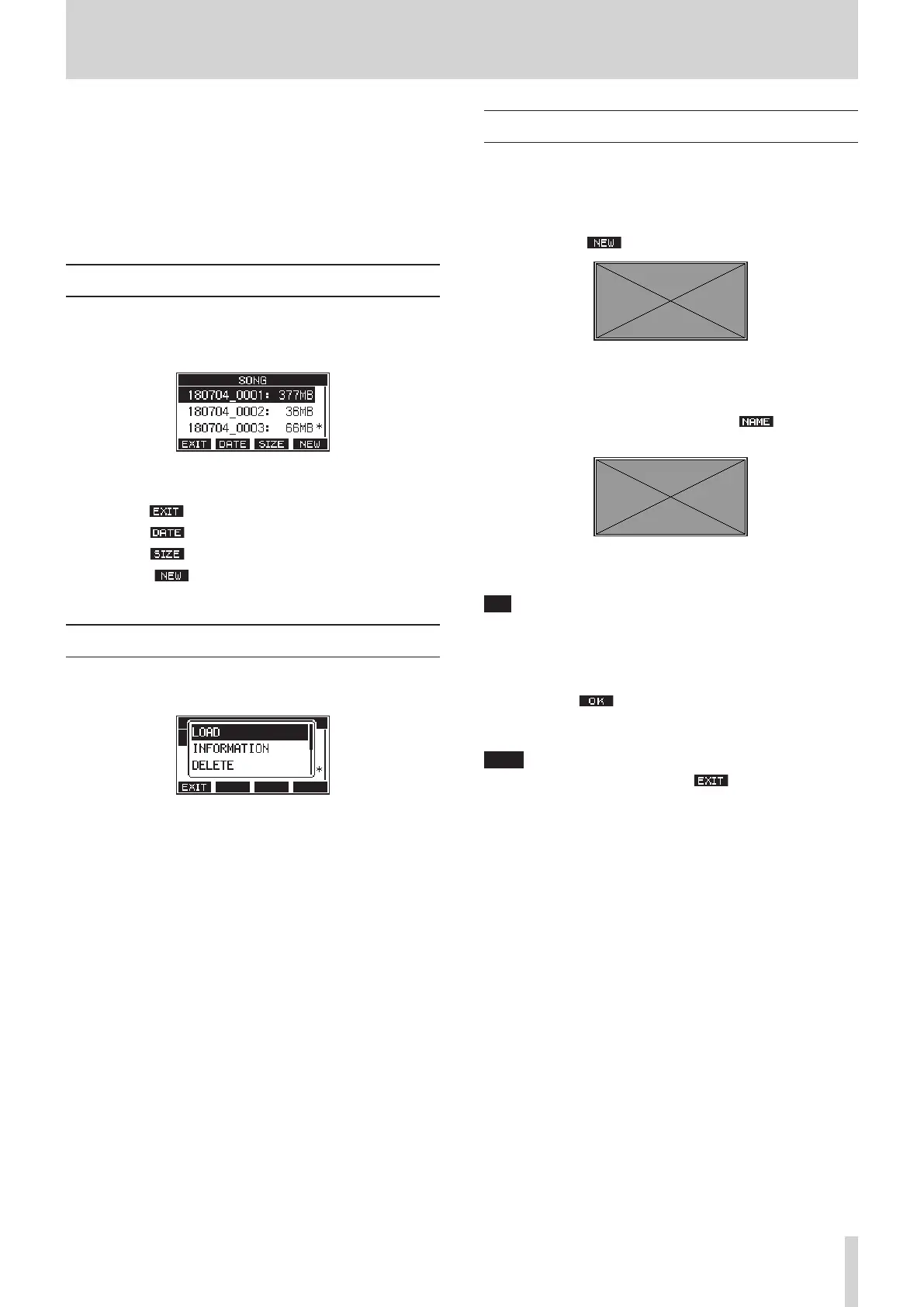
Viewing the song list
To open a list of songs saved on an SD card, select SONG on the MENU
Screen, and press the MULTI JOG dial to open the SONG Screen.(see
“Menu operation procedures” on page 18)
On the SONG Screen, the following functions are assigned to the func-
tion buttons.
0
Press the F1
button to return to the MENU Screen.
0
Press the F2
button to show the size on the SONG Screen.
0
Press the F3
button to show the date on the SONG Screen.
0
Press the F4
button to open the NEW Screen where you can
create a new song.(see “Creating a New Song” on page 23)
Song Operation
Select the desired song file on the SONG Screen and press the MULTI
JOG dial to open a pop-up menu list with possible song operations.
To use a song operation, turn the MULTI JOG dial to select the desired
item, and press the MULTI JOG dial.
LOAD
Loads the selected song.
INFORMATION
View information about the selected song.
DELETE
Deletes the selected song.
PROTECT
Protect the selected song.
UNPROTECT
Stop protection of the selected song.
RENAME
Edits the name of the selected song.
Creating a New Song
To record or play with this unit, you must create and load a song.
The following procedure can be used to create a new song.
1.
Open the SONG Screen when the recorder is stopped.(see “Menu
operation procedures” on page 18)
2.
Press the F4 button to open the NEW Screen.
Created songs are given names (titles) using the characters set on
the SONG NAME Screen followed by a four-digit number.
3.
Edit the name of the song as necessary.
To edit the name of the song, press the F2 button to open
the NAME EDIT Screen.
For details about how to edit song names, see “Editing textpage
25.
TIP
The song name can also be edited later using the RENAME Screen.
4.
Turn the MULTI JOG dial to select the recording file format.
Options: 44.1kHz - 16bit (default), 44.1kHz - 24bit, 48kHz -
16bit, 44.1kHz - 24bit
5.
Press the F4 button to save the currently loaded song and
create a new song.
When song creation completes, the SONG Screen reopens.
NOTE
i
To cancel song creation, press the F1
button.
i
A maximum of 100 songs can be created on a single SD card.
i
Songs are created in the MTR folder on the SD card.



 To Next Page