TASCAM Model 24
15
2 – Names and Functions of Parts
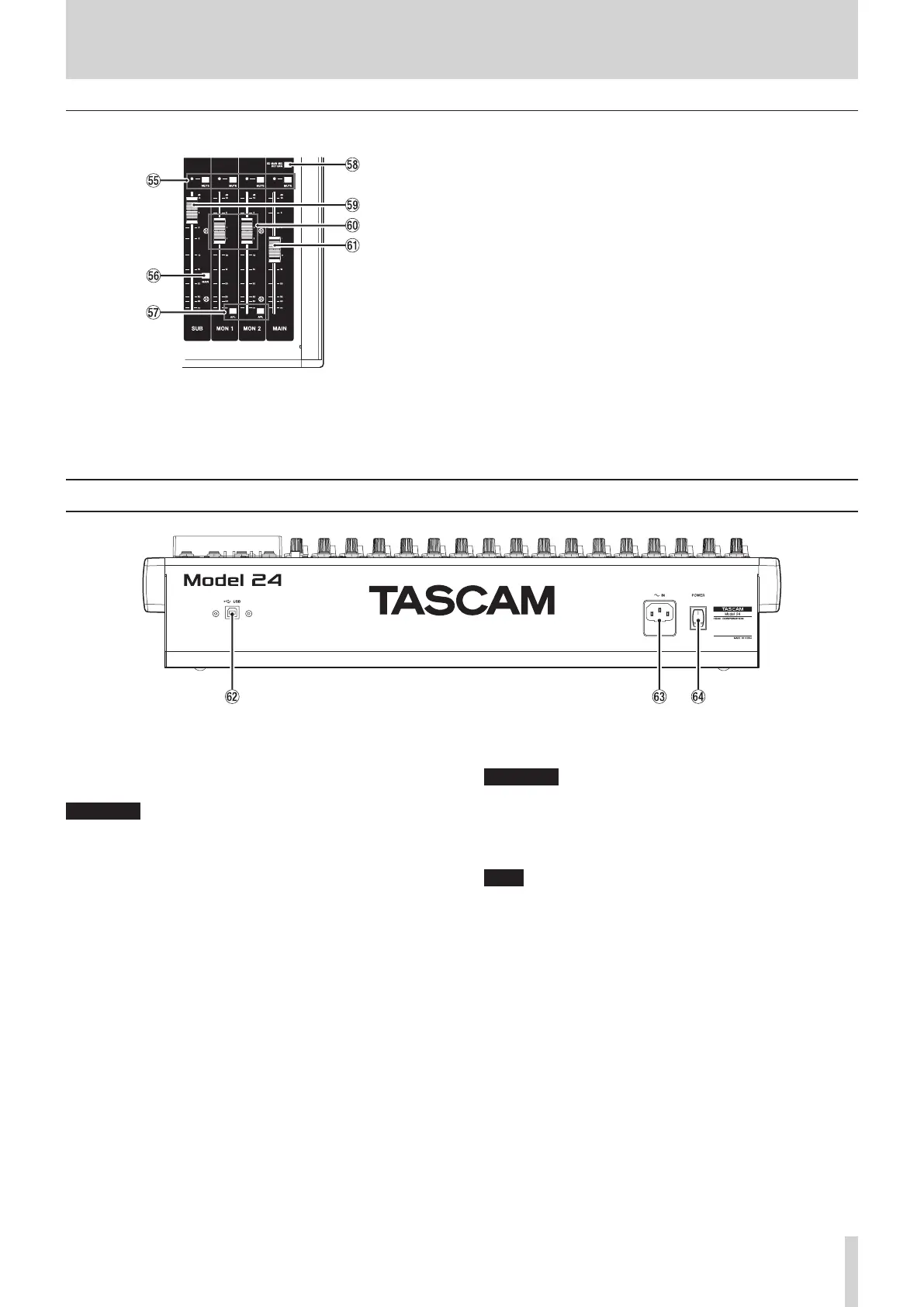
Analog output adjustment section
T MUTE switches and indicators (SUB, MON 1, MON 2,
MAIN)
When MUTE switches are on (MUTE indicators lit), signals to the
corresponding output jacks are muted.
Y MAIN switch
When this switch is on, the SUB OUTPUT L/R jack output signal is
sent to the MAIN MIX L/R bus.
U AFL switches (MON 1/MON 2)
When these switches are on, the AUX OUTPUT MON 1/2 jack out-
put signals are sent to the PFL/AFL L/R bus.
I SD MAIN MIX RETURN switch
When this switch is on, signals from the USB interface and SD card
can be mixed into the MAIN MIX L/R bus.
O SUB fader
Use to adjust the output level of the SUB OUTPUT jacks.
P MON 1/MON 2 fader
Use to adjust the output levels of the AUX OUTPUT MON 1/2 jacks.
A MAIN fader
Use to adjust the output level of the MAIN OUTPUT jacks.
Rear panel
S USB port
This is a B-type USB port. Use a USB cable (Type-A to Type-B) to con-
nect the unit to a computer.(see “Connecting with a Computer” on
page 37)
ATTENTION
The unit should be connected directly to the computer, not through
a USB hub.
D AC IN connector
Connect the included power cord here.
F POWER switch
Press to turn the unit on and off.
ATTENTION
Before turning the unit on, lower the volumes of connected equip-
ment to their minimum levels.
Failure to do so might cause sudden loud noises, which could harm
your hearing or result in other trouble.
NOTE
Do not do this when the unit is operating (including recording, play-
ing back or writing data to an SD card). Doing so could cause proper
recording to fail and recorded data to be lost.



 To Next Page