TASCAM Model 24
17
2 – Names and Functions of Parts
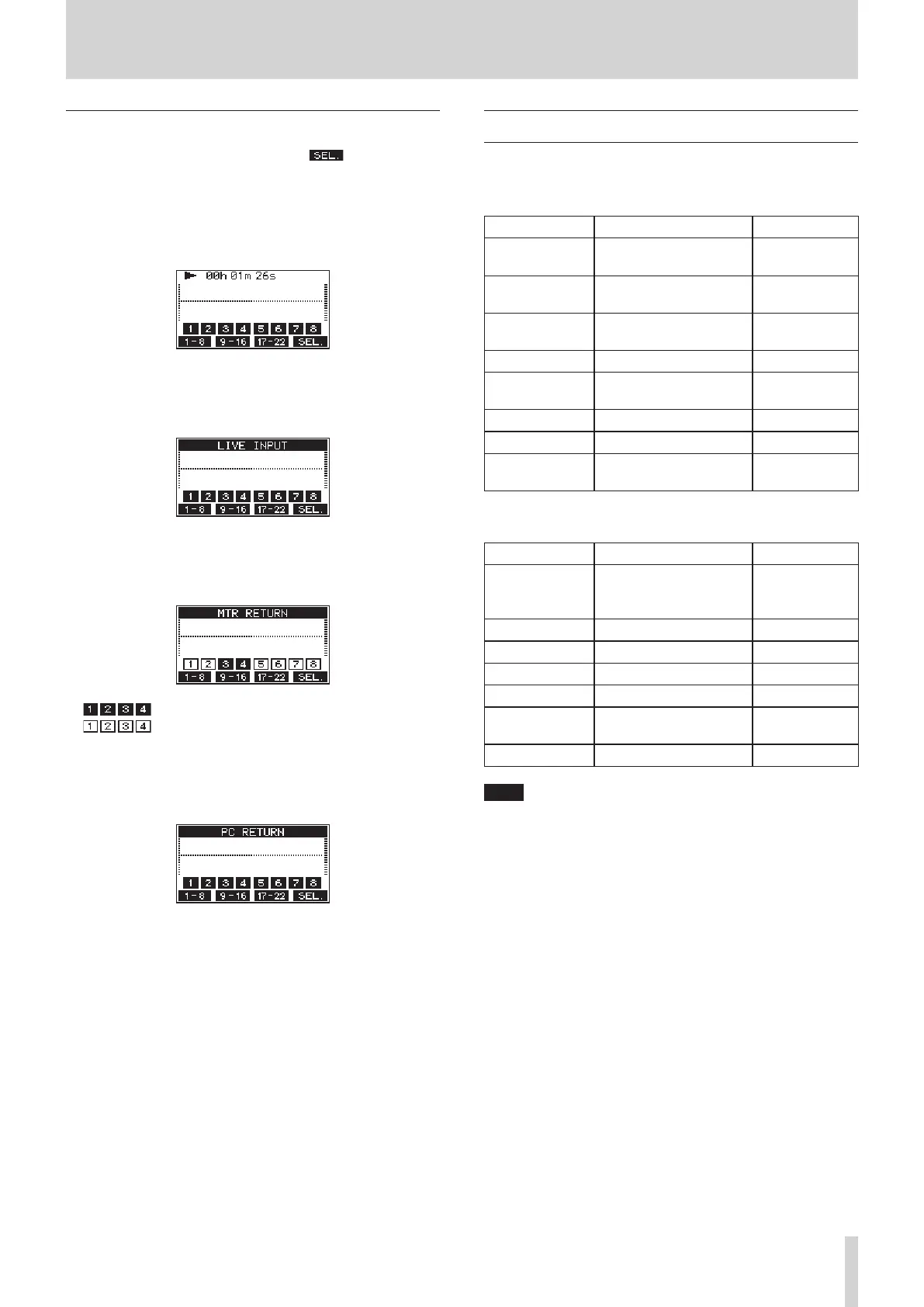
Meter Screen details
When the Meter Screen is open, press the F4 button to change
the signal sources shown by the meters.
Channel input level screens
Depending on the MODE switch setting, the signal levels set for each
channel are shown by the level meters.
LIVE INPUT Screen
These level meters show the levels of the signals being input to the input
jacks.
MTR RETURN Screen
These level meters show the playback signal levels of songs recorded on
SD cards.
Channels that have recording data in the song
Channels that do not have recording data in the song
PC RETURN Screen
These level meters show output signals from a computer when used as a
USB audio interface.
Menu structure
When the Home Screen is open, press the MENU button to open the
MENU Screen.
The various menu items are as follows.
Menu item Function Page
SONG
Work with songs on an SD
card
see page 24
TRACK CLEAR
Clear specific tracks or all
tracks
see page 33
AUTO PUNCH
Set the auto punch in/out
function
see page 31
A.PUNCH PRE ROLL
Set the pre-roll point see page 32
IMPORT
Import chosen WAV files to
song tracks
see page 33
SYSTEM
Open the SYSTEM Screen
SD PLAY
Play WAV files on an SD card see page 36
STORAGE
SD cards can be accessed
from a computer
see page 37
On the MENU Screen, select SYSTEM to open the SYSTEM Screen.
The menu items on the SYSTEM Screen are as follows.
Menu item Function Page
INFORMATION
View SD card information,
song information and the
firmware version
see page 34
DATE/TIME
Date and time settings see page 22
SONG NAME
Set the song name format. see page 34
DISPLAY
Adjust the display see page 22
FOOTSW
Make footswitch settings see page 31
INITIALIZE
Restore factory default
settings
see page 35
MEDIA FORMAT
Format the SD card see page 35
NOTE
The settings for all menu items are retained even when the unit is
turned off.



 To Next Page