16
TASCAM Model 24
2 – Names and Functions of Parts
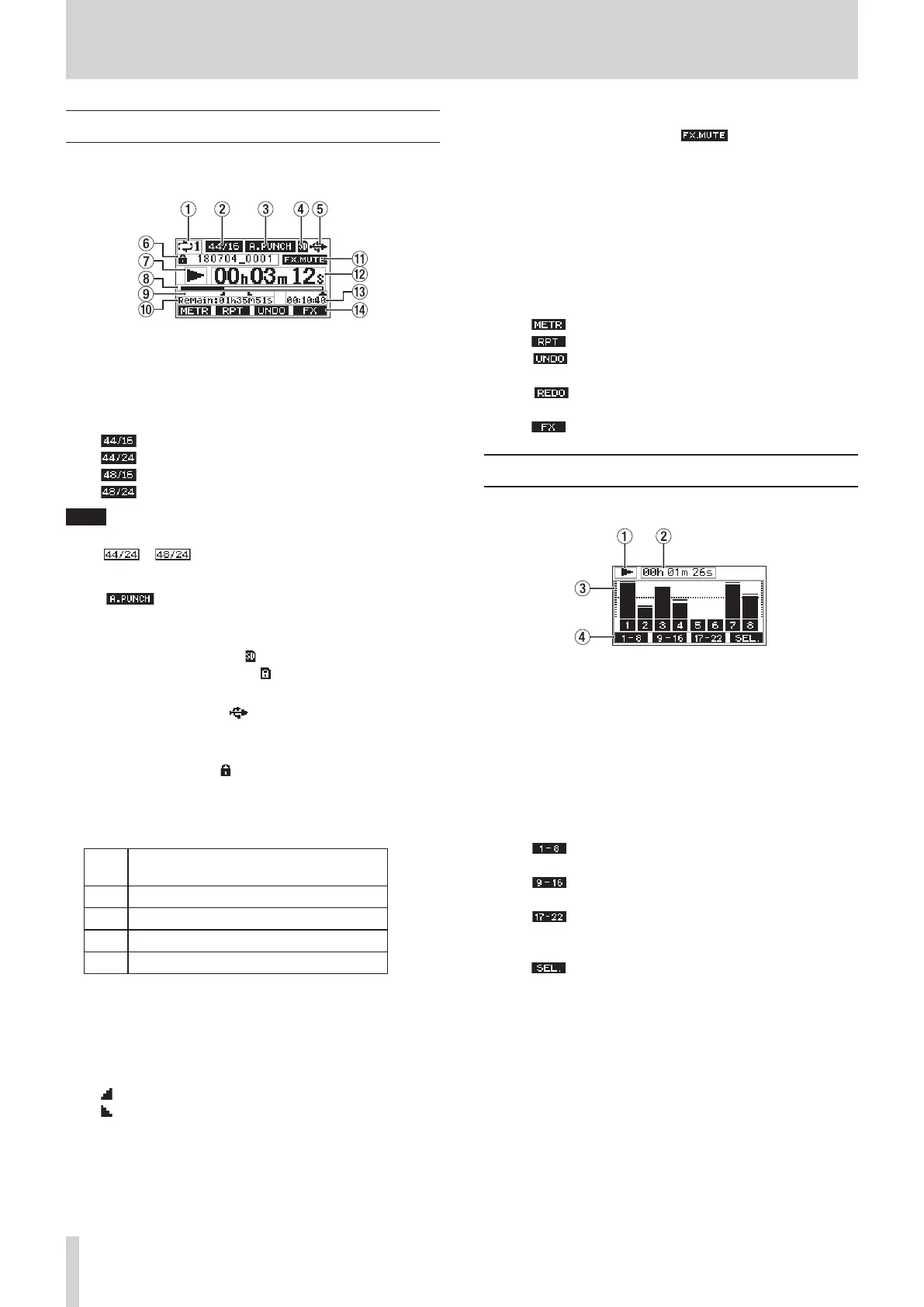
Home Screen
When the Meter Screen is open, press the MENU button to open the
Home Screen.
1 Repeat playback status
An icon appears when the repeat playback function is on.(see “Repeat
playback function” on page 30)
2 Song format
This shows the current song file format.
44.1kHz, 16bit
44.1kHz, 24bit
48kHz, 16bit
48kHz, 24bit
NOTE
If no song is loaded, the operation format of the unit will be shown
like
or .
3 Automatic punch in/out function on/off status
The icon appears when the automatic punch in/out func-
tion is on.(see “Automatic punch in/out function” on page 31)
4 SD card present status
When an SD card is loaded, the icon appears.
When an SD card is protected, the icon appears.
5 USB connection status
During USB connection, the icon appears.
6 Song name
This shows the name of the current song.
If a song is protected, an icon appears before the file name.(see
“Protecting/unprotecting songs” on page 25)
7 Transport status
This icon shows the recorder operation status.
Indi-
cator
Meaning
8
Stopped at the beginning of the file
9
Paused
0
Recording
7
Playback
8 Playback position
The current playback position is shown by a bar.
9 Automatic punch in/out point setting status
When the automatic punch in/out function is on, these show the sta-
tus of automatic punch in/out point setting.
Punch in point
Punch out point
0 Remaining time
The remaining time available for recording on the SD card is shown (in
hours: minutes: seconds).
q Built-in effect on/off status
When the built-in effect is on, the icon appears.(see “Using
the built-in effects” on page 28)
w Recorder time counter
This shows the elapsed time from the beginning of the song.
e Song length
This shows the length of the current song (in hours: minutes:
seconds).
r Function button functions
This shows the functions assigned to the function button on the
Home Screen.
i
F1
button: This opens the Meter Screen.
i
F2 button: This turns the repeat playback function on/off.
i
F3 button: This returns to the state before the previous
operation.
i
F3 button: This restores the state after the previous
operation.
i
F4 button: This turns the built-in effect on/off.
Meters Screen
This shows the levels of the signals being input to the unit.
1 Transport status
This icon shows the recorder operation status.
2 Recorder time counter
This shows the elapsed time from the beginning of the song.
3 Track level meters
These show the signal levels of each channel.
4 Function button functions
This shows the functions assigned to the function button on the
Meter Screen.
i
F1
Press to show the level meters for channel 1–8 sig-
nals on the Meter Screen.
i
F2 Press to show the level meters for channel 9–16
signals on the Meter Screen.
i
F3 Press to show the level meters for channel 17–22
and MAIN MIX L/R bus signals on the Meter
Screen.
i
F4 Press to change the input sources shown on the
Meter Screen.



 To Next Page