22
83488001 Revision N
5.11. Current Display (Ref 10)
The Current Display is a 4 digit LED indicator showing the average current delivered by the
power supply output. Current display is active in local and remote modes.
5.12. Power switch (Ref 11)
The power switch connects AC input power to the control circuitry and causes the internal
AC contactor to close if the interlock loop is closed.
5.13. Front Panel Layout (S Model)
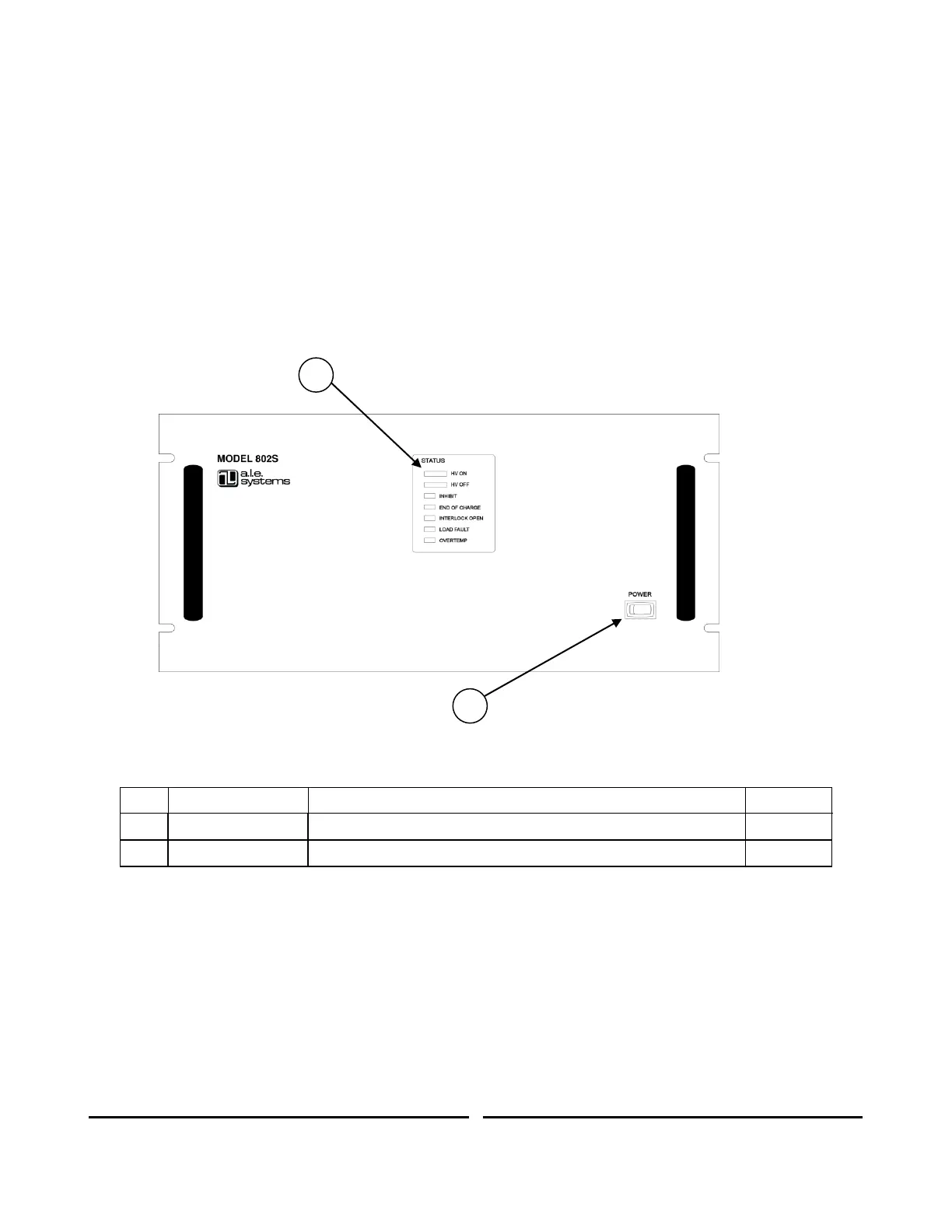
The 802S series power supply is equipped with a partially instrumented front panel featuring
status LEDs, and a power on switch. The 802S can only be operated remotely via the control
connector located on the rear panel (see Section 6.2).
Figure 7 Front Panel Controls and Indicators (S Model)
Indicates status of supply and presence of any faults
Turns on/off power to auxiliary circuits
Table 4 Front Panel Controls and Indicators (S Model)
A description of the function of the LEDs and the power switch are given in sections 5.3 and
5.12 respectively.
5.14. Front Panel Layout (OEM Model)
The 802OEM front panel is completely blank and features no indicators or switches.











 To Next Page