EasyManua.ls Logo

Teac A-3300S - Stereo Recording Procedures; Preliminary Setting; Operation Steps

Teac A-3300S
30 pages
Print Icon
To Next Page IconTo Next Page
To Previous Page IconTo Previous Page
Loading...
Stereo
Recording
Procedures
Preliminary
Setting
OPERATION
1.
Apply
AC
Power
to
the
deck
and
other
components
(POWER
Switch
ON)
2.
Depress
the
REC
and
Buttons.
TEAC
TEAC
Pi
tO
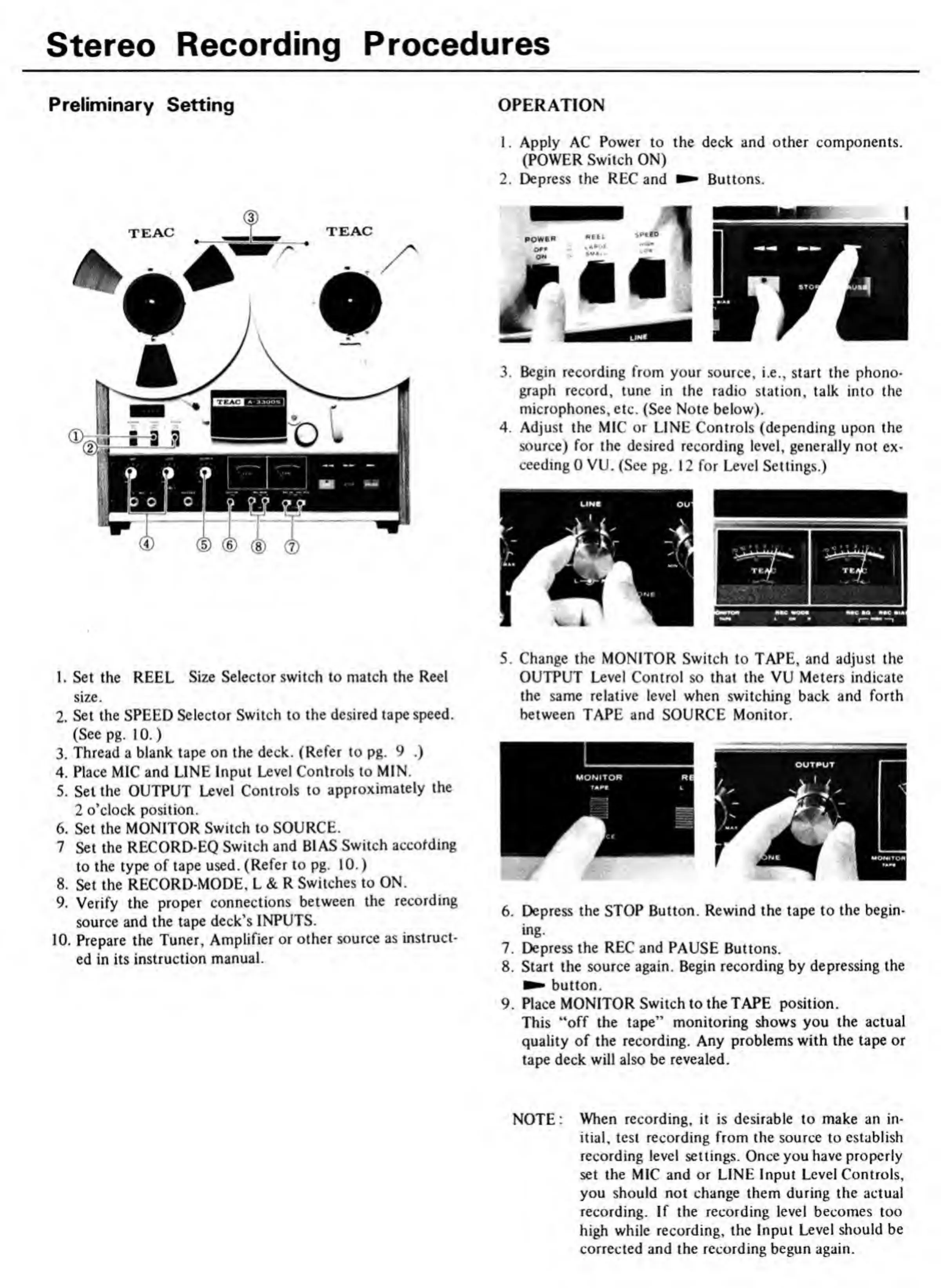
1.
Set
the
REEL
Size
Selector
switch
to
match
the
Reel
size.
2.
Set
the
SPEED
Selector
Switch
to
the
desired
tape
speed.
(See
pg.
10.)
3.
Thread
a
blank
tape
on
the
deck.
(Refer
to
pg.
9
.)
4.
Place
MIC
and
LINE
Input
Level
Controls
to
MIN.
5.
Set
the
OUTPUT
Level
Controls
to
approximately
the
2
o’clock
position.
6.
Set
the
MONITOR
Switch
to
SOURCE.
7
Set
the
RECORD-EQ
Switch
and
BIAS
Switch
according
to
the
type
of
tape
used.
(Refer
to
pg.
10.)
8.
Set
the
RECORD-MODE,
L
&
R
Switches
to
ON.
9.
Verify
the
proper
connections
between
the
recording
source
and
the
tape
deck’s
INPUTS.
10.
Prepare
the
Tuner,
Amplifier
or
other
source
as
instruct¬
ed
in
its
instruction
manual.
5.
Change
the
MONITOR
Switch
to
TAPE,
and
adjust
the
OUTPUT
Level
Control
so
that
the
VU
Meters
indicate
the
same
relative
level
when
switching
back
and
forth
between
TAPE
and
SOURCE
Monitor.
6.
Depress
the
STOP
Button.
Rewind
the
tape
to
the
begin-
ing.
7.
Depress
the
REC
and
PAUSE
Buttons.
8.
Start
the
source
again.
Begin
recording
by
depressing
the
button.
9.
Place
MONITOR
Switch
to
the
TAPE
position.
This
“off
the
tape”
monitoring
shows
you
the
actual
quality
of
the
recording.
Any
problems
with
the
tape
or
tape
deck
will
also
be
revealed.
NOTE:
When
recording,
it
is
desirable
to
make
an
in¬
itial,
test
recording
from
the
source
to
establish
recording
level
settings.
Once
you
have
properly
set
the
MIC
and
or
LINE
Input
Level
Controls,
you
should
not
change
them
during
the
actual
recording.
If
the
recording
level
becomes
too
high
while
recording,
the
Input
Level
should
be
corrected
and
the
recording
begun
again.

Related product manuals