EasyManua.ls Logo

Teac A-3300S - Recording with Dolby Noise Reduction

Teac A-3300S
30 pages
Print Icon
To Next Page IconTo Next Page
To Previous Page IconTo Previous Page
Loading...
Sound
On
Sound
Recording
(for
the
experienced
recordist)
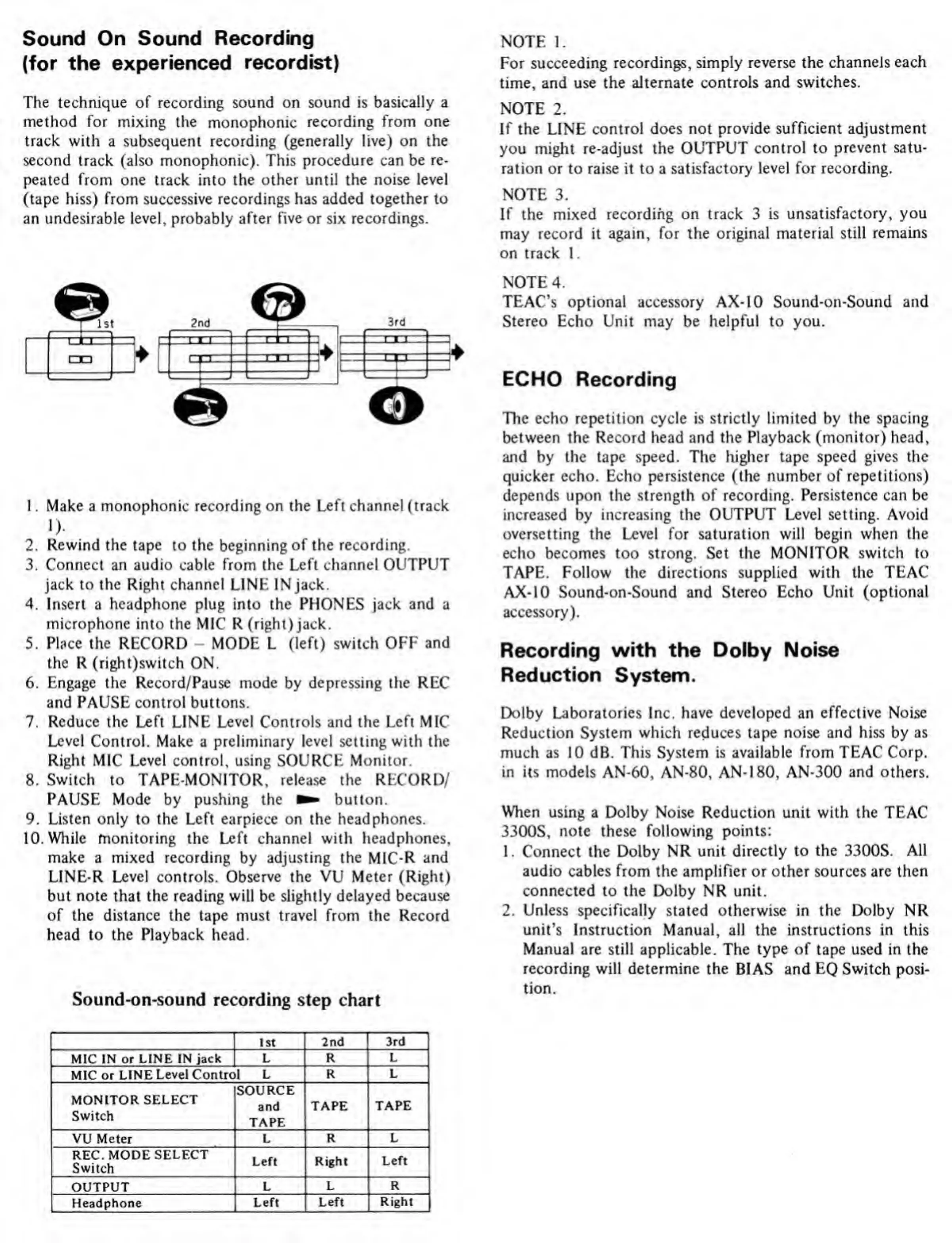
The
technique
of
recording
sound
on
sound
is
basically
a
method
for
mixing
the
monophonic
recording
from
one
track
with
a
subsequent
recording
(generally
live)
on
the
second
track
(also
monophonic).
This
procedure
can
be
re¬
peated
from
one
track
into
the
other
until
the
noise
level
(tape
hiss)
from
successive
recordings
has
added
together
to
an
undesirable
level,
probably
after
five
or
six
recordings.
1.
Make
a
monophonic
recording
on
the
Left
channel
(track
1
).
2.
Rewind
the
tape
to
the
beginning
of
the
recording.
3.
Connect
an
audio
cable
from
the
Left
channel
OUTPUT
jack
to
the
Right
channel
LINE
IN
jack.
4.
Insert
a
headphone
plug
into
the
PHONES
jack
and
a
microphone
into
the
MIC
R
(right)
jack.
5.
Place
the
RECORD
-
MODE
L
(left)
switch
OFF
and
the
R
(right)switch
ON.
6.
Engage
the
Record/Pause
mode
by
depressing
the
REC
and
PAUSE
control
buttons.
7.
Reduce
the
Left
LINE
Level
Controls
and
the
Left
MIC
Level
Control.
Make
a
preliminary
level
setting
with
the
Right
MIC
Level
control,
using
SOURCE
Monitor.
8.
Switch
to
TAPE-MONITOR,
release
the
RECORD/
PAUSE
Mode
by
pushing
the
button.
9.
Listen
only
to
the
Left
earpiece
on
the
headphones.
10.
While
monitoring
the
Left
channel
with
headphones,
make
a
mixed
recording
by
adjusting
the
MIC-R
and
LINE-R
Level
controls.
Observe
the
VU
Meter
(Right)
but
note
that
the
reading
will
be
slightly
delayed
because
of
the
distance
the
tape
must
travel
from
the
Record
head
to
the
Playback
head.
Sound-on-sound
recording
step
chart
NOTE
1.
For
succeeding
recordings,
simply
reverse
the
channels
each
time,
and
use
the
alternate
controls
and
switches.
NOTE
2.
If
the
LINE
control
does
not
provide
sufficient
adjustment
you
might
re-adjust
the
OUTPUT
control
to
prevent
satu¬
ration
or
to
raise
it
to
a
satisfactory
level
for
recording.
NOTE
3.
If
the
mixed
recording
on
track
3
is
unsatisfactory,
you
may
record
it
again,
for
the
original
material
still
remains
on
track
1.
NOTE
4.
TEAC's
optional
accessory
AX-10
Sound-on-Sound
and
Stereo
Echo
Unit
may
be
helpful
to
you.
ECHO
Recording
The
echo
repetition
cycle
is
strictly
limited
by
the
spacing
between
the
Record
head
and
the
Playback
(monitor)
head,
and
by
the
tape
speed.
The
higher
tape
speed
gives
the
quicker
echo.
Echo
persistence
(the
number
of
repetitions)
depends
upon
the
strength
of
recording.
Persistence
can
be
increased
by
increasing
the
OUTPUT
Level
setting.
Avoid
oversetting
the
Level
for
saturation
will
begin
when
the
echo
becomes
too
strong.
Set
the
MONITOR
switch
to
TAPE.
Follow
the
directions
supplied
with
the
TEAC
AX-10
Sound-on-Sound
and
Stereo
Echo
Unit
(optional
accessory).
Recording
with
the
Dolby
Noise
Reduction
System.
Dolby
Laboratories
Inc.
have
developed
an
effective
Noise
Reduction
System
which
reduces
tape
noise
and
hiss
by
as
much
as
10
dB.
This
System
is
available
from
TEAC
Corp.
in
its
models
AN-60,
AN-80,
AN-180,
AN-300
and
others.
When
using
a
Dolby
Noise
Reduction
unit
with
the
TEAC
3300S,
note
these
following
points:
1.
Connect
the
Dolby
NR
unit
directly
to
the
3300S.
All
audio
cables
from
the
amplifier
or
other
sources
are
then
connected
to
the
Dolby
NR
unit.
2.
Unless
specifically
stated
otherwise
in
the
Dolby
NR
unit's
Instruction
Manual,
all
the
instructions
in
this
Manual
are
still
applicable.
The
type
of
tape
used
in
the
recording
will
determine
the
BIAS
and
EQ
Switch
posi¬
tion.
1st
2nd
3rd
MIC
IN
or
LINE
IN
jack
L
R
L
MIC
or
LINE
Level
Control
L
R
L
MONITOR
SELECT
Switch
SOURCE
and
TAPE
TAPE
TAPE
VU
Meter
L
R
L
REC.
MODE
SELECT
Switch
Left
Right
Left
OUTPUT
L
L
R
Headphone
Left
Left
Right

Related product manuals