EasyManua.ls Logo

Teac A-3300S - Editing and Splicing Tape.17

Teac A-3300S
30 pages
Print Icon
To Next Page IconTo Next Page
To Previous Page IconTo Previous Page
Loading...
Editing
and
Splicing
Tape
Editing
tape
is
a
fascinating
way
to
make
creative
record¬
ings
by
eliminating
and
joining
different
segments
of
a
recording
into
one
pleasing
tape.
Long,
silent
or
boring
segments
can
be
removed
by
proper
editing.
In
fact,
as
editing
is
a
creative
exercise,
there
is
only
your
imagination
and
the
length
of
tape
to
limit
the
possibilities.
Of
course,
broken
tape
can
also
be
easily
mended
by
splicing,
one
of
the
steps
required
in
editing.
The
first
step
is
to
precisely
locate
the
section
of
tape
to
be
removed.
This
can
be
done
by
manually
cueing
the
tape.
1.
Remove
the
cap
from
the
Pinch
Roller.
2.
Remove
the
Pinch
Roller.
3.
Hold
the
right
take-up
reel
with
your
hand
while
you
depress
the
^
Play
button.
4.
Move
the
tape
back
and
forth
by
manipulating
the
reels
until
the
precise
point
for
editing
is
positioned
at
the
Forward
Play
tape
head.
5.
Mark
the
spot
on
the
tape.
Repeat
this
procedure
for
the
end
of
the
selection
to
be
edited.
Next,
use
an
Editing
Block
or
a
pair
of
scissors
(demagnetiz¬
ed)
to
cut
the
tape
at
the
places
marked.
Finally,
the
splicing
is
to
be
done.
A
Tape
Splicer
is
prefer¬
red,
but
a
pair
of
scissors
that
have
been
demagnetized
will
be
satisfactory.
Before
you
proceed,
have
some
commercial¬
ly
available
Splicing
Tape
available.
Never
use
Cellophane
(Scotch
Brand)
tape,
for
that
adhesive
will
spread
and
con¬
taminate
your
heads.
1.
Overlap
the
ends
to
be
spliced
by
approximately
1/2
inch
and
align
them
carefully.
2.
Cut
through
the
center
of
the
overlapped
area
at
a
45
to
60
degree
angle.
3.
Butt
the
slanted
ends
of
the
cut
tape
together.
Use
a
straightedge
or
ruler
to
assure
a
perfectly
straight
align¬
ment.
4.
Apply
splicing
tape
to
the
shiny
base
side
of
the
tape
as
shown
in
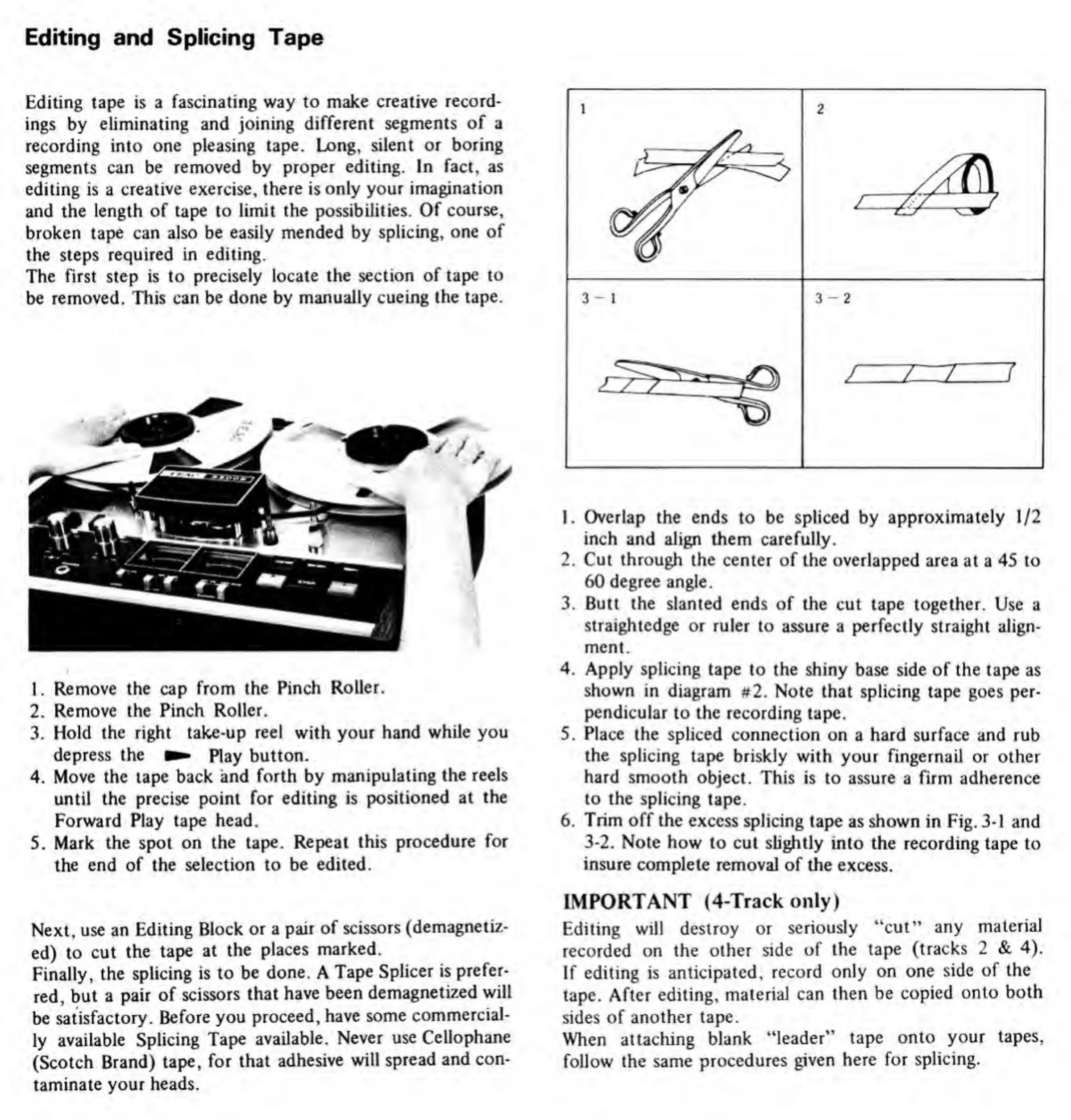
diagram
#2.
Note
that
splicing
tape
goes
per¬
pendicular
to
the
recording
tape.
5.
Place
the
spliced
connection
on
a
hard
surface
and
rub
the
splicing
tape
briskly
with
your
fingernail
or
other
hard
smooth
object.
This
is
to
assure
a
firm
adherence
to
the
splicing
tape.
6.
Trim
off
the
excess
splicing
tape
as
shown
in
Fig.
3-1
and
3-2.
Note
how
to
cut
slightly
into
the
recording
tape
to
insure
complete
removal
of
the
excess.
IMPORTANT
(4-Track
only)
Editing
will
destroy
or
seriously
“cut'’
any
material
recorded
on
the
other
side
of
the
tape
(tracks
2
&
4).
If
editing
is
anticipated,
record
only
on
one
side
of
the
tape.
After
editing,
material
can
then
be
copied
onto
both
sides
of
another
tape.
When
attaching
blank
“leader”
tape
onto
your
tapes,
follow
the
same
procedures
given
here
for
splicing.

Related product manuals