EasyManua.ls Logo

Teac A-3300S - Level Setting; Setting the Recording Level; Setting the Playback Level

Teac A-3300S
30 pages
Print Icon
To Next Page IconTo Next Page
To Previous Page IconTo Previous Page
Loading...
Level
Setting
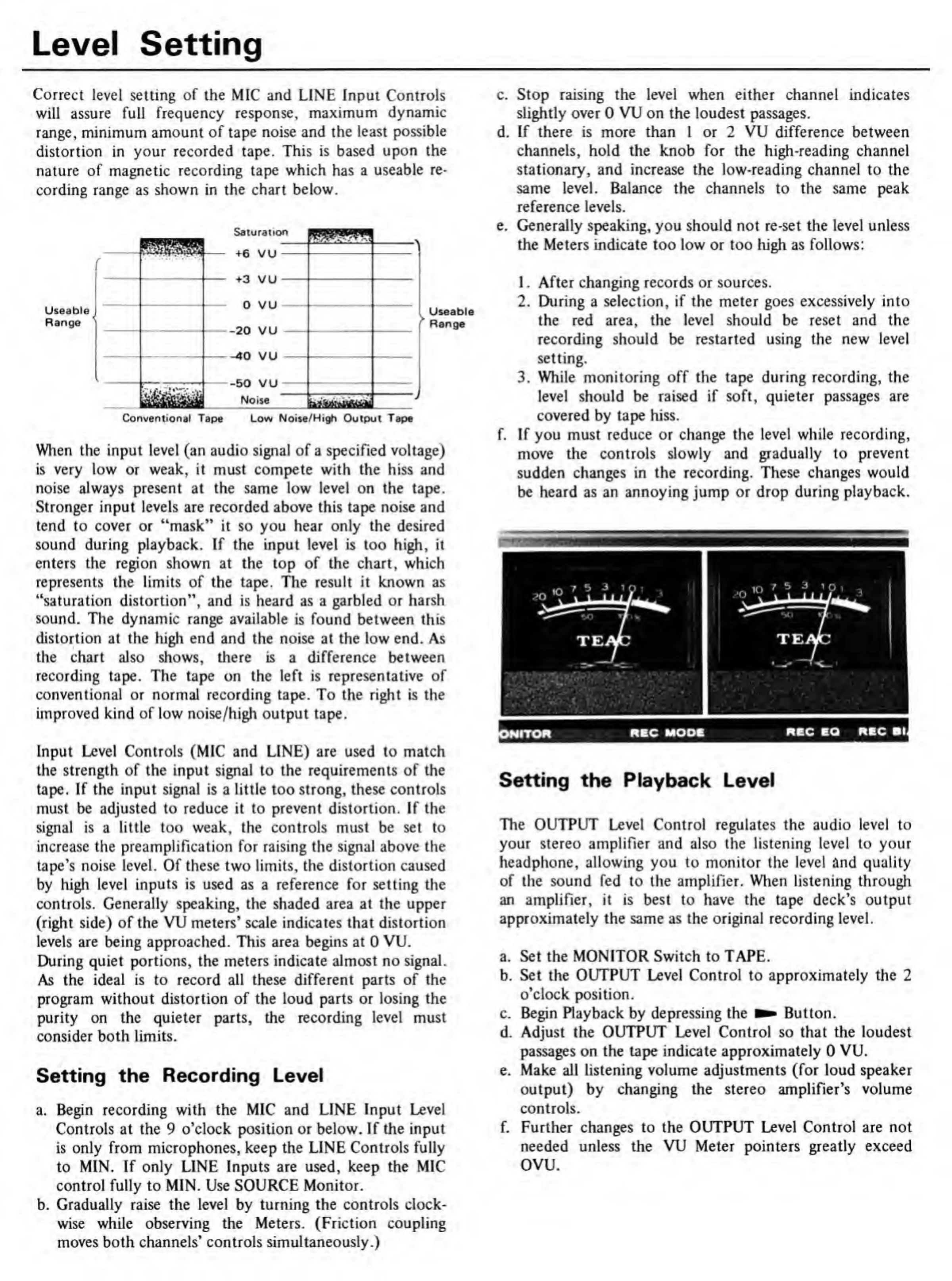
Correct
level
setting
of
the
MIC
and
LINE
Input
Controls
will
assure
full
frequency
response,
maximum
dynamic
range,
minimum
amount
of
tape
noise
and
the
least
possible
distortion
in
your
recorded
tape.
This
is
based
upon
the
nature
of
magnetic
recording
tape
which
has
a
useable
re¬
cording
range
as
shown
in
the
chart
below.
Saturation
Useable
Range
l-W1
|
-
r
i
T
U
V
u
n
\j
11
v
u
on
\/1
1
1
-—J
•aU
V
u
-40
VU
[
CA
W
1
1
V
U
III
1
.
Noise
fa
*
1
>
Useable
Range
Conventional
Tape
Low
Noise/High
Output
Tape
When
the
input
level
(an
audio
signal
of
a
specified
voltage)
is
very
low
or
weak,
it
must
compete
with
the
hiss
and
noise
always
present
at
the
same
low
level
on
the
tape.
Stronger
input
levels
are
recorded
above
this
tape
noise
and
tend
to
cover
or
“mask”
it
so
you
hear
only
the
desired
sound
during
playback.
If
the
input
level
is
too
high,
it
enters
the
region
shown
at
the
top
of
the
chart,
which
represents
the
limits
of
the
tape.
The
result
it
known
as
“saturation
distortion”,
and
is
heard
as
a
garbled
or
harsh
sound.
The
dynamic
range
available
is
found
between
this
distortion
at
the
high
end
and
the
noise
at
the
low
end.
As
the
chart
also
shows,
there
is
a
difference
between
recording
tape.
The
tape
on
the
left
is
representative
of
conventional
or
normal
recording
tape.
To
the
right
is
the
improved
kind
of
low
noise/high
output
tape.
Input
Level
Controls
(MIC
and
LINE)
are
used
to
match
the
strength
of
the
input
signal
to
the
requirements
of
the
tape.
If
the
input
signal
is
a
little
too
strong,
these
controls
must
be
adjusted
to
reduce
it
to
prevent
distortion.
If
the
signal
is
a
little
too
weak,
the
controls
must
be
set
to
increase
the
preamplification
for
raising
the
signal
above
the
tape's
noise
level.
Of
these
two
limits,
the
distortion
caused
by
high
level
inputs
is
used
as
a
reference
for
setting
the
controls.
Generally
speaking,
the
shaded
area
at
the
upper
(right
side)
of
the
VU
meters’
scale
indicates
that
distortion
levels
are
being
approached.
This
area
begins
at
0
VU.
During
quiet
portions,
the
meters
indicate
almost
no
signal.
As
the
ideal
is
to
record
all
these
different
parts
of
the
program
without
distortion
of
the
loud
parts
or
losing
the
purity
on
the
quieter
parts,
the
recording
level
must
consider
both
limits.
Setting
the
Recording
Level
a.
Begin
recording
with
the
MIC
and
LINE
Input
Level
Controls
at
the
9
o’clock
position
or
below.
If
the
input
is
only
from
microphones,
keep
the
LINE
Controls
fully
to
MIN.
If
only
LINE
Inputs
are
used,
keep
the
MIC
control
fully
to
MIN.
Use
SOURCE
Monitor.
b.
Gradually
raise
the
level
by
turning
the
controls
clock¬
wise
while
observing
the
Meters.
(Friction
coupling
moves
both
channels’
controls
simultaneously.)
c.
Stop
raising
the
level
when
either
channel
indicates
slightly
over
0
VU
on
the
loudest
passages.
d.
If
there
is
more
than
1
or
2
VU
difference
between
channels,
hold
the
knob
for
the
high-reading
channel
stationary,
and
increase
the
low-reading
channel
to
the
same
level.
Balance
the
channels
to
the
same
peak
reference
levels.
e.
Generally
speaking,
you
should
not
re-set
the
level
unless
the
Meters
indicate
too
low
or
too
high
as
follows:
1.
After
changing
records
or
sources.
2.
During
a
selection,
if
the
meter
goes
excessively
into
the
red
area,
the
level
should
be
reset
and
the
recording
should
be
restarted
using
the
new
level
setting.
3.
While
monitoring
off
the
tape
during
recording,
the
level
should
be
raised
if
soft,
quieter
passages
are
covered
by
tape
hiss.
f.
If
you
must
reduce
or
change
the
level
while
recording,
move
the
controls
slowly
and
gradually
to
prevent
sudden
changes
in
the
recording.
These
changes
would
be
heard
as
an
annoying
jump
or
drop
during
playback.
Setting
the
Playback
Level
The
OUTPUT
Level
Control
regulates
the
audio
level
to
your
stereo
amplifier
and
also
the
listening
level
to
your
headphone,
allowing
you
to
monitor
the
level
and
quality
of
the
sound
fed
to
the
amplifier.
When
listening
through
an
amplifier,
it
is
best
to
have
the
tape
deck’s
output
approximately
the
same
as
the
original
recording
level.
a.
Set
the
MONITOR
Switch
to
TAPE.
b.
Set
the
OUTPUT
Level
Control
to
approximately
the
2
o’clock
position.
c.
Begin
Playback
by
depressing
the
Button.
d.
Adjust
the
OUTPUT
Level
Control
so
that
the
loudest
passages
on
the
tape
indicate
approximately
0
VU.
e.
Make
all
listening
volume
adjustments
(for
loud
speaker
output)
by
changing
the
stereo
amplifier’s
volume
controls.
f.
Further
changes
to
the
OUTPUT
Level
Control
are
not
needed
unless
the
VU
Meter
pointers
greatly
exceed
ovu.

Related product manuals