EasyManua.ls Logo

Teac A-3300S - Basic Operation of the TEAC 3300 S; Transport Controls

Teac A-3300S
30 pages
Print Icon
To Next Page IconTo Next Page
To Previous Page IconTo Previous Page
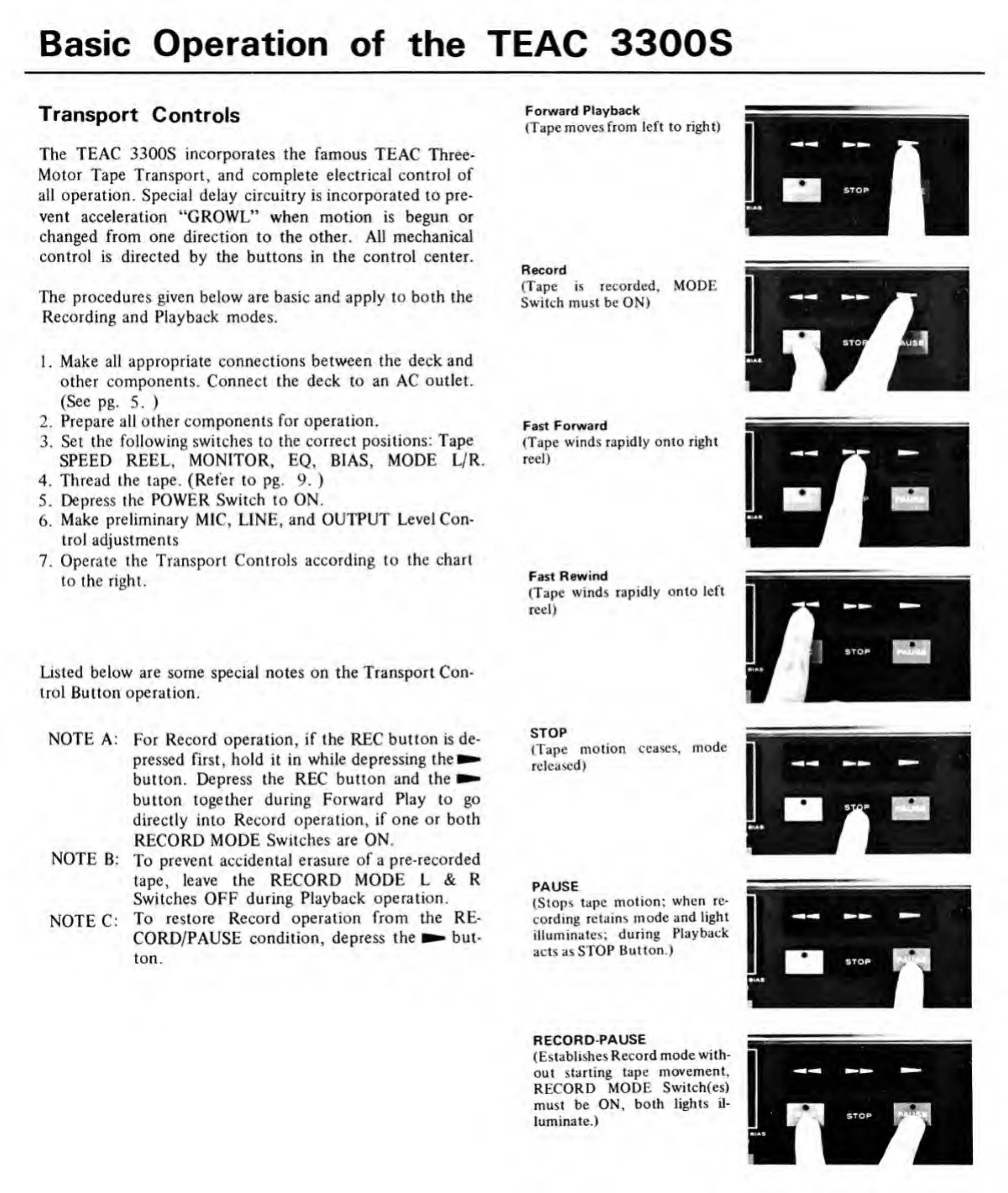
Loading...
Basic
Operation
of
the
TEAC
3300S
Transport
Controls
The
TEAC
3300S
incorporates
the
famous
TEAC
Three-
Motor
Tape
Transport,
and
complete
electrical
control
of
all
operation.
Special
delay
circuitry
is
incorporated
to
pre¬
vent
acceleration
“GROWL”
when
motion
is
begun
or
changed
from
one
direction
to
the
other.
All
mechanical
control
is
directed
by
the
buttons
in
the
control
center.
The
procedures
given
below
are
basic
and
apply
to
both
the
Recording
and
Playback
modes.
1.
Make
all
appropriate
connections
between
the
deck
and
other
components.
Connect
the
deck
to
an
AC
outlet.
(Sec
pg.
5.
)
2.
Prepare
all
other
components
for
operation.
3.
Set
the
following
switches
to
the
correct
positions:
Tape
SPEED
REEL,
MONITOR,
EQ,
BIAS,
MODE
L/R
4.
Thread
the
tape.
(Refer
to
pg.
9.
)
5.
Depress
the
POWER
Switch
to
ON.
6.
Make
preliminary
MIC,
LINE,
and
OUTPUT
Level
Con¬
trol
adjustments
7.
Operate
the
Transport
Controls
according
to
the
chart
to
the
right.
Listed
below
are
some
special
notes
on
the
Transport
Con¬
trol
Button
operation.
NOTE
A:
For
Record
operation,
if
the
REC
button
is
de¬
pressed
first,
hold
it
in
while
depressing
the^
button.
Depress
the
REC
button
and
the
button
together
during
Forward
Play
to
go
directly
into
Record
operation,
if
one
or
both
RECORD
MODE
Switches
are
ON.
NOTE
B:
To
prevent
accidental
erasure
of
a
pre-recorded
tape,
leave
the
RECORD
MODE
L
&
R
Switches
OFF
during
Playback
operation.
NOTE
C:
To
restore
Record
operation
from
the
RE¬
CORD/PAUSE
condition,
depress
the
but¬
ton.
Forward
Playback
(Tape
moves
from
left
to
right)
Record
(Tape
is
recorded.
MODE
Switch
must
be
ON)
Fast
Forward
(Tape
winds
rapidly
onto
right
reel)
Fast
Rewind
(Tape
winds
rapidly
onto
left
reel)
STOP
(Tape
motion
ceases,
mode
released)
PAUSE
(Stops
tape
motion;
when
re¬
cording
retains
mode
and
light
illuminates;
during
Playback
acts
as
STOP
Button.)
RECORD
PAUSE
(Establishes
Record
mode
with¬
out
starting
tape
movement,
RECORD
MODE
Switch(es)
must
be
ON,
both
lights
il¬
luminate.)

Related product manuals