EasyManua.ls Logo

Teac A-3300S - Special Recording Information and Procedures.19; Monophonic Recording

Teac A-3300S
30 pages
Print Icon
To Next Page IconTo Next Page
To Previous Page IconTo Previous Page
Loading...
Special
Recording
Information
and
Procedures
Monophonic
Recording
Monophonic
recording
is
performed
one
track
at
a
time,
using
only
the
Left
or
Right
channel
as
explained
below.
The
only
advantage
of
monophonic
recording
is
the
increas¬
ed
time
available
on
the
tape,
which
is
doubled.
If
the
source
is
monophonic
or
if
recording
only
one
person
speak¬
ing,
you
will
enjoy
this
monophonic
recording
capability
of
the
TEAC
3300S.
Follow
the
Basic
Recording
Procedures
(see
pg.
8
)
with
these
differences.
1.
Connect
the
source
to
the
Left
Channel
LINE
IN
jack
or
L
MIC.
2.
Place
the
RECORD
-
MODE
Switch
L
to
the
ON
and
R
to
the
OFF
position.
3.
R
otate
the
Right
channel
control
knobs
for
the
MIC,
LINE,
and
OUTPUT
Level
Controls
to
the
MIN
position
(fully
CCW).
4.
W
hen
you
begin
recording,
only
the
Left
channel
will
be
recorded
first
(Track
1).
At
the
conclusion
of
Side
1
on
the
tape,
interchange
the
reels.
Follow
the
same
pro¬
cedures
to
record
the
Left
channels,
this
time
on
Track
4.
NOTE:
When
adjusting
these
frictron-coupled
controls,
you
must
hold
one
of
the
knobs
stationary
while
rotating
the
other.
Tape
monitoring
(MONITOR
Switch
-
TAPE)
especially
requires
that
the
non-
recording
channel
be
kept
to
MIN
on
the
OUTPUT
control.
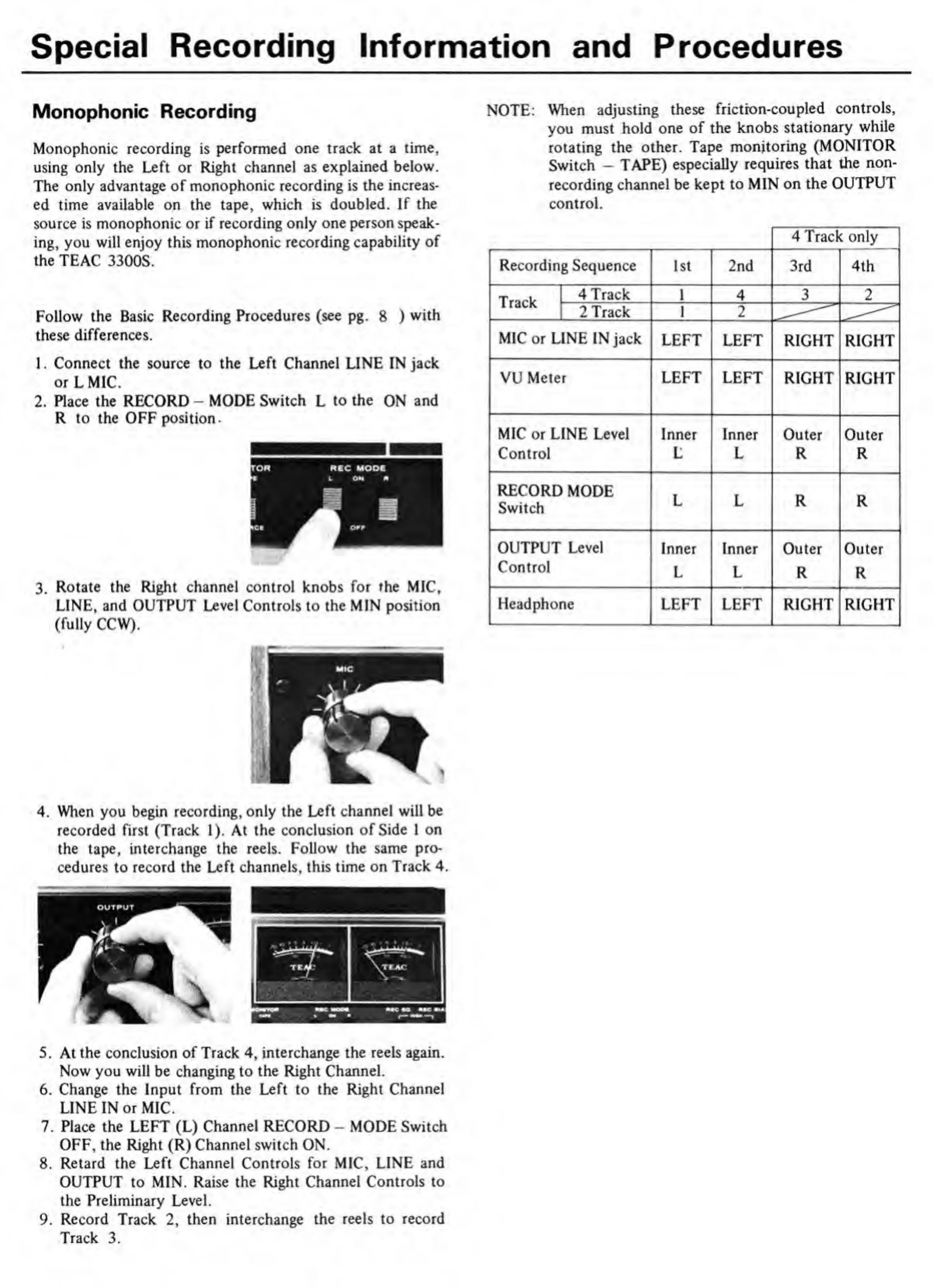
4
Track
only
Recording
Sequence
1st
2nd
3rd
4th
Track
4
Track
1
4
3
2
2
Track
1
2
MIC
or
LINE
IN
jack
LEFT
LEFT
RIGHT
RIGHT
VU
Meter
LEFT
LEFT
RIGHT
RIGHT
MIC
or
LINE
Level
Inner
Inner
Outer
Outer
Control
L
L
R
R
RECORD
MODE
Switch
L
L
R
R
OUTPUT
Level
Inner
Inner
Outer
Outer
Control
L
L
R
R
Headphone
LEFT
LEFT
RIGHT
RIGHT
5.
At
the
conclusion
of
Track
4,
interchange
the
reels
again.
Now
you
will
be
changing
to
the
Right
Channel.
6.
Change
the
Input
from
the
Left
to
the
Right
Channel
LINE
IN
or
MIC.
7.
Place
the
LEFT
(L)
Channel
RECORD
-
MODE
Switch
OFF,
the
Right
(R)
Channel
switch
ON.
8.
Retard
the
Left
Channel
Controls
for
MIC,
LINE
and
OUTPUT
to
MIN.
Raise
the
Right
Channel
Controls
to
the
Preliminary
Level.
9.
Record
Track
2,
then
interchange
the
reels
to
record
Track
3.

Related product manuals