EasyManua.ls Logo

Teac A-3300S - Explanation of Controls and Features; Threading the Tape; REEL Size Selector Switch

Teac A-3300S
30 pages
Print Icon
To Next Page IconTo Next Page
To Previous Page IconTo Previous Page
Loading...
Explanation
of
the
Controls
and
Features
Quik-Lok
Reel
Holders
a
.
Loosen
the
reel
shaft
tip
fully
CCW
(counter-clockwise).
b.
Align
the
outer
3
index
tabs
(Ref.
2)
and
the
inner
3
index
tabs
(Ref.
3).
This
is
done
by
turning
the
upper
tab
section
(Ref.
2)
slightly
CCW
to
place
the
tabs
in
a
straight
line
between
the
two
sections.
c.
Using
both
hands,
grasp
a
reel
and
place
its
center
hole
partially
over
the
reel
shaft
tip
(Ref.
1).
Then
gently
rotate
the
reel
CCW
while
sliding
the
reel
fully
onto
the
turntable.
When
the
outer
3
index
tabs
(Ref.
2)
are
fully
visible
above
the
reel,
you
may
proceed
to
step
(d).
d.
Carefully
rotate
the
outer
tab
section
(Ref.
2)
clockwise
until
it
stops
(approximately
60
degrees
or
1/6
of
a
re¬
volution).
Then
turn
the
reel
shaft
tip
clockwise
approxi¬
mately
3
revolutions
so
it
is
finger-tip
tight.
Check
that
the
outer
index
tabs
are
still
in
the
clockwise
position,
about
mid-way
between
the
corresponding
slots
on
the
reel.
e.
Repeat
the
steps
above
in
the
same
sequence
for
the
other
reel.
f.
Remove
the
reel
by
performing
Steps
(a)
and
(b),
then
lift
off
the
reel.
if
large-center
(NAB
10-1/2")
metal
reels
are
to
be
used,
insert
the
plastic
Reel
Adapters
into
the
center
of
the
metal
reels
before
placing
them
on
the
reel
tables.
Also
place
the
Reel
Height
Adapter
sheets
on
to
the
Reel
Tables.
These
inserts
and
sheets
are
included
with
the
Standard
Ac¬
cessories
packet
accompanying
your
deck.
Always
use
a
reel
of
the
same
type
and
size
on
the
right,
take-up
reel
table.
Both
reels
should
be
of
the
same
hub
diameter,
material
and
outside
diameter
to
assure
proper
braking
and
tension.
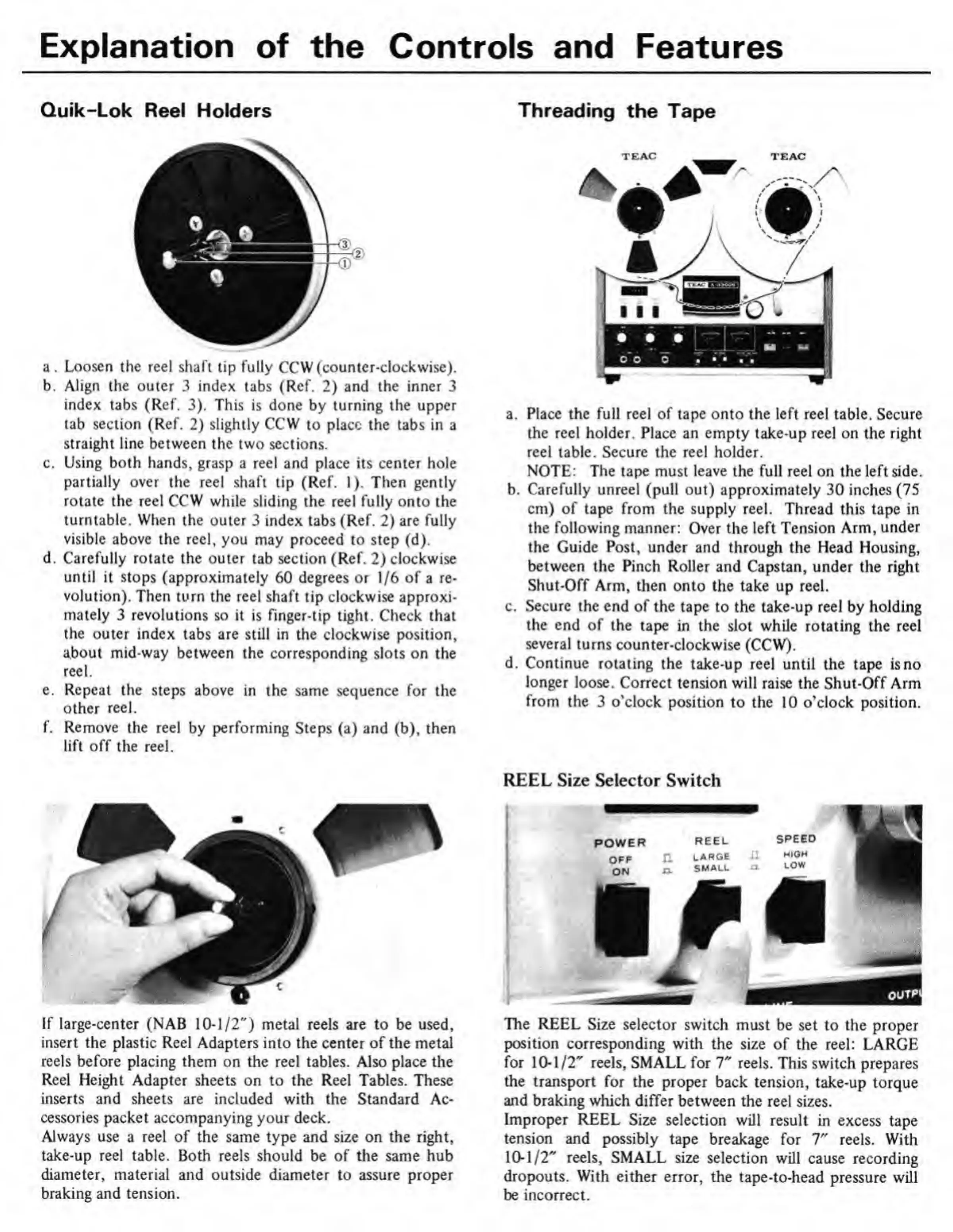
Threading
the
Tape
a.
Place
the
full
reel
of
tape
onto
the
left
reel
table.
Secure
the
reel
holder.
Place
an
empty
take-up
reel
on
the
right
reel
table.
Secure
the
reel
holder.
NOTE:
The
tape
must
leave
the
full
reel
on
the
left
side.
b.
Carefully
unreel
(pull
out)
approximately
30
inches
(75
cm)
of
tape
from
the
supply
reel.
Thread
this
tape
in
the
following
manner:
Over
the
left
Tension
Arm,
under
the
Guide
Post,
under
and
through
the
Head
Housing,
between
the
Pinch
Roller
and
Capstan,
under
the
right
Shut-Off
Arm,
then
onto
the
take
up
reel.
c.
Secure
the
end
of
the
tape
to
the
take-up
reel
by
holding
the
end
of
the
tape
in
the
slot
while
rotating
the
reel
several
turns
counter-clockwise
(CCW).
d.
Continue
rotating
the
take-up
reel
until
the
tape
is
no
longer
loose.
Correct
tension
will
raise
the
Shut-Off
Arm
from
the
3
o'clock
position
to
the
10
o'clock
position.
REEL
Size
Selector
Switch
The
REEL
Size
selector
switch
must
be
set
to
the
proper
position
corresponding
with
the
size
of
the
reel:
LARGE
for
10-1/2"
reels,
SMALL
for
7"
reels.
This
switch
prepares
the
transport
for
the
proper
back
tension,
take-up
torque
and
braking
which
differ
between
the
reel
sizes.
Improper
REEL
Size
selection
will
result
in
excess
tape
tension
and
possibly
tape
breakage
for
7"
reels.
With
10-1/2"
reels,
SMALL
size
selection
will
cause
recording
dropouts.
With
either
error,
the
tape-to-head
pressure
will
be
incorrect.

Related product manuals