EasyManua.ls Logo

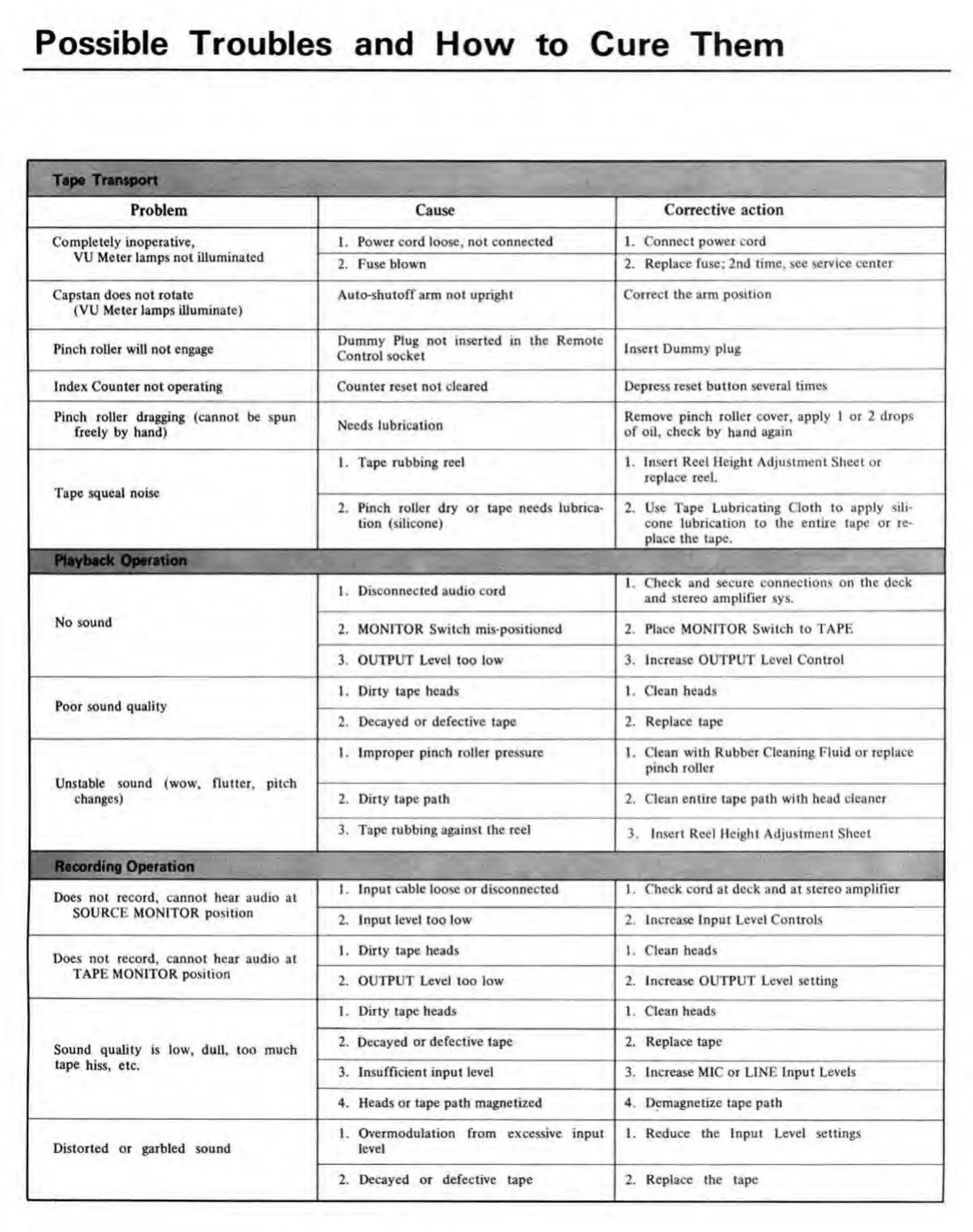
Teac A-3300S - Possible Troubles and How to Cure Them; Tape Transport Problems; Playback Operation Problems; Recording Operation Problems

Teac A-3300S
30 pages
Print Icon
To Next Page IconTo Next Page
To Previous Page IconTo Previous Page
Loading...
Possible
Troubles
and
How
to
Cure
Them
ft
Tape
Transport
Problem
Cause
Corrective
action
Completely
inoperative,
VU
Meter
lamps
not
illuminated
1.
Power
cord
loose,
not
connected
1.
Connect
power
cord
2.
Fuse
blown
2.
Replace
fuse;
2nd
time,
see
service
center
Capstan
does
not
rotate
(VU
Meter
lamps
illuminate)
Auto-shutoff
arm
not
upright
Correct
the
arm
position
Pinch
roller
will
not
engage
Dummy
Plug
not
inserted
in
the
Remote
Control
socket
Insert
Dummy
plug
Index
Counter
not
operating
Counter
reset
not
cleared
Depress
reset
button
several
times
Pinch
roller
dragging
(cannot
be
spun
freely
by
hand)
Needs
lubrication
Remove
pinch
roller
cover,
apply
1
or
2
drops
of
oil,
check
by
hand
again
Tape
squeal
noise
1.
Tape
rubbing
reel
1.
Insert
Reel
Height
Adjustment
Sheet
or
replace
reel.
2.
Pinch
roller
dry
or
tape
needs
lubrica¬
tion
(silicone)
2.
Use
Tape
Lubricating
Cloth
to
apply
sili¬
cone
lubrication
to
the
entire
tape
or
re¬
place
the
tape.
1
Playback
Operation
No
sound
1
1.
Disconnected
audio
cord
1.
Check
and
secure
connections
on
the
deck
and
stereo
amplifier
sys.
2.
MONITOR
Switch
mis-positioned
2.
Place
MONITOR
Switch
to
TAPE
3.
OUTPUT
Level
too
low
3.
Increase
OUTPUT
Level
Control
Poor
sound
quality
1.
Dirty
tape
heads
1.
Clean
heads
2.
Decayed
or
defective
tape
2.
Replace
tape
Unstable
sound
(wow,
flutter,
pitch
changes)
1.
Improper
pinch
roller
pressure
1.
Clean
with
Rubber
Cleaning
Fluid
or
replace
pinch
roller
2.
Dirty
tape
path
2.
Clean
entire
tape
path
with
head
cleaner
3.
Tape
rubbing
against
the
reel
3.
Insert
Reel
Height
Adjustment
Sheet
1
Recording
Operation
Docs
not
record,
cannot
hear
audio
at
SOURCE
MONITOR
position
1.
Input
cable
loose
or
disconnected
1.
Check
cord
at
deck
and
at
stereo
amplifier
2.
Input
level
too
low
2.
Increase
Input
Level
Controls
Docs
not
record,
cannot
hear
audio
at
TAPE
MONITOR
position
1.
Dirty
tape
heads
1.
Clean
heads
2.
OUTPUT
Level
too
low
2.
Increase
OUTPUT
Level
setting
Sound
quality
is
low,
dull,
too
much
tape
hiss,
etc.
1.
Dirty
tape
heads
1.
Clean
heads
2.
Decayed
or
defective
tape
2.
Replace
tape
3.
Insufficient
input
level
3.
Increase
MIC
or
LINE
Input
Levels
4.
Heads
or
tape
path
magnetized
4.
Demagnetize
tape
path
Distorted
or
garbled
sound
1.
Overmodulation
from
excessive
input
level
1.
Reduce
the
Input
Level
settings
2.
Decayed
or
defective
tape
2.
Replace
the
tape

Related product manuals