EasyManua.ls Logo

Teac A-3300S - Erasing Recorded Tape; Tape Erasing Methods

Teac A-3300S
30 pages
Print Icon
To Next Page IconTo Next Page
To Previous Page IconTo Previous Page
Loading...
Changing
the
Power
Line
Setting
Erasing
Recorded
Tape
One
of
the
advantages
of
magnetic
tape
over
phonograph
records
is
that
it
can
be
recorded
over
and
over
again.
This
raises
the
question
of
how
is
the
previous
recording
remov¬
ed.
Here
are
three
different
ways
to
erase
earlier
recorded
material.
Simultaneous
erasing
and
recording
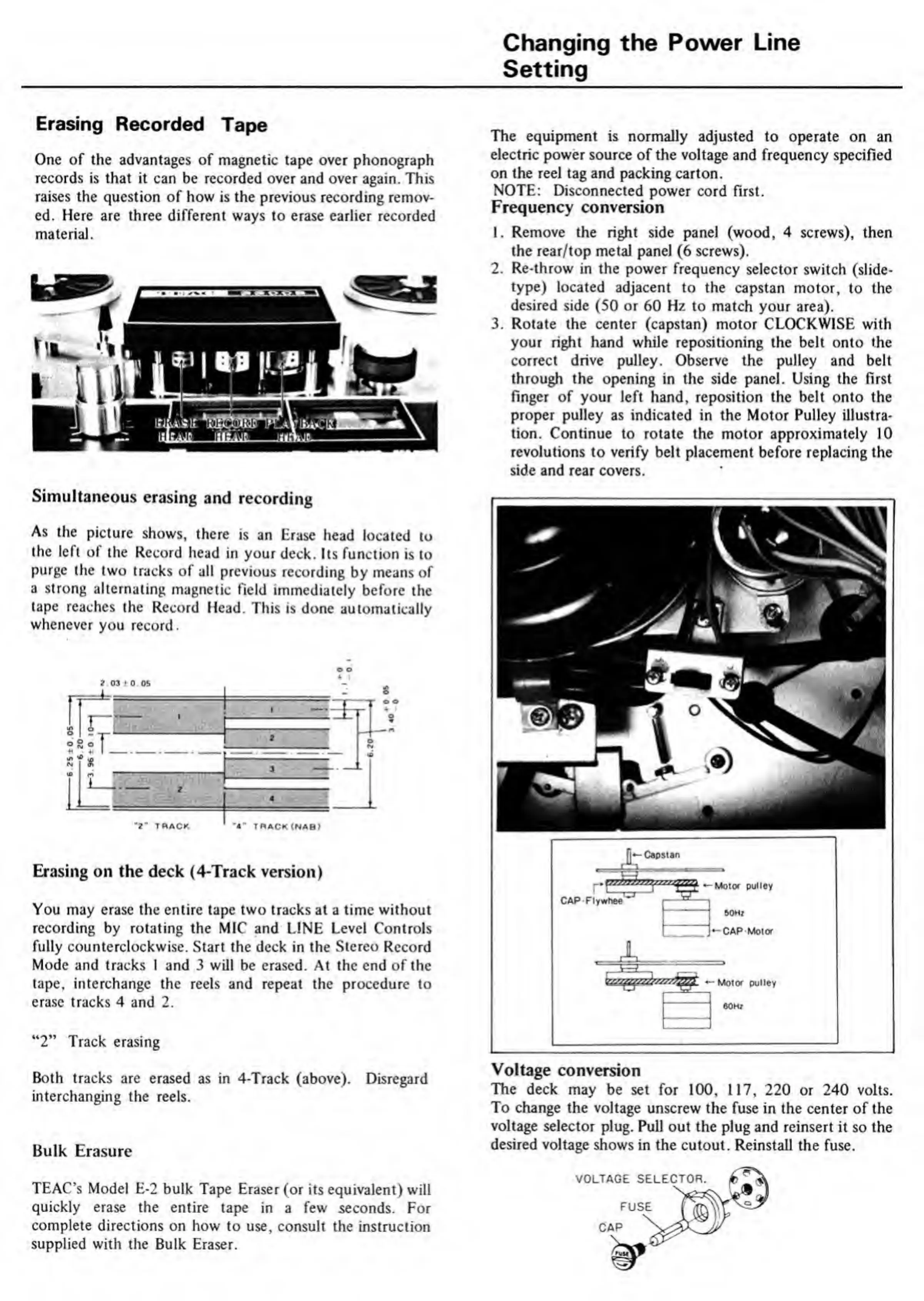
As
the
picture
shows,
there
is
an
Erase
head
located
to
the
left
of
the
Record
head
in
your
deck.
Its
function
is
to
purge
the
two
tracks
of
all
previous
recording
by
means
of
a
strong
alternating
magnetic
field
immediately
before
the
tape
reaches
the
Record
Head.
This
is
done
automatically
whenever
you
record.
Erasing
on
the
deck
(4-Track
version)
You
may
erase
the
entire
tape
two
tracks
at
a
time
without
recording
by
rotating
the
MIC
and
LINE
Level
Controls
fully
counterclockwise.
Start
the
deck
in
the
Stereo
Record
Mode
and
tracks
1
and
3
will
be
erased.
At
the
end
of
the
tape,
interchange
the
reels
and
repeat
the
procedure
to
erase
tracks
4
and
2.
“2”
Track
erasing
Both
tracks
are
erased
as
in
4-Track
(above).
Disregard
interchanging
the
reels.
Bulk
Erasure
TEAC’s
Model
E-2
bulk
Tape
Eraser
(or
its
equivalent)
will
quickly
erase
the
entire
tape
in
a
few
seconds.
For
complete
directions
on
how
to
use,
consult
the
instruction
supplied
with
the
Bulk
Eraser.
The
equipment
is
normally
adjusted
to
operate
on
an
electric
power
source
of
the
voltage
and
frequency
specified
on
the
reel
tag
and
packing
carton.
NOTE:
Disconnected
power
cord
first.
Frequency
conversion
1.
Remove
the
right
side
panel
(wood,
4
screws),
then
the
rear/top
metal
panel
(6
screws).
2.
Re-throw
in
the
power
frequency
selector
switch
(slide-
type)
located
adjacent
to
the
capstan
motor,
to
the
desired
side
(50
or
60
Hz
to
match
your
area).
3.
Rotate
the
center
(capstan)
motor
CLOCKWISE
with
your
right
hand
while
repositioning
the
belt
onto
the
correct
drive
pulley.
Observe
the
pulley
and
belt
through
the
opening
in
the
side
panel.
Using
the
first
finger
of
your
left
hand,
reposition
the
belt
onto
the
proper
pulley
as
indicated
in
the
Motor
Pulley
illustra¬
tion.
Continue
to
rotate
the
motor
approximately
10
revolutions
to
verify
belt
placement
before
replacing
the
side
and
rear
covers.
Motor
pulley
CAP
Flywhee
CAP
Motor
Motor
pulley
Voltage
conversion
The
deck
may
be
set
for
100,
117,
220
or
240
volts.
To
change
the
voltage
unscrew
the
fuse
in
the
center
of
the
voltage
selector
plug.
Pull
out
the
plug
and
reinsert
it
so
the
desired
voltage
shows
in
the
cutout.
Reinstall
the
fuse.

Related product manuals