EasyManua.ls Logo

Teac AG-V3050 - REMOTE CONTROL UNIT DETAILS; Remote Control Buttons and Functions

Teac AG-V3050
55 pages
Print Icon
To Next Page IconTo Next Page
To Previous Page IconTo Previous Page
Loading...
Saiiinseinnmemaammemimeeemeiammmmmmereetemeeneeeeee
ee
@
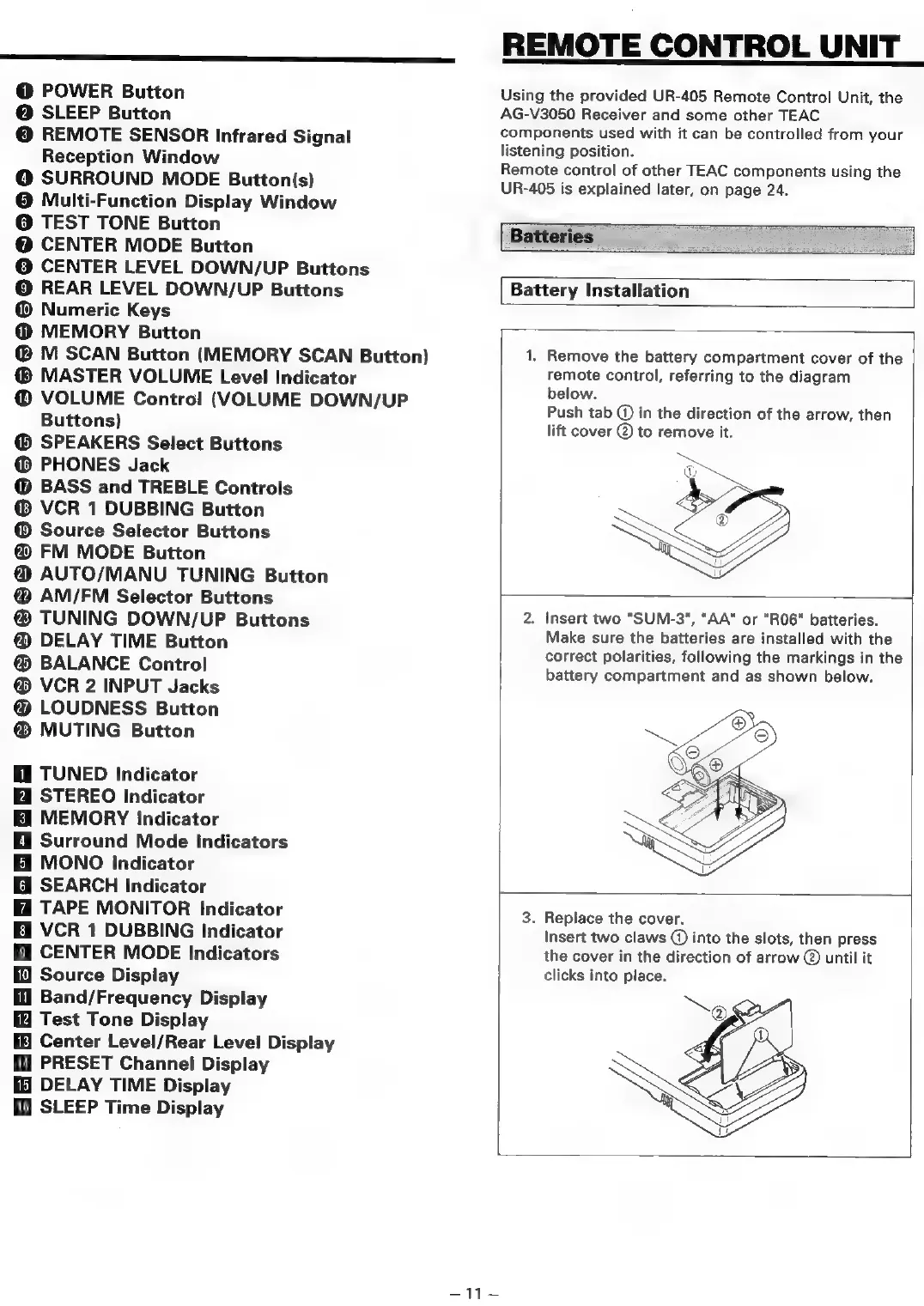
POWER
Button
@
SLEEP
Button
©
REMOTE SENSOR
Infrared
Signal
Reception
Window
@
SURROUND
MODE
Button(s)
@
Multi-Function
Display
Window
@
TEST
TONE
Button
@
CENTER
MODE
Button
©
CENTER
LEVEL
DOWN/UP
Buttons
©
REAR
LEVEL
DOWN/UP
Buttons
@
Numeric
Keys
@
MEMORY
Button
@
M
SCAN
Button
(MEMORY
SCAN
Button)
MASTER
VOLUME
Level
Indicator
@
VOLUME
Control
(VOLUME
DOWN/UP
Buttons)
SPEAKERS
Select
Buttons
PHONES
Jack
@
BASS
and
TREBLE
Controls
VCR
1
DUBBING
Button
Source
Selector
Buttons
@
FM
MODE
Button
@
AUTO/MANU
TUNING
Button
@
AM/FM
Selector
Buttons
TUNING
DOWN/UP
Buttons
@
DELAY
TIME
Button
®
BALANCE
Control
®
VCR
2
INPUT
Jacks
@
LOUDNESS
Button
MUTING
Button
TUNED
Indicator
STEREO
Indicator
MEMORY
Indicator
@
Surround
Mode
Indicators
BH
MONO
Indicator
@
SEARCH
Indicator
TAPE
MONITOR
Indicator
i
VCR
1
DUBBING
Indicator
Hi
CENTER
MODE
Indicators
Source
Display
fl
Band/Frequency
Display
Test
Tone
Display
Center
Level/Rear
Level
Display
i
PRESET
Channel
Display
DELAY
TIME
Display
fi
SLEEP
Time
Display
REMOTE
CONTROL
UNIT
Using
the
provided
UR-405
Remote
Control
Unit,
the
AG-V3050
Receiver
and
some
other
TEAC
components
used
with
it
can
be
controlled
from
your
istening
position.
Remote
control
of
other
TEAC
components
using
the
UR-405
is
explained
later,
on
page
24.
Batteries
Battery
Installation
1.
Remove
the
battery
compartment
cover
of
the
remote
control,
referring
to
the
diagram
below.
Push
tab
©
in
the
direction
of
the
arrow,
then
lift
cover
@
to
remove
it.
2.
Insert
two
"SUM-3",
"AA"
or
"R06"
batteries.
Make
sure
the
batteries
are
installed
with
the
correct
polarities,
following
the
markings
in
the
battery
compartment
and
as
shown
below.
3.
Replace
the
cover.
Insert
two
claws
@
into
the
slots,
then
press
the
cover
in
the
direction
of
arrow
©
until
it
clicks
into
place.
=
44

Table of Contents

Related product manuals