EasyManua.ls Logo

Teac AG-V3050 - AUDIO OPERATIONS; Basic Operation and Setup

Teac AG-V3050
55 pages
Print Icon
To Next Page IconTo Next Page
To Previous Page IconTo Previous Page
Loading...
AUDIO
OPERATIONS
Note:
The
following
points
apply
throughout
the
“AUDIO
and
VIDEO
OPERATIONS"
sections
unless
otherwise
noted.
@
To
simplify
explanations,
instructions
refer
to
names
of
buttons
and
controls
on
the
front
panel,
making
no
mention
of
the
use
of
remote
control
unit.
©
Be
sure
the
TAPE
2
MONITOR
button
is
set
to
OFF
(the
TAPE
MONITOR
indicator
will
not
appear
in
the
display).
Hereafter,
this
instruction
will
not
be
repeated.
SLEEP
Timer
Function
This
function
allows
you
to
preprogram
the
AG-
V3050
to
switch
its
own
power
off
automatically.
You
can
then
enjoy
the
audio/video
system
for
a
specified
amount
of
time
without
having
to
worry
about
turning
the
unit
off
later.
To
engage
SLEEP
Timer,
press
the
SLEEP
button
(@)
until
the
approximate
desired
remaining
power-on
time
is
displayed.
The
time,
displayed
by
MIN(ute),
changes,
as
shown
below,
each
time
the
button
is
pressed.
No
display
—>10—»20—»
30—»
60—+-
90
The
SLEEP
Time
Display
counts
down
in
1-MIN
decrements
until
the
preset
amount
of
time
is
expired,
at
which
time
the
power
is
automatically
switched
off.
Hae
Satine
|
.
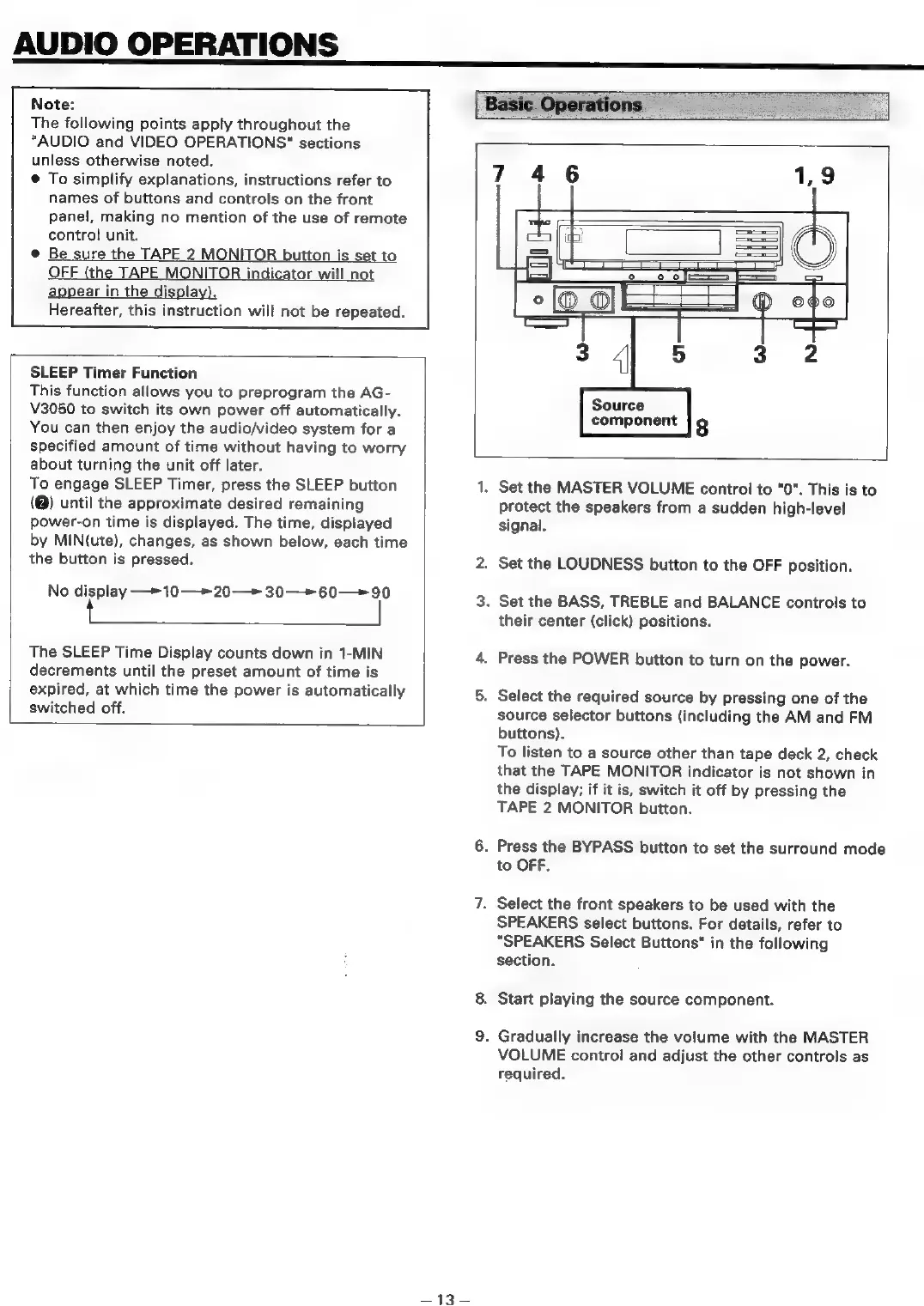
Set
the
MASTER
VOLUME
control
to
"0".
This
is
to
protect
the
speakers
from
a
sudden
high-level
signal.
.
Set
the
LOUDNESS
button
to
the
OFF
position.
.
Set
the
BASS,
TREBLE
and
BALANCE
controls
to
their
center
(click)
positions.
.
Press
the
POWER
button
to
turn
on
the
power.
.
Select
the
required
source
by
pressing
one
of
the
source
selector
buttons
(including
the
AM
and
FM
buttons).
To
listen
to
a
source
other
than
tape
deck
2,
check
that
the
TAPE
MONITOR
indicator
is
not
shown
in
the
display;
if
it
is,
switch
it
off
by
pressing
the
TAPE
2
MONITOR
button.
.
Press
the
BYPASS
button
to
set
the
surround
mode
to
OFF.
.
Select
the
front
speakers
to
be
used
with
the
SPEAKERS
select
buttons.
For
details,
refer
to
“SPEAKERS
Select
Buttons"
in
the
following
section.
.
Start
playing
the
source
component.
.
Gradually
increase
the
volume
with
the
MASTER
VOLUME
control
and
adjust
the
other
controls
as
required.

Table of Contents

Related product manuals