EasyManua.ls Logo

Teac AG-V3050 - SURROUND SOUND ADJUSTMENTS; Delay Time and Volume Balancing

Teac AG-V3050
55 pages
Print Icon
To Next Page IconTo Next Page
To Previous Page IconTo Previous Page
Loading...
[Delay
Time
_
=]
In
the
surround
modes,
the
sound
from
the
rear
speakers
should
be
delayed
slightly,
relative
to
that
from
the
front
speakers.
The
optimum
delay
time
will
be
different
in
rooms
of
different
sizes
and
will
depend
on
acoustic
properties,
whether
the
walls
and
furnishings
reflect
or
absorb
sound,
etc.
It
is
recommended
that
you
try
different
delay
times
to
obtain
the
best
effect.
The
delay
is
digitally
synthesized,
for
the
highest
sound
quality
with
minimum
noise
and
distortion.
The
delay
time
can
be
set
independently
for
each
surround
mode
using
the
DELAY
TIME
button
(@),
with
the
current
setting
shown
in
the
display.
Delay
Time
Setting
Adjustable
Range
Surround
Mode
(with
5ms
steps)
DOLBY
PRO
15
—30ms
HALL
5
-
30ms
Playing
Surround
Sound
.
DOLBY
PRO
LOGIC
Surround
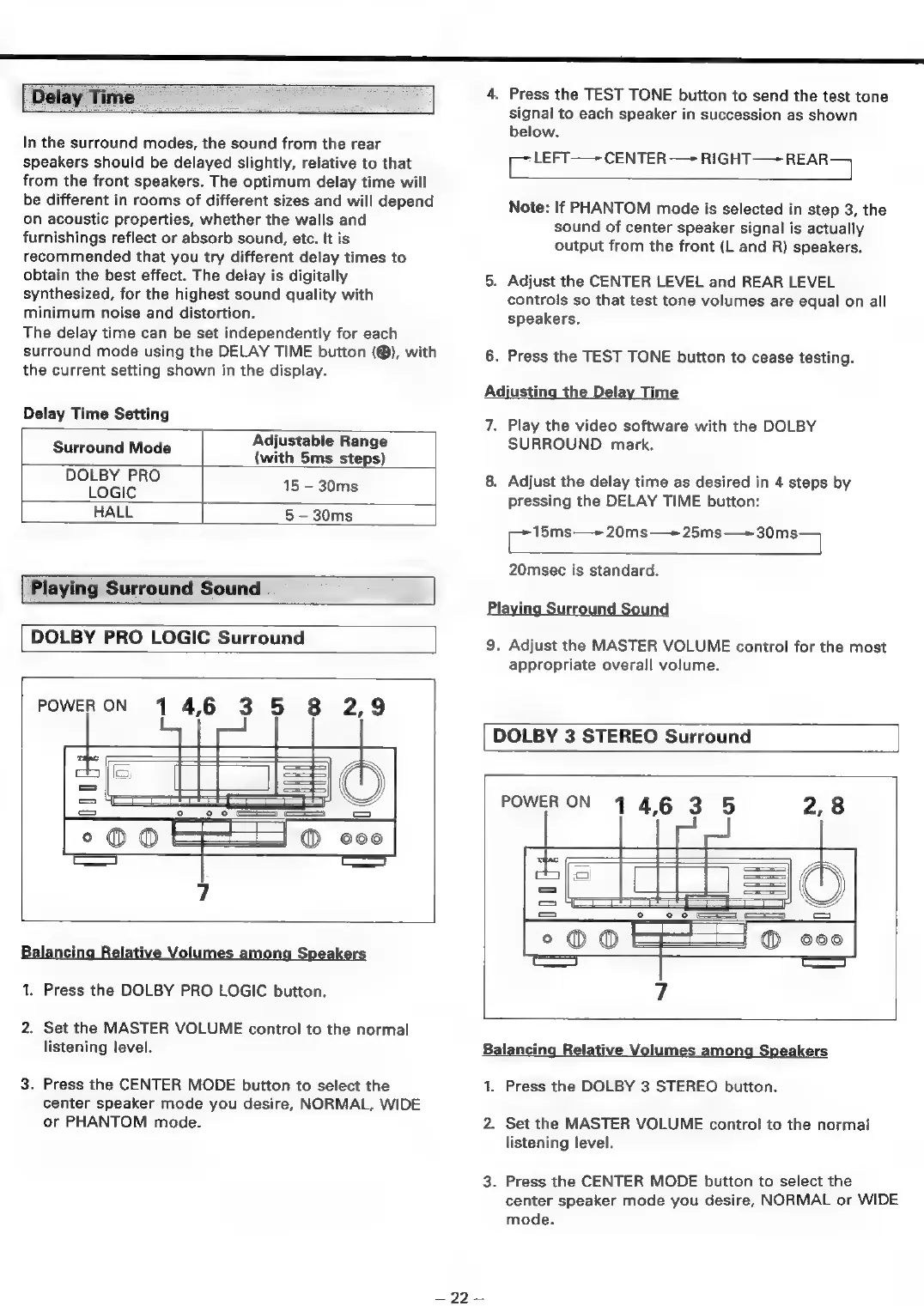
POWERON
14,6
3
5
8
2,9
=
la
\\
WA
°o
ooo
eS
=
©
©
@M
ooo
©
110
7
Balancing
Relative
Volumes
among
Speakers
1.
Press
the
DOLBY
PRO
LOGIC
button.
2.
Set
the
MASTER
VOLUME
control
to
the
normal
listening
level.
3.
Press
the
CENTER
MODE
button
to
select
the
center
speaker
mode
you
desire,
NORMAL,
WIDE
or
PHANTOM
mode.
4.
Press
the
TEST
TONE
button
to
send
the
test
tone
signal
to
each
speaker
in
succession
as
shown
below.
prberl:
CENTER
—+
RIGHT—+
REAR
Note:
If
PHANTOM
mode
is
selected
in
step
3,
the
sound
of
center
speaker
signal
is
actually
output
from
the
front
(L
and
R)
speakers.
5.
Adjust
the
CENTER
LEVEL
and
REAR
LEVEL
controls
so
that
test
tone
volumes
are
equal
on
all
speakers.
6.
Press
the
TEST
TONE
button
to
cease
testing.
Adjusting
the
Delay
Time
7.
Play
the
video
software
with
the
DOLBY
SURROUND
mark.
8.
Adjust
the
delay
time
as
desired
in
4
steps
by
pressing
the
DELAY
TIME
button:
15ms—+
20ms—+
25ms—+30ms
Cc
=
20msec
is
standard.
Playing
Surround
Sound
9.
Adjust
the
MASTER
VOLUME
control
for
the
most
appropriate
overall
volume.
DOLBY
3
STEREO
Surround
POWER
ON
4
4,6
35
2,8
°o@@®
=F
©00
a)
7
Balancing
Relative
Volumes
among
Speakers
1.
Press
the
DOLBY
3
STEREO
button.
2.
Set
the
MASTER
VOLUME
control
to
the
normal
listening
level.
3.
Press
the
CENTER
MODE
button
to
select
the
center
speaker
mode
you
desire,
NORMAL
or
WIDE
mode.
=
27

Table of Contents

Related product manuals