EasyManua.ls Logo

Teac AG-V3050 - Second Audio Source for Video Editing) SYSTEM Function; A;V Background Recording Function

Teac AG-V3050
55 pages
Print Icon
To Next Page IconTo Next Page
To Previous Page IconTo Previous Page
Loading...
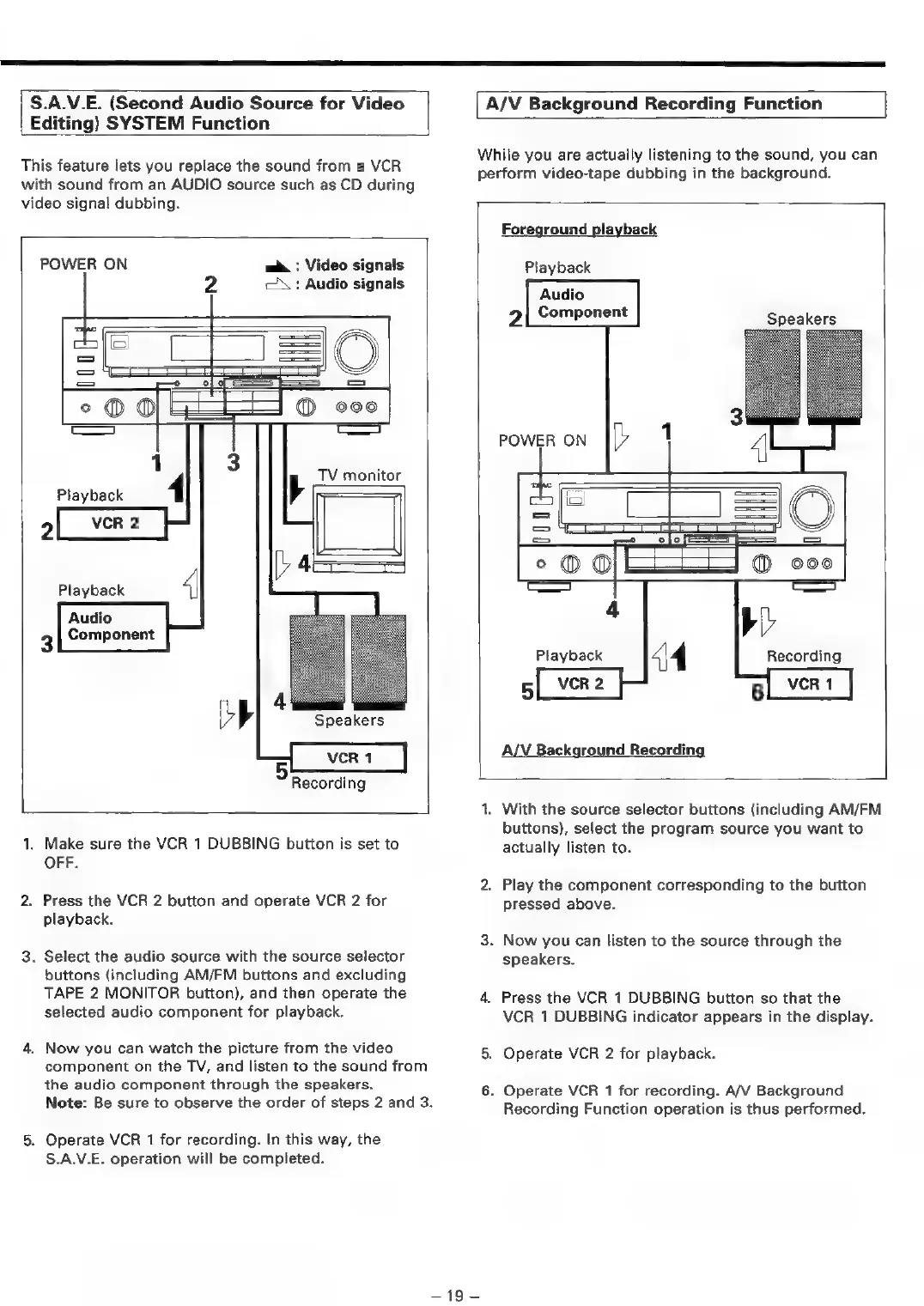
S.A.V.E.
(Second
Audio
Source
for
Video
Editing)
SYSTEM
Function
This
feature
lets
you
replace
the
sound
from
a
VCR
with
sound
from
an
AUDIO
source
such
as
CD
during
video
signal
dubbing.
POWER
ON
me
:
Video
signals
2
CX:
Audio
signals
=)
=|
=
==
=
=
=
°o@@®
coo
———s
1
3
TV
monitor
Playback
4
a
R
2
2
vel
[D4
Playback
4
Audio
Component
3
P'
Ma
+
Speakers
VCR
1
Recording
1.
Make
sure
the
VCR
1
DUBBING
button
is
set
to
OFF.
2.
Press
the
VCR
2
button
and
operate
VCR
2
for
playback.
3.
Select
the
audio
source
with
the
source
selector
buttons
(including
AM/FM
buttons
and
excluding
TAPE
2
MONITOR
button),
and
then
operate
the
selected
audio
component
for
playback.
4,
Now
you
can
watch
the
picture
from
the
video
component
on
the
TV,
and
listen
to
the
sound
from
the
audio
component
through
the
speakers.
Note:
Be
sure
to
observe
the
order
of
steps
2
and
3.
5.
Operate
VCR
1
for
recording.
In
this
way,
the
S.A.V.E.
operation
will
be
completed.
A/V
Background
Recording
Function
While
you
are
actually
listening
to
the
sound,
you
can
perform
video-tape
dubbing
in
the
background.
Foreground
playback
Playback
Audio
2
Component
Speakers
POWER
ON
[>
1
1
=le
=O
°o@@®
:
®
000
a
4
bi’
Playback
44
Recording
5
VCR
2
6
VCR
1
A/V
Background
Recording
1.
With
the
source
selector
buttons
(including
AM/FM
buttons),
select
the
program
source
you
want
to
actually
listen
to.
2.
Play
the
component
corresponding
to
the
button
pressed
above.
3.
Now
you
can
listen
to
the
source
through
the
speakers.
4.
Press
the
VCR
1
DUBBING
button
so
that
the
VCR
1
DUBBING
indicator
appears
in
the
display.
5,
Operate
VCR
2
for
playback.
fo)
.
Operate
VCR
1
for
recording.
A/V
Background
Recording
Function
operation
is
thus
performed.

Table of Contents

Related product manuals