EasyManua.ls Logo

Teac AG-V3050 - CONNECTIONS; System Wiring and Speaker Terminals

Teac AG-V3050
55 pages
Print Icon
To Next Page IconTo Next Page
To Previous Page IconTo Previous Page
Loading...
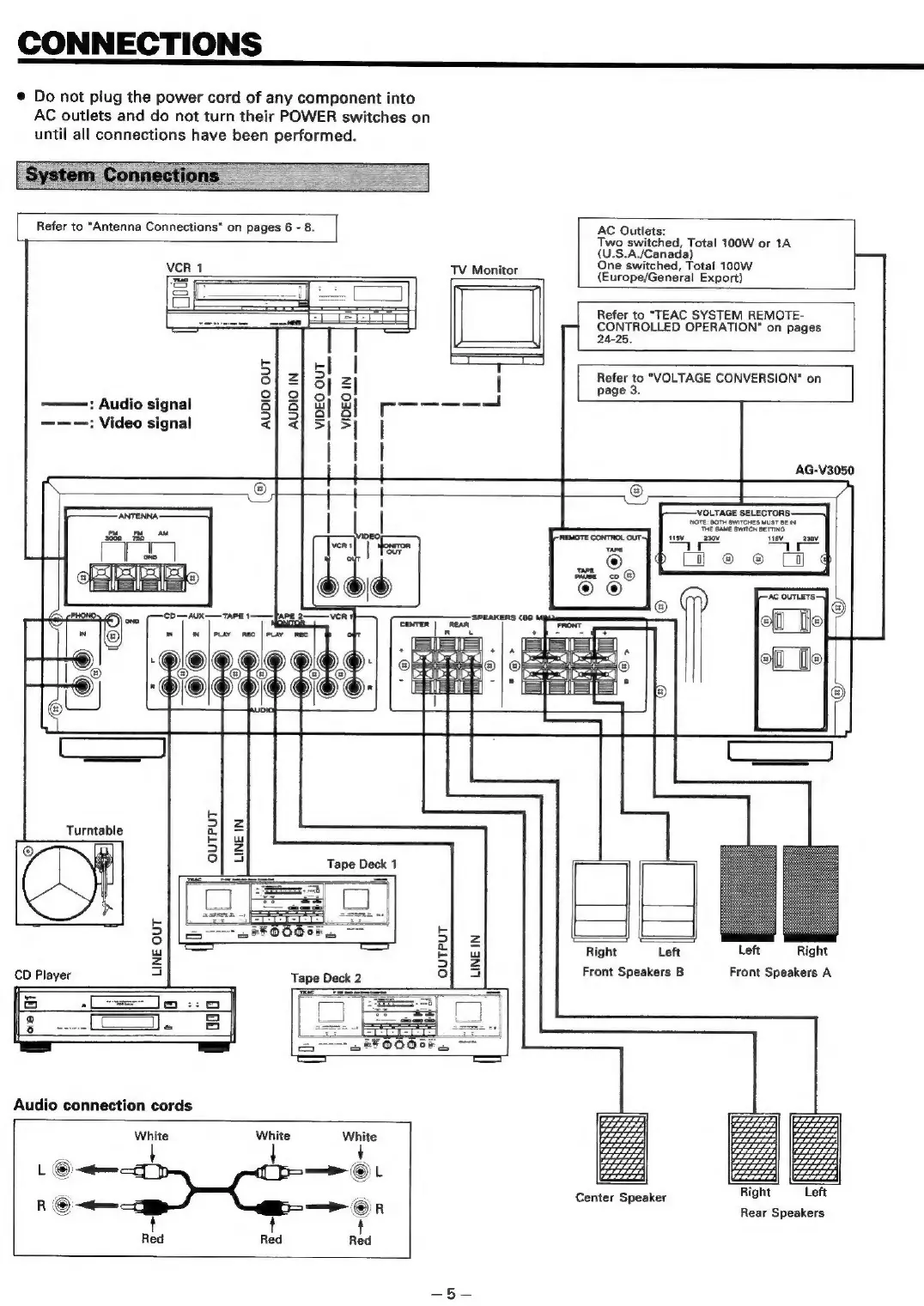
CONNECTIONS
@
Do
not
plug
the
power
cord
of
any
component
into
AC
outlets
and
do
not
turn
their
POWER
switches
on
until
all
connections
have been
performed.
Refer
to
“Antenna
Connections"
on
pages
6
-
8.
|
AC
Outlets:
Two
switched,
Total
100W
or
1A
(U.S.A./Canada)
One
switched,
Total
100W
NCR
uJ
JV:
Monttor
(Europe/General
Export)
S
=
=
i
=
Refer
to
"TEAC
SYSTEM
REMOTE-
u
po
ee
CONTROLLED
OPERATION"
on
pages
]
|
24-25.
5]
J}
sll
T
E
:
ol12Z
3]
2]
|
Refer
to
"VOLTAGE
CONVERSION"
on
fick
2]
2
obo
4
pases:
———
Audio
signal
a}8
a
SSS
——-—:
Video
signal
<|<
>|
>|
|
AG-V3050
©
t
t
t
.
‘VOLTAGE
SELECTORS:
ATEN
|
|
MOTE
SAME
OwiTon
SeTTNa
Pe
es
REMOTE
CONTROL
OUT]
ff
issv_
_azov 15v__
aa0v
ver
is
|
J
|
te
©
®
ff
|
z
rs
o
©
pause
co
@)
|
©
sam
®
a
ro|®
oi
‘CO—=AUX——
TAPE
TAPE
2-
VER
‘SPEAKERS
(60
|
|
fi
iN
@|
_
iN
|
PLAY
REC
|
PLAY
REC
A
nd
bal
a
Ea
+]a
a
7
®
©
@|@
je
e(_T]
|
=e
@L®
@FO)
pal
tee
9
i"
g
|
hand
@
5}
2
Turntable
El
w
9
al
5
Tape
Deck
1
5
kK
3
>|
z
:
w
El
ow
Right
Left
Left
Right
<
=)
er
CD
Player
|
Tape
Deck
2
ol
a
Front
Speakers
B
Front
Speakers
A
i=
eo
_——
-
8
Audio
connection
cords
White White
White
eis
!
—©L
Sik
——
Se
Or
RS
ada
Red
Center
Speaker
Rear
Speakers

Table of Contents

Related product manuals