27
ENGLISH
Basic operation
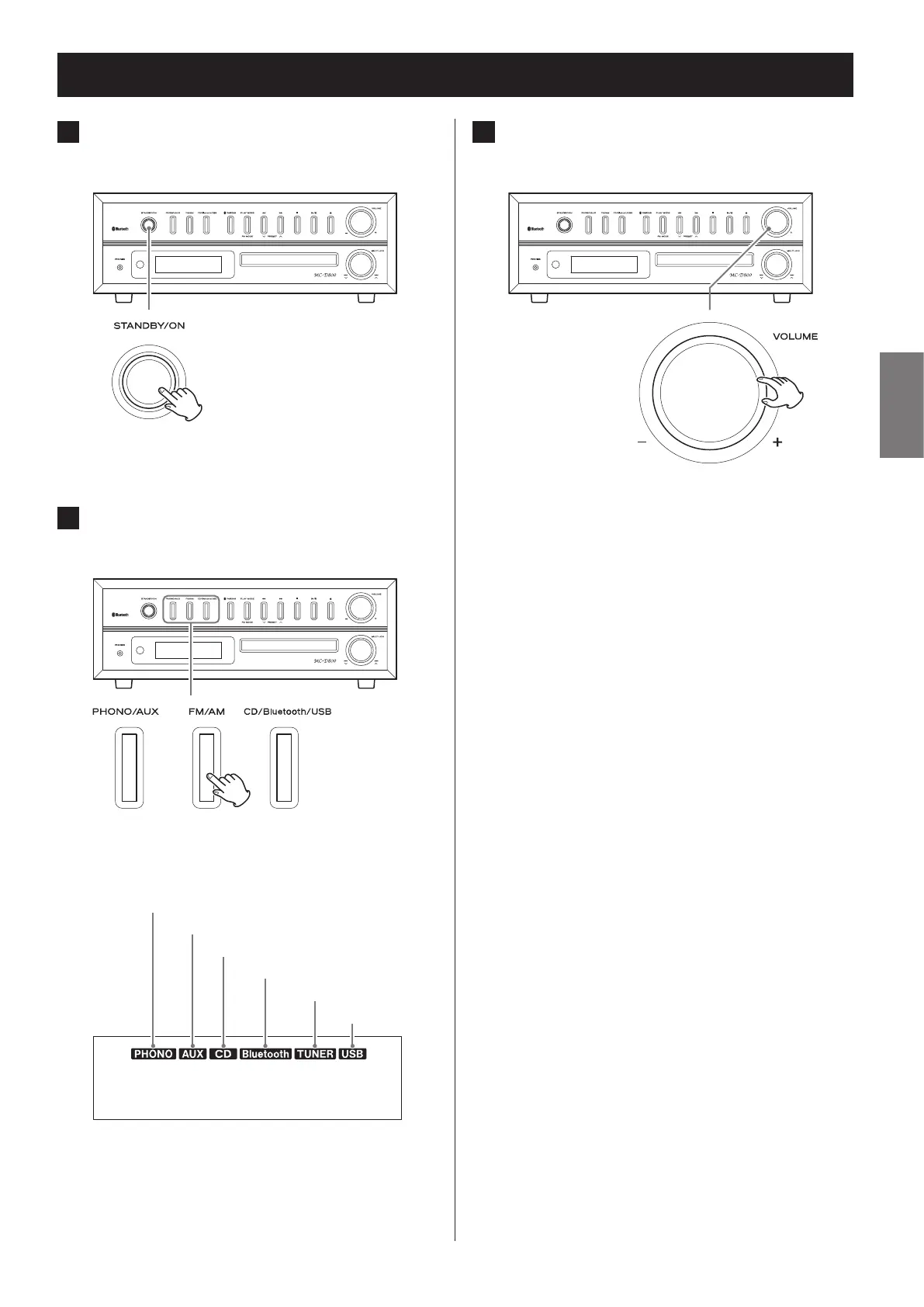
1 Press the STANDBY/ON button to turn
the unit on.
Z
o Even when in standby (unit off ), pressing a func-
tion button will turn the unit on.
2 Press a function button to set the play-
back source.
Z
When a playback source is selected, the corre-
sponding indicator appears on the display.
Record
External input
Radio
CD
Bluetooth
USB
3 Turn the VOLUME knob to adjust the
volume.
Z
MIN (0): minimum volume
MAX (40): maximum volume
Turn the VOLUME knob right to raise the volume
and left to lower it.
o The default value is 20.
o When you turn the VOLUME knob, the volume
will be shown for about three seconds.
o When the volume is at minimum level, “MIN”
appears on the display. At maximum, “MAX”
appears.
V
Sudden loud noises could damage your hear-
ing or cause other harm. Set the volume to
minimum. After sound output begins, adjust
the volume to a suitable level.
o When not using this unit, press the STANDBY/ON
button to put the unit into standby.


 To Next Page