17
ENGLISH
Replacing the stylus
o Record styluses are precision parts, so handle them
carefully to avoid bending or damaging their tips. If
a stylus becomes bent or damaged, it might not be
able to follow the audio groove precisely and could
damage records or cause other malfunction.
o If a stylus becomes dirty, use a commercially avail-
able stylus cleaner or similar product to clean it.
o Do not rub the stylus tip forcefully with anything
hard. Do not wipe the stylus with thinner or other
chemicals. Doing so could harm it.
Replacing the stylus
Using a record stylus wears it down, which could cause
the sound quality to worsen and possibly damage
records. Replace the stylus with a replacement stylus
specified by TEAC as soon as possible.
In general, you should replace a sapphire stylus for LP
and EP records after about 50 hours of use and a dia-
mond stylus for SP records after about every 100 hours.
CAUTION
o Since loud noises could suddenly occur, put the unit
into standby before changing the stylus.
o Be careful not to hurt your hand or the equipment.
o Be careful not to allow small children to accidentally
swallow styluses.
Replacement styluses (sold separately)
STL-103: Sapphire stylus for LP and EP records
(3 per set)
SPL-102: Diamond stylus for SP records
(2 per set)
For replacement styluses, contact your dealer.
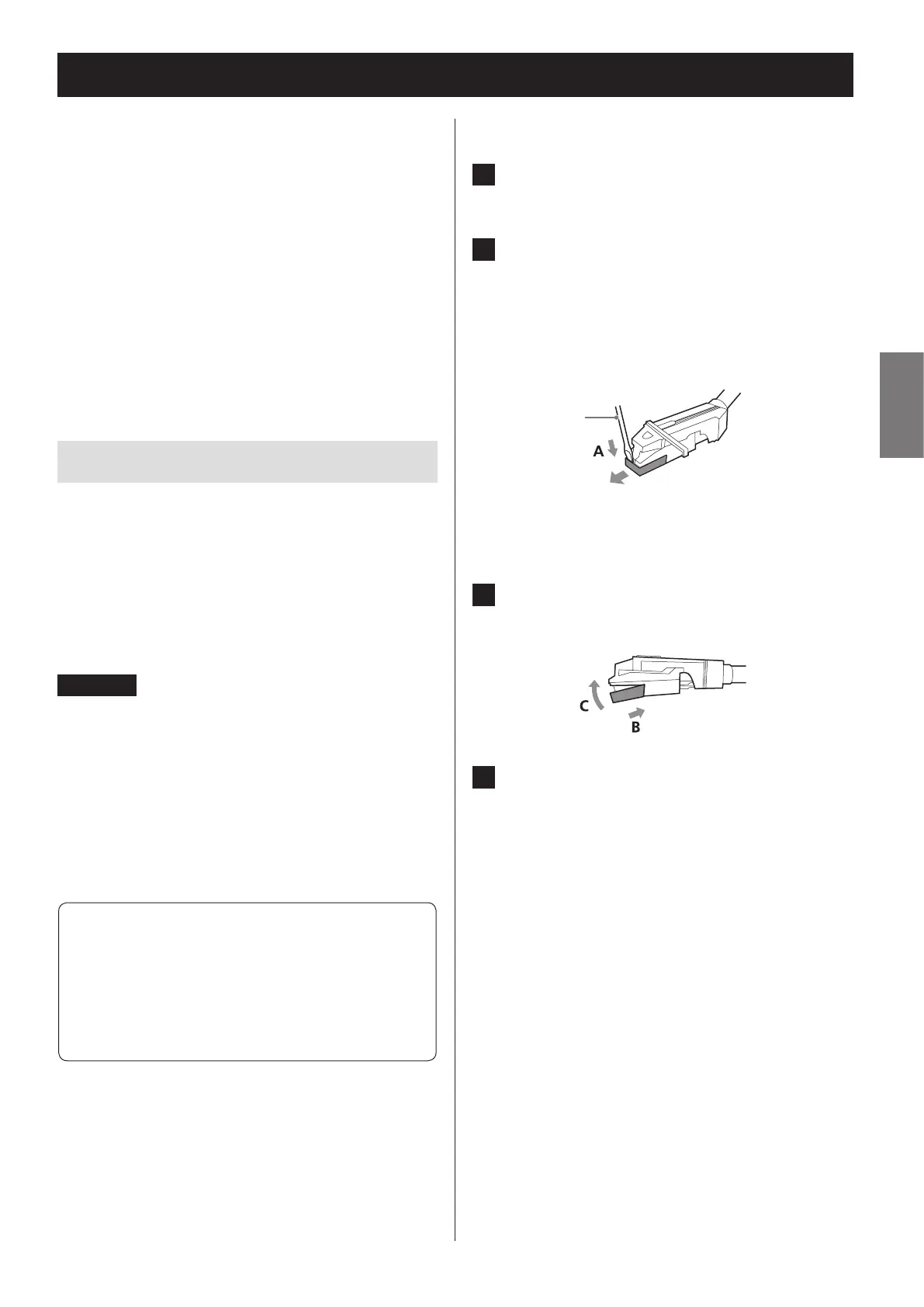
Removing the stylus (red part)
1 Press the STANDBY/ON button to put
the unit into standby.
2 Hold the cartridge with one hand, and
use a small screwdriver or other tool to
push the level difference at the front
of the stylus down in the “A” direction.
Then, pull it forward and o.
Screwdriver
Attaching a new stylus
1 Insert it in the “B” direction so that the
end of the stylus ts into the cartridge.
2 Push in the “C” direction until it snaps
into place.


 To Next Page