42
Listening to audio from a Bluetooth device
With this unit, you can enjoy listening to music played
back on another Bluetooth device wirelessly.
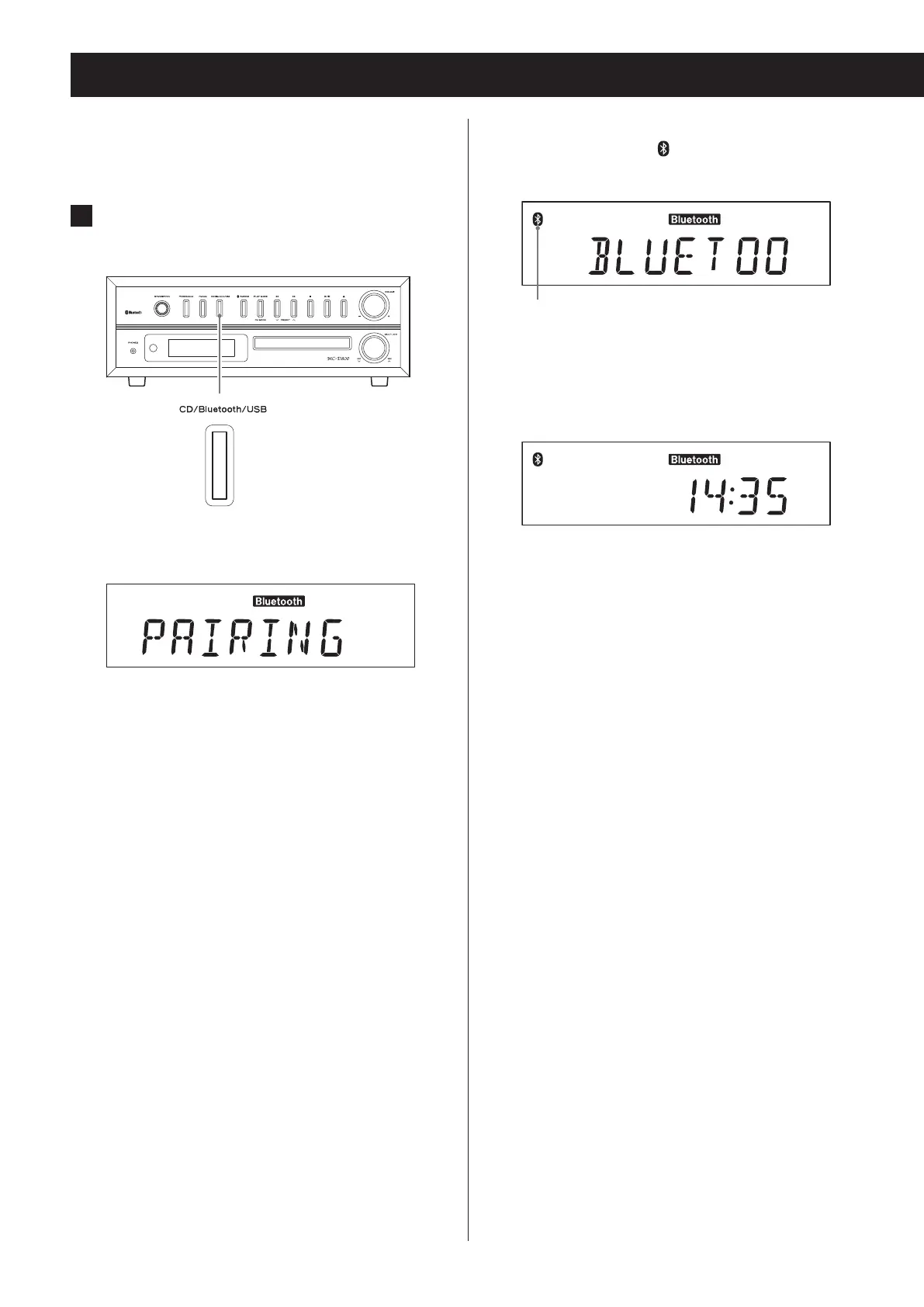
1 Press the CD/Bluetooth/USB button to
select “Bluetooth”.
Z
“PAIRING” appears on the display, and the unit
searches for paired devices.
o Press the CD/Bluetooth/USB button to select
“Bluetooth” (the Bluetooth indicator lights).
When connection with a Bluetooth device succeeds,
the Bluetooth icon ( ) appears and “BLUETOOTH”
scrolls across the display.
Bluetooth figure mark
c
After “BLUETOOTH” scrolls across five times, the cur-
rent time is shown.
o The unit will automatically try to connect to the
previously connected device.
o If it cannot connect for two minutes or longer,
“NO DEVICE CONNECTED” will scroll across the
display.
o Pairing is necessary before using the Bluetooth
function of this unit for the first time and when
you want to connect a new Bluetooth device.
o If connection fails, confirm that the other
Bluetooth device is ready to make a Bluetooth
connection.
o If the connection is broken during use, “NO
DEVICE CONNECTED” scrolls across this unit's dis-
play. Conduct the connection operations again
on this unit and the other Bluetooth device.


 To Next Page